1. Power on/off and volume adjustment
Press the power button briefly until the indicator ⑨ (working status indicator) flashes
in multiple colors alternately; the unit powers on and the power indicator stays on
constantly.
While the unit is powered on, hold the power button for about 2s; the unit powers off
and the power indicator goes off.
Turn the volume knob clockwise to increase volume; turn anticlockwise to decrease
volume.
2. Input selection and indicator explained
a. The color of the working status indicator represents for different input method
(only lights up when connected to the corresponding device):
White: USB input
Yellow: Coaxial input
Purple: Optical input
Green: Line input
Blue: Bluetooth input
The coaxial, optical and line input shares the same port. You can press the button ③
briefly to switch among the three input methods.
b. The DSD indicator only lights up at USB input and when the input data is in DSD
format.
c. The side USB port is for charging, and it's recommended to use a DC 5V/2A charger.
The USB port at the bottom is for data input, which can be connected to PC or
iPhone/iPod/iPad for audio decoding.
3. Bluetooth mode
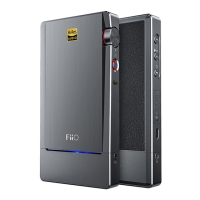
Automatic connect-back: While the unit is powered on, hold the button ② for
about 2s, the working status indicator lights up blue to indicate entering Bluetooth
mode and then the Q5 will connect back to the last-connected Bluetooth device
automatically; if the connecting succeeds, the working status indicator will stay on
constantly in blue; if the connecting fails, the working status indicator will flash red
and blue alternately and then the Q5 will enter Bluetooth pairing mode;


 To Next Page