4 5
Charging
Charging the earbuds:
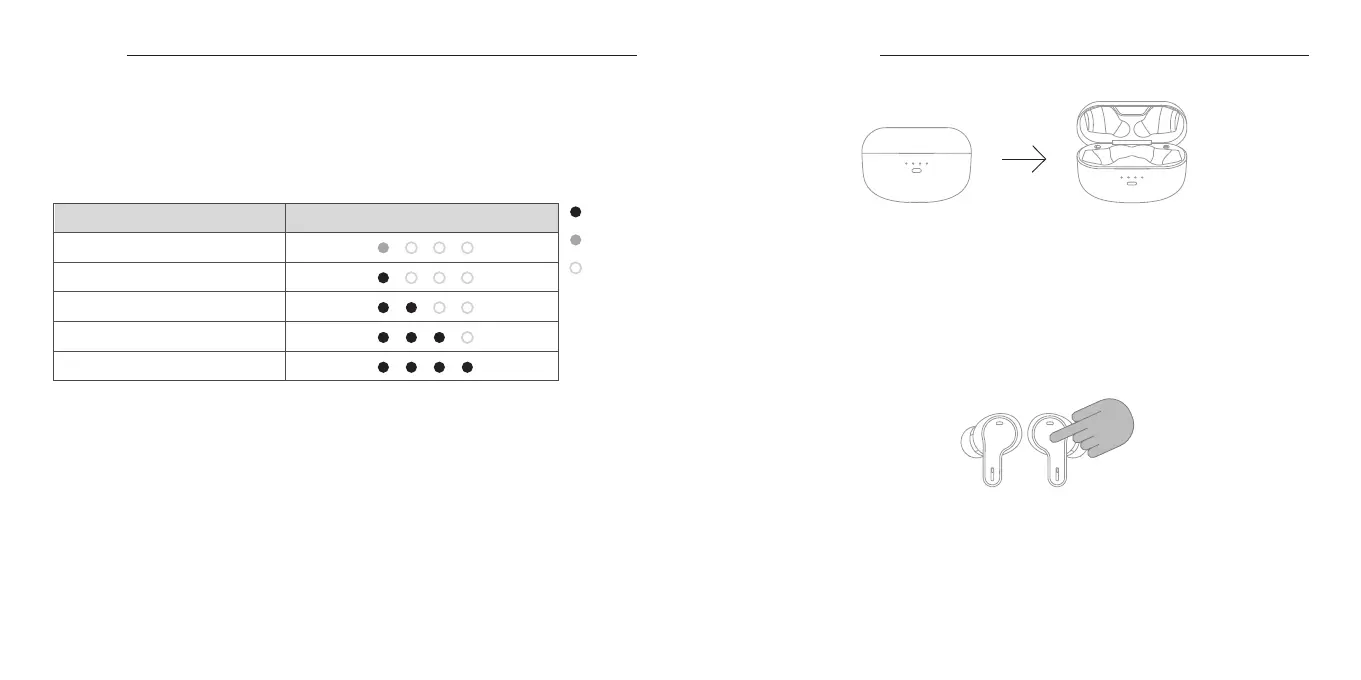
When you place the earbuds back into the charging case, one of the four LED indicators on the side
where the earbud was placed will light up, and charging will begin*1. When the lid of the charging case
is closed, the power of the earbuds will turn OFF, and the LED indicators on the charging case will light
up for approximately 3 seconds according to the charging case battery level, as shown in the table
below.
*1: If the leftmost LED indicator on the charging case is flashing rapidly, the battery level of the charging
case is low, so please charge it promptly. If the LED indicator does not blink even when the lid is
closed, this means the charging case battery level is 0%, and charging of the earbuds will not occur.
In this case, even if the lid is opened, the earbuds will not turn ON automatically, so please charge
the charging case as soon as possible.
* When only one earbud is placed back into the charging case, only the earbud that was placed will be
charged.
ON
Blinking
OFF
LED Indicator of the Charging Case
Charging Case Battery Level
0
〜
1
%
1
〜
25
%
26
〜
50
%
51
〜
75
%
76
〜
100
%
Turning ON the Power
When you open the lid of the charging case, the power of the earbuds will automatically turn ON.
For approximately 3 seconds after opening the lid, the charging case will show its battery level.
Please refer to the table on page 4 for details on the charging case’ s battery level indication.
* If the LED indicator on the charging case does not light up when the lid is opened, the charging
case is out of battery, and the earbuds will not turn on automatically. In this case, please charge
the charging case promptly.
*The battery level of the earbuds can be checked using the dedicated app “final CONNECT”
while paired with a smartphone or other device. Please refer to Page 12 for details on the “final
CONNECT” app.


 To Next Page