38
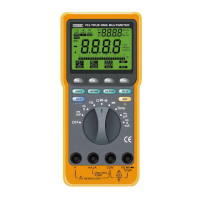
C (Compare mode). Displayed when the Compare mode is
selected. This mode allows you to do the GO-NO GO test
(see
⑤
).
39
°C (Centigrade degree). The value displayed is the
temperature in Centigrade scale.
40
°F (Fahrenheit degree). The value displayed is the
temperature in Fahrenheit scale.
41
The following symbols indicate the un
i
t of the va
l
ue
displayed.
µF Microfarads (1 x 10
– 6
Farads)
% Percentage Annunciator in the both Percentage (%)
mode and THD @ 50/60Hz mode. [The THD @
50/60Hz mode is a
v
ailable for Model: 509THD
Only]
V Volts
mV Millivolts (1 x 10
– 3
Volts)
A Amperes (Amps)
mA Milliamperes (1 x 10
– 3
Amps)
µA
Microamperes (1 x 10
– 6
Amps)
Ω Ohms
KΩ Kilohm (1 x 10
3
Ohms)
MΩ Megohm (1 x 10
6
Ohms)
Hz Hertz (1 cycle/sec)
KHz Kilohertz (1 x 10
3
cycles/sec)
AT.
Displayed when the Auto Range mode is selected.
O . F . L
(Overload Indication). Displayed on the LCD when
input value is too large to display.
(Low Battery). Battery life warn
i
ng. When is first
turned on, at least 8 hours of battery life remain. Replace the
batter
y
immediately. Never lea
v
e a weak or dead battery in the
Meter. Even leak-proof types can leak and damage the Meter.
. Displayed when the Meter is
i
n the continuity test
function.
31
R . Displayed when the REC button has been pressed.
32
MAX (Maximum Value in the Recording mode). The value
displayed is the maximum reading taken since the Recording
mode was entered.
33
MIN (Minimum Value in the Recording mode). The value
displayed is the minimum reading taken since the Recording
mode was entered.
34
AVG (Average Value in the Recording mode). The value
displayed is the true average of all readings taken since the
Recording mode was entered.
35
REL (Relative mode). The value displayed is the difference
between the present measurement and the previously stored
reading.
36
(Diode test). The value displayed is the forward voltage
of semiconductor junction(s).
37
HOLD. Displayed when the Hold mode is selected.
14 15



 To Next Page