5
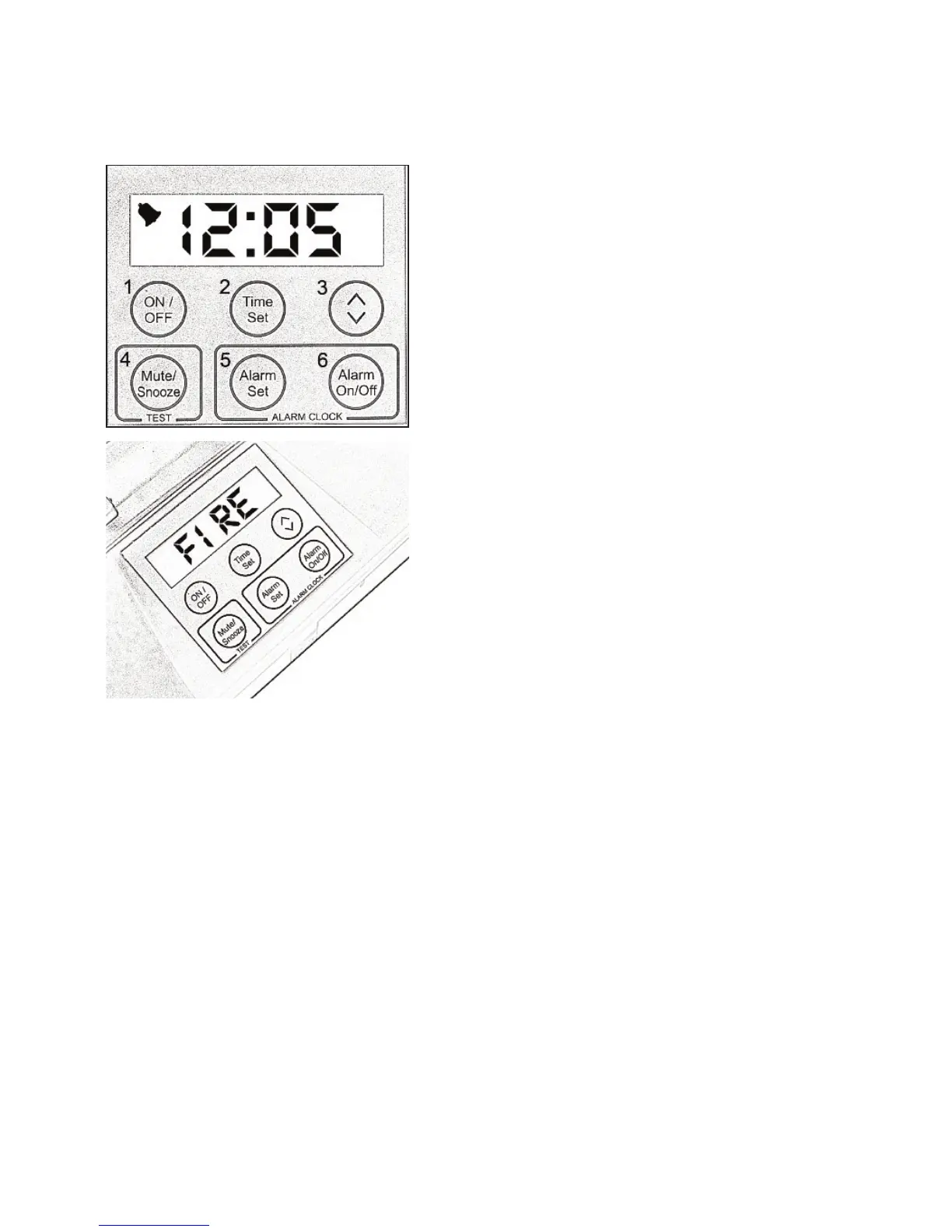
LCD & Keypad
The LCD is back-lit and is used to
display the Time, Wake-up Alarm
settings, low Battery conditions and
any faults.
In a fire alarm condition, the LCD will
display ‘FIRE’.
The LCD will display any error
messages.
Note: See page 17 for Error
Messages.
Keypad
1. Button 1 ON/OFF - Power On/Off.
2. Button 2 TIME SET - Used to set
Time.
3. Button 3 SCROLL Adjust Clock
and Wake-up Alarm settings.
4. Button 4 MUTE/SNOOZE - Used to
mute Wake-up Alarm as well as
testing the Deafgard unit.
5. Button 5 ALARM SET - Used to set
the Wake-up Alarm.
6. Button 6 ALARM ON/OFF - Turns
Wake-up Alarm On/Off.
Common LCD readouts:
FIRE: Fire alarm has sounded
PAD: Pillow Pad cable has
detached or has a fault.
SELF: Deafgard is
conducting a Self Test
TEST: Deafgard is
conducting a test after Button
4 has been pressed.


 To Next Page