EasyManua.ls Logo

FireKing ES18B - User Manual

FireKing ES18B
9 pages
Print Icon
To Next Page IconTo Next Page
Loading...
Table of Contents
1.0
Installation ...............................................................2
1.1
Lock and Keypad Installation ................................ 2
1.2
Installing/Removing the Battery ............................ 2
1.3
Code Length ..............................................................2
2.0
Manager Code ID01 and ID02 ..................................... 3
2.1
Opening the Lock and Accessing the Menu ..............3
2.2
Encryption Key Set ....................................................3
2.3
System Info .......................................................... 4
2.4
Change Code ................................................................ 4
2.5
Enrolling New Users ..................................................4
2.6
Delete One User ........................................................5
2.7
Disable User Code ....................................................5
2.8
Enable User Code .....................................................5
2.9
Enable/Disable Dual Mode ........................................6
2.10
Delete All General Users ...........................................6
2.11
Show/Hide Code .......................................................6
2.12
Set/Cancel Time Delay ..............................................6
2.13
Pair Locks..................................................................7
3.0
General User (ID03-ID32) ........................................8
3.1
Opening the Lock ......................................................8
3.2
System Info .......................................................... 8
3.3
Change Code ................................................................ 8
4.0
Menus .......................................................................9
4.1
Manager Code Menu (ID01 and ID02) ......................9
4.2
General User Code Menu ..........................................9
Document No: ED-ENG-001 Version No: B10 The pictures provided in this manual are for reference only. Actual product may vary.
ES18B Operation Instructions
Question and Answer IconNeed help?

Do you have a question about the FireKing ES18B and is the answer not in the manual?

Summary

Installation

Lock and Keypad Installation

Instructions for physically installing the lock and keypad components onto the safe door.

Installing and Removing the Battery

Guide on how to properly insert and remove the 9V battery for power.

Code Length Configuration

Details on setting the password length for user access, recommending 8 digits.

Manager Code Operations

Opening Lock and Accessing Menu

Steps to open the lock using a manager code and navigate the system menu.

Encryption Key Setup

Procedure for setting or verifying the encryption key for secure data communication.

System Information Display

How to view system details, including model and user status.

Changing Manager Codes

Instructions for modifying the existing manager code for security.

Enrolling New Users

Process for adding new user codes and assigning them specific IDs.

Deleting a Single User Code

Steps to remove a specific user's access code from the system.

Disabling User Access Codes

Temporarily revoking a user's access by disabling their code.

Enabling User Access Codes

Restoring access for a previously disabled user code.

Dual Mode Access Control

Enabling or disabling dual mode requiring two users to open the lock.

Deleting All General Users

Command to remove all general user codes (ID03-ID32) from the system.

Hiding Code Entry Display

Feature to obscure entered digits with asterisks for enhanced privacy.

Setting and Canceling Time Delay

Configuring a delay period between entering a code and unlocking the safe.

Pairing Locks and Keypads

Procedure to link a new keypad to an existing lock or vice versa.

General User Operations

Opening Lock as General User

Steps for a general user to open the lock using their assigned code.

General User System Information

How general users can view basic system information.

Changing General User Code

Instructions for general users to change their own access code.

System Menus Overview

Manager Code Menu Options

List of all available functions accessible via manager codes ID01 and ID02.

General User Menu Options

List of functions available to general users (ID03-ID32).

Overview

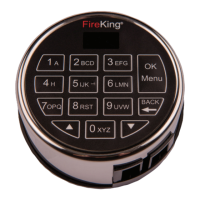
The FireKing ES18B, also identified as FK1, is a high-security electronic lock system. It comprises the ESK18B keypad and the ESL18B lock body. This system is designed for secure access control, offering various features for both managers and general users.

Function Description:

The ES18B system provides electronic access to a safe or secure container. It utilizes a keypad for code entry and an electronic lock mechanism for securing the door. The system supports multiple users with different access levels: Manager Codes (ID01 and ID02) and General User Codes (ID03-ID32). Manager codes have full access to programming menus, allowing them to manage users, set system parameters, and configure security features. General users have limited menu selections, primarily for opening the lock and changing their own codes.
Important Technical Specifications:

  • User Capacity: The FK1 supports up to 32 users (ID01 to ID32).
  • Code Length: Passwords can be 6 to 8 digits long. For enhanced security, 8-digit passwords are recommended, providing 1 million unique UL password code combinations.
  • Battery: The system requires a standard 9V alkaline battery for operation.
  • Relock Time: The lock automatically relocks after 3.5 seconds, a hard-coded setting that cannot be changed.
  • Lockout Period: After more than 4 incorrect password attempts, the system locks for 4 minutes, with the display flashing every 15 seconds.
  • Encryption: Data transmission between the keypad and the lock is encrypted to ensure security. The encryption key is set during manufacturing but can be changed by a manager.

Usage Features:

  • Installation: The installation process involves connecting the lock cable from the keypad to the lock body, mounting the keypad on shoulder bolts, and securing the lock body to the mounting plate. Proper cable routing through a dedicated channel on the lock body is crucial to prevent damage.
  • Battery Installation/Removal: A 9V battery is connected via a terminal clip and pushed into the battery compartment. Removal involves pinching the fingers as shown in the manual and gently pulling the battery out.
  • Opening the Lock: To open the lock, users enter their 6-8 digit code and press the "Menu/OK" key. The display will show "Lock Open" followed by "3.5 Sec" before relocking.
  • Accessing Menus: After opening the lock, during the 2-second unlocking period, the display shows "Select Menu." Users can then use the up and down keys to browse menu options and "Menu/OK" to select.
  • Encryption Key Set: Managers can change the default encryption key. This key is vital for communication between the keypad and the lock.
  • System Info: Both managers and general users can view system information, including the software version and the number of users currently enrolled.
  • Change Code: All users can change their own 6-8 digit codes. The system requires entering the new code twice for confirmation.
  • Enrolling New Users (Manager Only): Managers can enroll new users by selecting an available ID position (or choosing a specific one) and entering a new 6-8 digit code, which must be repeated for confirmation.
  • Delete One User (Manager Only): Managers can delete individual user codes by selecting the desired User ID.
  • Disable/Enable User Code (Manager Only): This feature allows managers to temporarily revoke or restore a user's access without deleting their code. This is useful for situations like employee vacations.
  • Enable/Disable Dual Mode (Manager Only): When enabled, Dual Mode requires two different valid user codes to open the lock within 60 seconds, enhancing security.
  • Delete All General Users (Manager Only): This command allows managers to delete all general user codes (ID03-ID32) from the system.
  • Show/Hide Code (Manager Only): This feature controls how code entries are displayed on the LCD. In "Hide Code" mode, all digits are displayed as "*" immediately upon entry, obscuring the code from view. In normal operation, digits are visible until the next digit is entered.
  • Set/Cancel Time Delay (Manager Only): Time Delay is a security feature that requires a user to enter their code, wait a prescribed period (0-99 minutes), and then re-enter a valid code to unlock the safe. Managers can set both the delay period and the "Time Window" (0-15 minutes), which is the allowed time to re-enter the code after the delay expires.
  • Pair Locks (Manager Only): This operation is necessary to link a new lock or keypad to the existing system. When pairing a new keypad to an existing lock, the default manager code is used. If a new lock is installed with an existing keypad, the existing manager code from the safe is used. After pairing, codes revert to their previously saved states.

Maintenance Features:

  • Battery Replacement: The system relies on a 9V battery, which will need periodic replacement. The manual provides instructions for safe removal and installation.
  • Troubleshooting (Cable Connection): If the lock cable is not properly connected, the display will show "Fail to Link Lock" and "Check the Cable of Lock," indicating a connection issue.
  • Code Mismatch/Similar Code Alerts: During code changes or enrollment, the system provides feedback if entered codes do not match ("Code Mismatch") or if a registered password has been used before ("Code is Similar"), prompting the user to re-register.

FireKing ES18B Specifications

General IconGeneral
BrandFireKing
ModelES18B
CategoryLocks
LanguageEnglish

Related product manuals