EasyManua.ls Logo

FireKing ESK18B - User Manual

FireKing ESK18B
9 pages
Print Icon
To Next Page IconTo Next Page
Loading...
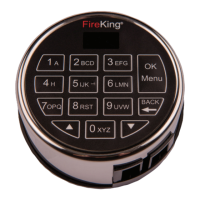
High Security Electronic Lock, Model ES18B electronic lock system
composed of the Model ESK18B keypad and Model ESL18B lock.
Document No: ED-ENG-001 Version No: B10 The pictures provided in this manual are for reference only. Actual product may vary.
ES18B Operation Instructions
1.0 Installation .............................................................. 2
1.1 Lock and Keypad Installation ................................... 2
1.2 Installing/Removing the Battery .............................. 2
1.3 Code Length ............................................................. 2
2.0 Administrator user ID01, ID02 ................................. 3
2.1 Opening the Lock ..................................................... 3
2.2 Encryption Key Set .................................................. 3
2.3 System Info ............................................................. 4
2.4 Change Code ............................................................ 4
2.5 Enrolling New Users ................................................. 4
2.6 Delete One User ....................................................... 5
2.7 Disable User Code .................................................... 5
2.8 Enable User Code ..................................................... 5
2.9 Enable/Disable Dual Mode ....................................... 6
2.10 Delete All General Users .......................................... 6
2.11 Show/Hide Code ...................................................... 6
2.12 Set/Cancel Time Delay ............................................. 6
2.13 Pair Locks ................................................................ 7
3.0 General User (ID03-ID33) ........................................ 8
3.1 Opening the Lock ..................................................... 8
3.2 System Info ............................................................. 8
3.3 Change Code ............................................................ 8
4.0 Menus ...................................................................... 9
4.1 Manager Code Menu (ID01 and ID02) ...................... 9
4.2 General User Code Menu ......................................... 9
Table of Contents

Question and Answer IconNeed help?

Do you have a question about the FireKing ESK18B and is the answer not in the manual?

Overview

The FireKing ES18B is a high-security electronic lock system, comprising the ESK18B keypad and the ESL18B lock. This system is designed to provide robust security for safes and other secure containers, offering a range of features for both administrators and general users.

Function Description:

The primary function of the ES18B system is to control access to a secure container. It operates by requiring users to enter a valid code on the ESK18B keypad to unlock the ESL18B lock. The system supports multiple users with different access levels, including two administrator users (ID01 and ID02) and up to 31 general users (ID03-ID33). The lock automatically relocks after a short period (3.5 seconds) to maintain security.

Important Technical Specifications:

  • User Capacity: 33 users total (2 administrators, 31 general users).
  • Code Length: Configurable from 6 to 8 digits. An 8-digit password is recommended for enhanced security, meeting UL requirements for 1 million unique password codes.
  • Battery: Requires a 9V standard alkaline battery.
  • Security Features:
    • Encryption Key Set: Data transmission between the keypad and lock is encrypted. The encryption key can be changed from its default value for added security.
    • Lockout Mode: After more than 4 incorrect password attempts, the system locks for 4 minutes, with the display flashing every 15 seconds.
    • Dual Mode: Can be enabled to require two valid codes from different users to open the lock within 60 seconds, enhancing security for high-value assets.
    • Time Delay: A configurable feature (0-99 minutes) that requires a user to enter their code, wait a prescribed period, and then re-enter a valid code to unlock the safe. This deters burglars by increasing the time required to access the safe.
    • Show/Hide Code: Allows users to hide the entered digits on the LCD screen, displaying them as asterisks ("*") to prevent shoulder surfing.

Usage Features:

  • Installation:
    • The lock cable from the keypad is carefully tucked into a cavity on the back of the keypad before installation on shoulder bolts.
    • The lock cable is then threaded through the spindle hole of the safe door.
    • The lock cable connects to the lock body, which is positioned on the lock mounting plate.
    • The lock cable must be routed through a channel on the back of the lock body to protect it from damage.
    • The lock body is secured to the mounting plate using provided lock bolts.
  • Battery Installation/Removal:
    • Connect the 9V battery to the terminal clip.
    • Position the battery with terminals downward and push it into the battery compartment.
    • To remove, gently pull the battery out as indicated by the arrow, holding it as shown in the manual.
  • Opening the Lock:
    • From standby, enter the 6-8 digit code and press "Menu/OK". The lock will open and relock after 3.5 seconds.
  • Administrator Functions (ID01, ID02):
    • Accessing Menus: After unlocking, the display will show "Select Menu". Use the up and down keys to browse menu options and press "Menu/OK" to select.
    • Encryption Key Set: Change the encryption key value.
    • System Info: View system information, including version, user count, and device ID.
    • Change Code: Change the code for any user ID.
    • Enrolling New Users: Add new general users by assigning an ID and setting a code. The system automatically suggests the next available ID.
    • Delete One User: Remove a specific user code from the system.
    • Disable/Enable User Code: Temporarily revoke or restore a user's access without deleting their code.
    • Enable/Disable Dual Mode: Activate or deactivate the dual-code requirement for unlocking.
    • Delete All General Users: Remove all general user codes from the system.
    • Show/Hide Code: Toggle the display of entered digits between actual numbers and asterisks.
    • Set/Cancel Time Delay: Configure the time delay period (0-99 minutes) and the time window (preset length of time allowed to enter a valid code after the time delay expires).
    • Pair Locks: Used when changing the lock body or keypad. This process ensures the new component is recognized by the system. Manager passwords are used for pairing, and the lock open password may change depending on the component replaced.
  • General User Functions (ID03-ID33):
    • Opening the Lock: Same procedure as administrators.
    • System Info: View system information, including the keypad model number.
    • Change Code: Change their own user code.

Maintenance Features:

  • Battery Replacement: The system relies on a 9V alkaline battery. Regular checks and replacement are necessary to ensure continuous operation.
  • Error Messages:
    • "Invalid code": Displayed for incorrect password entry.
    • "Locked": Displayed during the 4-minute lockout period after multiple incorrect attempts.
    • "Fail to Link Lock" / "Check the Cable of Lock": Indicates a problem with the connection between the keypad and the lock body.
    • "Code Mismatch": Displayed if passwords entered twice during code setting do not match.
    • "Code is Similar": Displayed if a new user password is too similar to an existing one, prompting the user to choose a different code.
  • System Information: The "System Info" menu allows users to view critical system details, which can be useful for troubleshooting or maintenance.

FireKing ESK18B Specifications

General IconGeneral
BrandFireKing
ModelESK18B
CategoryLocks
LanguageEnglish

Related product manuals