6
FJ Dynamics Technology Co., Ltd. All rights reserved.
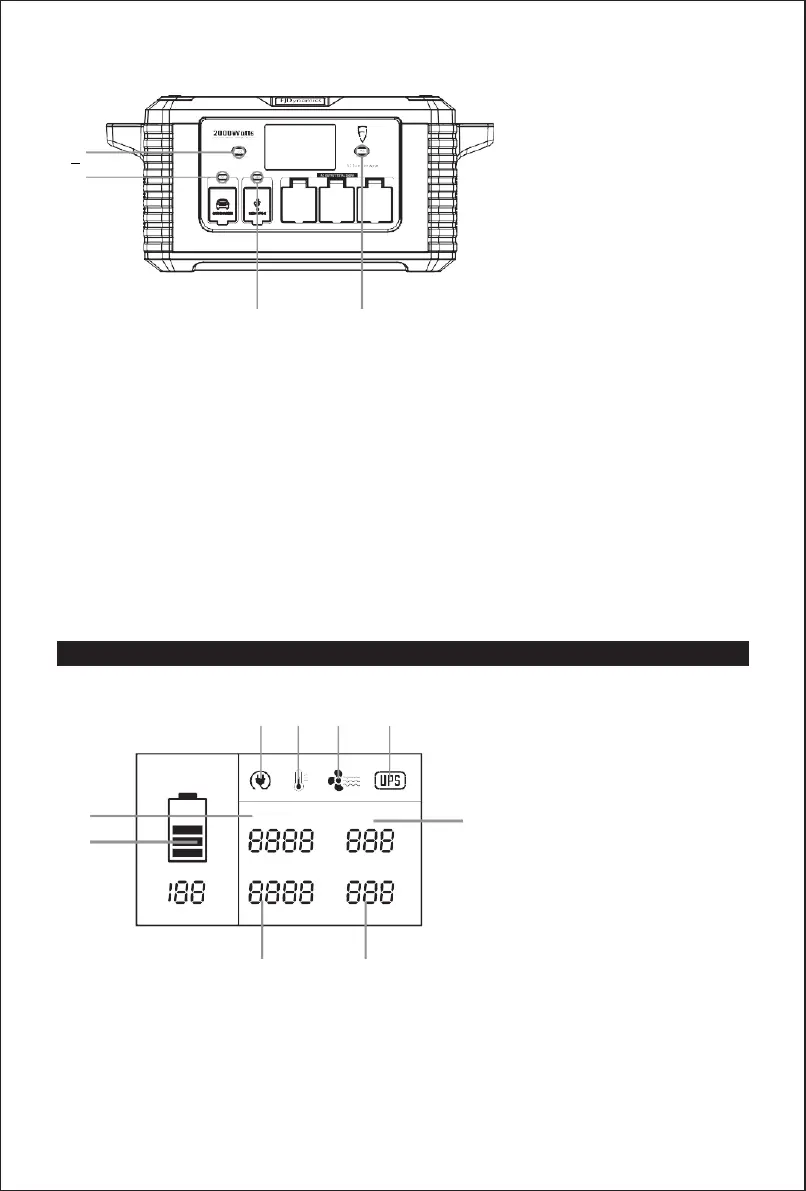
Buttons
A: Main power button
B: DC power button
C: USB power button
D: AC power button
Button A: main power switch. Press to turn on or off the product.
Button B: DC output switch. Before pressing this button to turn on DC output, ensure that the
product is powered on. Press this button to turn off the output when it is not in use.
Button C: USB output switch. Before pressing this button to turn on USB output, ensure that
the product is powered on. Press this button to turn off the output when it is not in use.
Note: The USB-C cables of different devices may support different protocols. If the USB-C
ports do not work, try to use an AC adapter for charging.
Button D: AC output switch. Before pressing this button to turn on AC output, ensure that the
product is powered on. Press this button to turn off the output when it is not in use.
LCD Screen
M N O P
I
H
H: Battery indicator
I: Input power
J: DC output
J
K: AC output
L: USB output
M: AC charging cable indicator
N: Temperature alarm
O: Fan cooling
P: UPS
K L


 To Next Page