12
USER MANUAL
eGIVE ADJUSTMENT
With this feature you’ll be able
to control the amount of “give,”
or resistance of the needle
upon impact with the skin, even
on direct drive tattoo machines.
This enables the artist to take
advantage of the softness
or hardness of hit to achieve
specic results. 0 has no effect,
5 offers the maximum amount
of eGive.
eGIVE WITH RCA MODULE
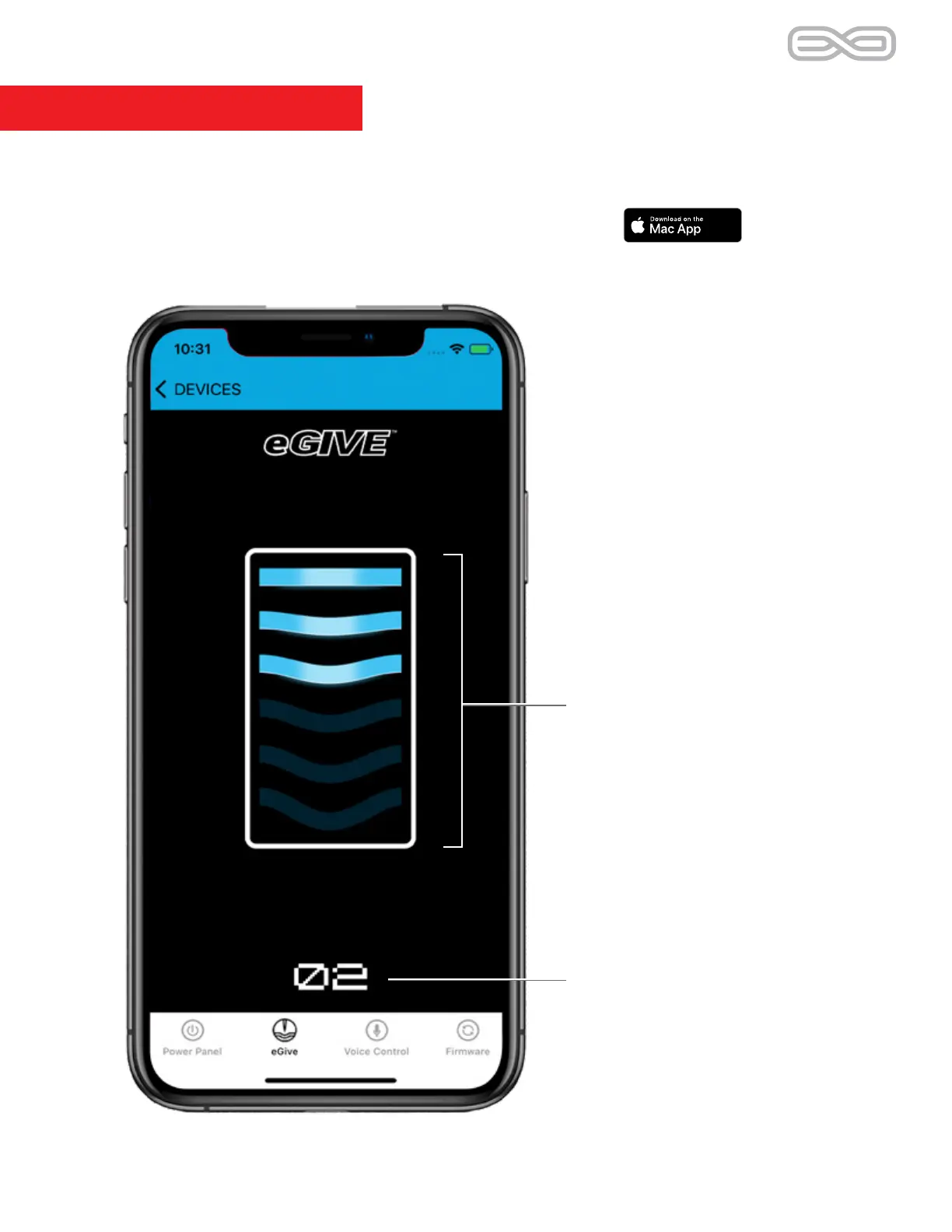
SETTING eGIVE
There are 6 settings for eGive,
0 through 5. Change the setting
by swiping the bars up or down.
The higher the setting the
higher the amount of give.
0 = no give, 5 = maximum give.
eGIVE INDICATOR
The number displayed is the
current eGive setting.
Currently, controlling eGive via the app is only available by
connecting the RCA cable to the Hover power supply.
You can control eGive on the PowerBolt itself without the app.


 To Next Page