7
USER MANUAL
THE POWERBOLT
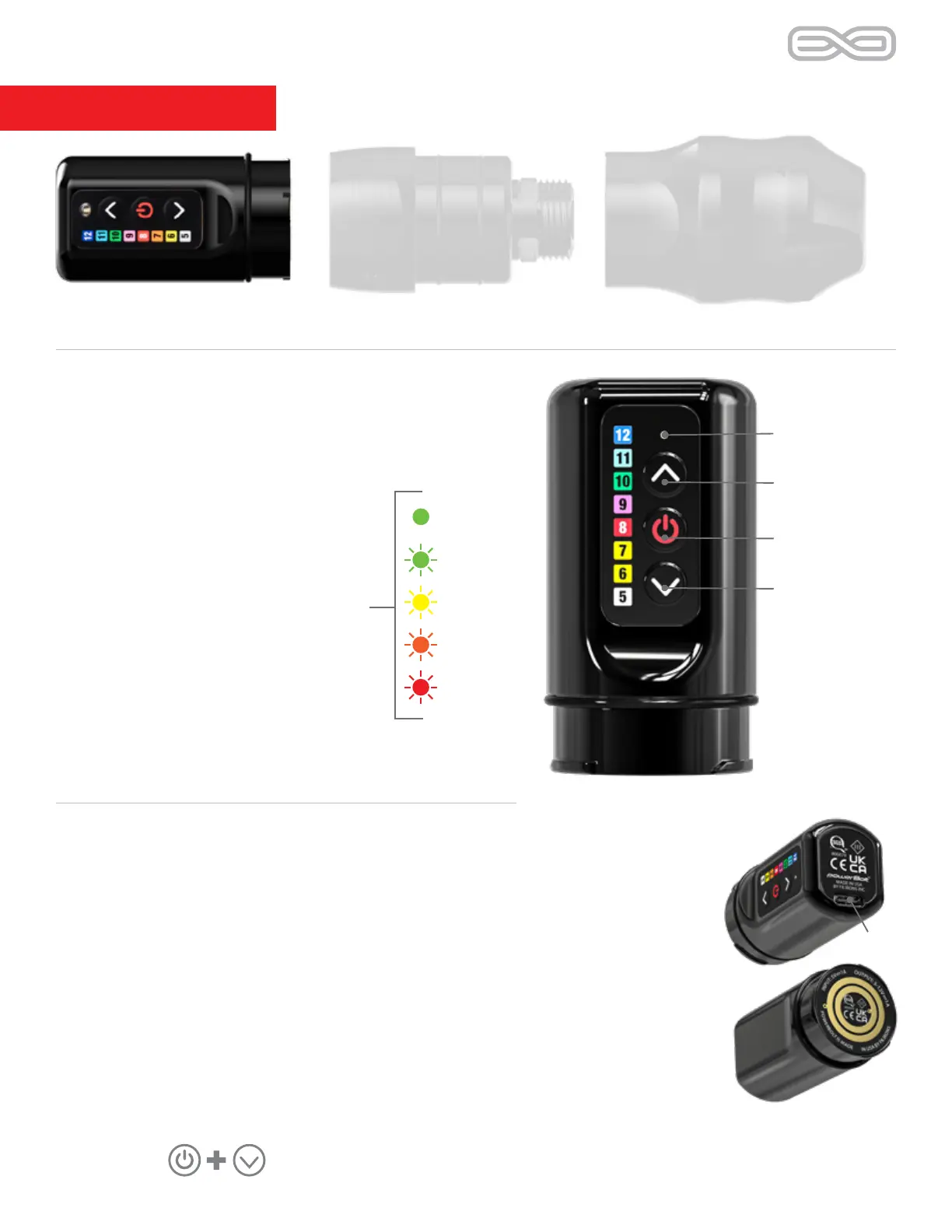
PowerBolt top/ bottom views
PowerBolt
LED indicator:
Solid Color = Whole Value
Blinking Color = Half Increment
Ex. Solid green indicates 10V
Flashing green indicates 10.5V
Working with modes: Modes work by pressing and releasing the power button.
THE POWERBOLT
LED indicator
Voltage up
Power button
Voltage down
USB-C
Battery level check: Press and hold
power button until white. A blinking
colored light indicates remaining
charge.
14 - 0%
97 - 60%
100 - 98%
59 - 40%
39 - 15%
Note: LED flashes while battery
charges. Once < 15% is reached, red
light will blink alternately with voltage.
Bluetooth – Hold the power button until a blue light appears and
immediately release the power button. A blue blinking light indicates
pairing mode is available for 60 seconds. To deactivate Bluetooth, hold
the power button and release when the yellow light flashes.
Travel Mode (hard shutoff) – Press and hold the power button until the red
light flashes. Use this mode to avoid unnecessary discharge and/or comply
with travel laws. To reactivate, connect / disconnect to a USB-C port.
Reset (factory settings) – Should you experience abnormal behavior, hold the
power button and the voltage down button at the same time, then quickly release.
Device reset:


 To Next Page