6 7
English
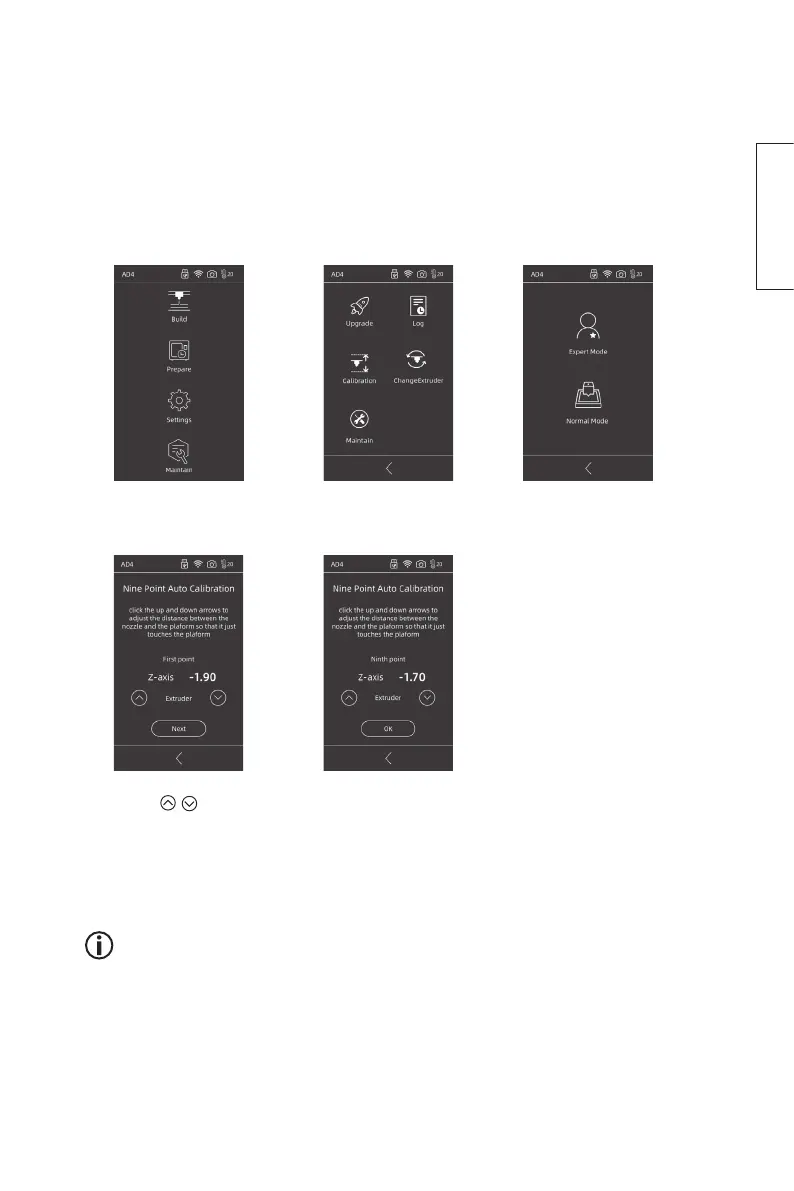
Calibration
The printer needs to be calibrated before first use and after changing the extruder.
Do thefollowing: Take asheet of regular A4 sized 80 gsm paper. Place thepaper
between thebuild plate and theextruder. The build plate and theextruder will
be thecorrect distance apart when thepaper can be moved back and forth with
just aslight resistance.
1. Press Setting 2. Press Calibration 3. Press Normal Mode*.
A nine-point calibration
begins.
4. Press
/ to raise or
lower the extruder.
Press Next to confirm.
5. Set all nine points and
press OK to complete
the calibration.
* Select Expert Mode if
amore accurate centre
calibration is to be
performed after changing
the extruder.
The accompanying USB stick contains a video clip that goes through all
the steps of the calibration.















 To Next Page