© 1999-2007 QualityWaterForLess.com - 16 - info@qualitywaterforless.com
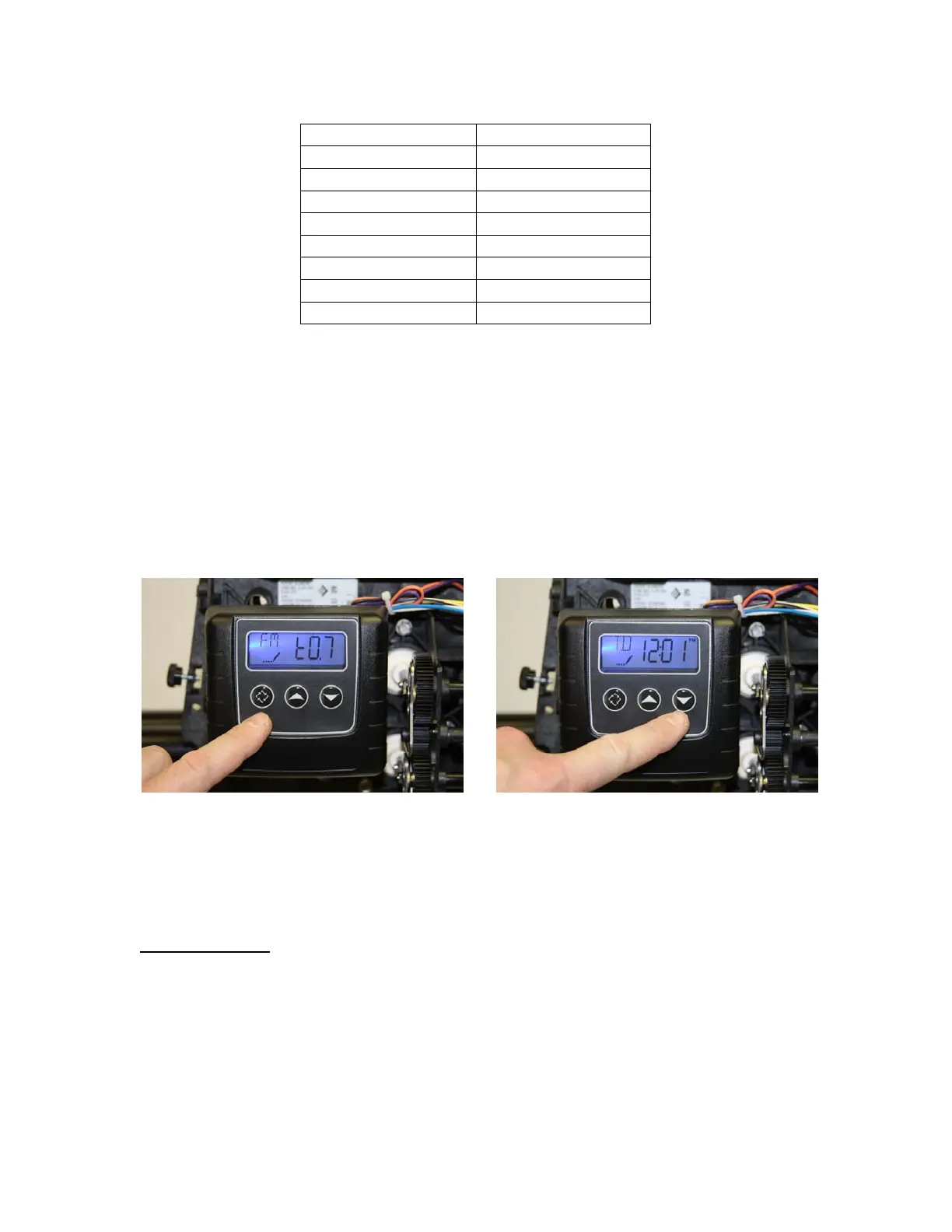
• The display may now show “FM / t0.7” as shown in figure 49 below. (This
indicates Flow Meter type 3/4" Turbine) Do not change this value, and press
the “Extra Cycle Button” once to continue – if this value is different, use the
“UP” or “DOWN” buttons to change this.
• The system will now exit the Master Programming mode, and the display should
now show the time of day, flowed by the new number of gallons remaining, as
shown in figure 50 below. Change the time of day by pressing and holding the
“UP” or “DOWN” button until the proper time setting is shown. Note that
there is a “PM” light indicator to differentiate between AM and PM times.
FIGURE 49 FIGURE 50
• Congratuations! Your new 9100SXT system is now programmed and ready for
operation. Please move on to the next section on the following page to initialize
and start-up your system.
Initial Start-Up:
• With one nearby softened faucet running in the COLD position, slowly open your
bypass valve or 3-valve bypass to about ¼ open to allow the air trapped in the
softener to escape via your running faucet. NOTE: Opening the bypass too
quickly or too open may damage your softener or plumbing.
• Allow the softener tank to slowly fill with water. After a few minutes, you will
see a trickle of water coming from the cold water faucet. Allow the water to run


 To Next Page
 Loading...