23
NORDICPANEL
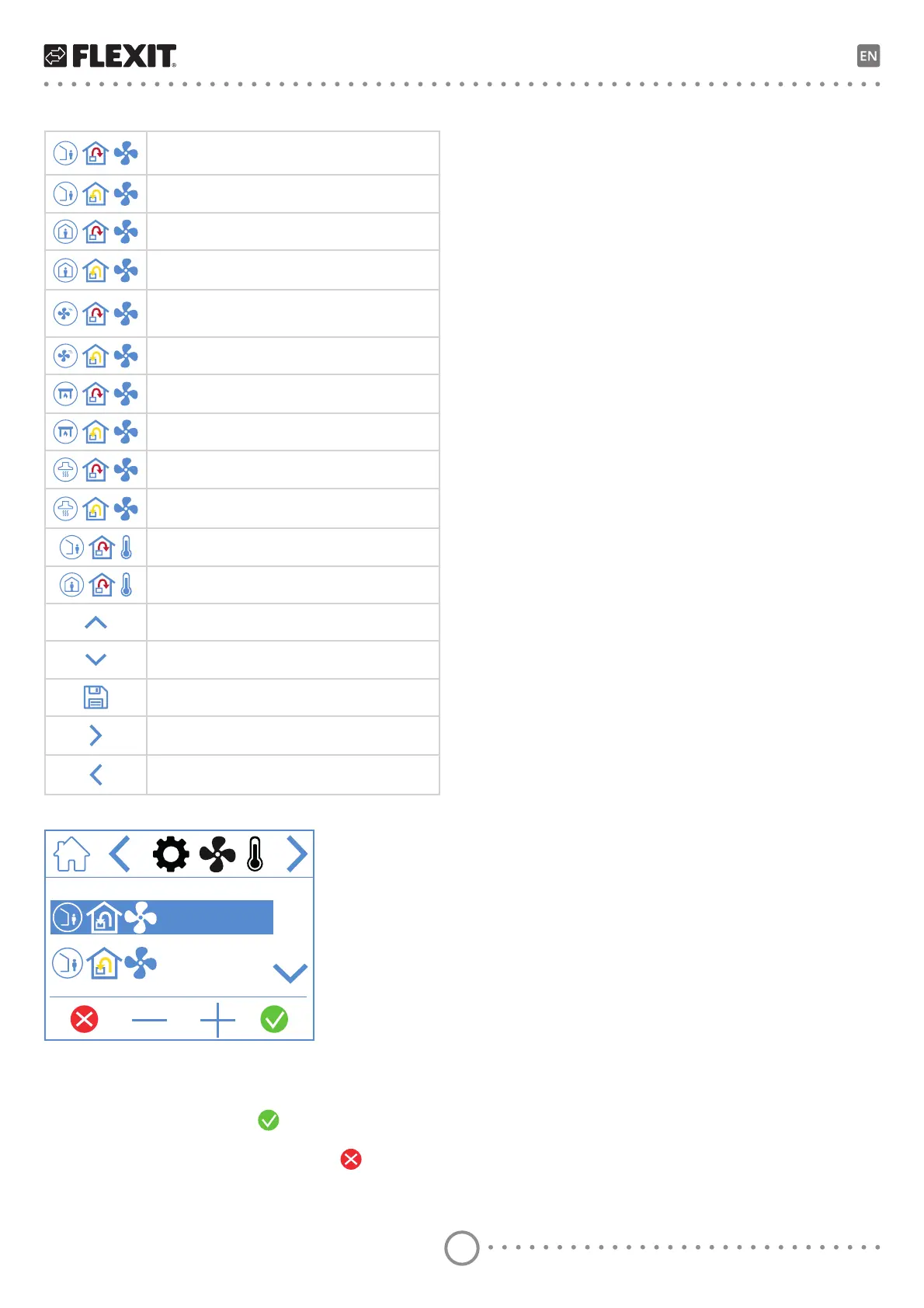
Fan and temperature settings screen icons
AWAY speed mode – Supply air fan
AWAY speed mode – Extract air fan
HOME speed mode – Supply air fan
HOME speed mode – Extract air fan
HIGH speed mode – Supply air fan
HIGH speed mode – Extract air fan
FIREPLACE speed mode – Supply air fan
FIREPLACE speed mode – Extract air fan
KITCHEN HOOD speed mode – Supply air fan
KITCHEN HOOD speed mode – Extract air fan
AWAY temperature mode
HOME temperature mode
Scroll up the menu.
Scroll down the menu.
Save settings.
Go to the next menu.
Go to the previous menu.
39 L/s
39 L/s
To adjust a value, highlight the line you want to change
by pressing it so that the line turns blue. Then press –
or + to decrease or increase the fan setting. When you
reach the desired value, press
WRFRQȴUP7KHbYDOXH
is written to the unit and the fan changes speed.
7RbFDQFHODQGQRWFKDQJHWKHYDOXHSUHVV
The same procedure applies to changing the
temperature mode.


 To Next Page