8
NORDICPANEL
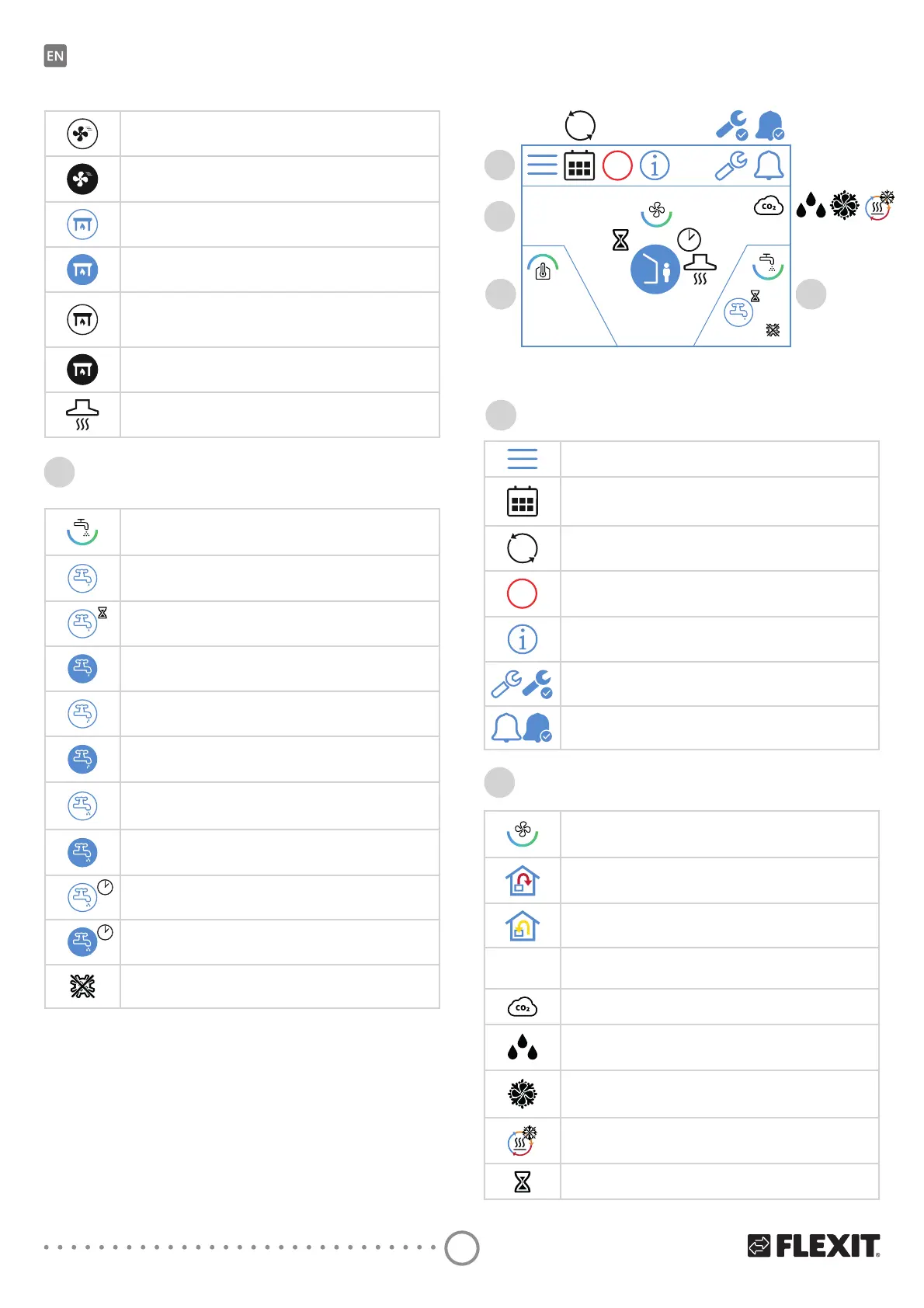
HIGH speed mode is inactive. The speeds are controlled
via digital input and cannot be changed via the panel.
HIGH speed mode is active and controlled
via a digital input.
FIREPLACE speed mode.
Press to change speed.
FIREPLACE speed mode is active.
FIREPLACE speed mode is inactive.
The speeds are controlled via digital input and cannot
EHbFKDQJHGYLDWKHSDQHO
FIREPLACE speed mode is active and controlled via a
digital input.
KITCHEN HOOD speed mode is active and controlled via a
digital input.
Symbol indicating the hot water element in the panel.
Symbol indicating the ECO hot water mode is selected
EXWbRQVWDQGE\
Symbol indicating the ECO hot water mode will be selected
after timer runs out.
Symbol indicating the ECO hot water mode is selected
DQGbDFWLYH
Symbol indicating the NORMAL hot water mode is selected
but on standby.
Symbol indicating the NORMAL hot water mode is selected
and active.
Symbol indicating the BOOST hot water mode is selected
but on standby.
Symbol indicating the BOOST hot water mode is selected
and active.
Symbol indicating the temporary BOOST hot water mode
is selected but on standby.
Symbol indicating the temporary BOOST hot water mode
is selected and active.
Symbol indicating the legionella hot water mode is active.
3
2.3. HOME SCREEN – ECONORDIC WH4
The home screen is the start screen when you
VZLWFKWKHbXQLWRQRUZKHQ\RXH[LWWKHVFUHHQVDYHU
7KHbQXPEHURIV\PEROVPD\YDU\GHSHQGLQJRQWKH
settings and operating status (calendar, alarm etc.).
%OXHbLFRQVDUHOLQNHGWRDIXQFWLRQDQG\RXFDQ
SUHVVbWKHP2WKHUFRORXUVDUHIRULQIRUPDWLRQRQO\
STOP
DI
1
2
20.0 °C
3
0.0
4
Home screen icons – EcoNordic WH4
1
Open menu
The calendar function has been activated.
You do this via the Flexit GO app.
DI
A digital input (moisture sensor, forcing switch etc.)
LVbDFWLYHDQGRYHUULGHVWKHFXUUHQWVSHHGPRGH
STOP
STOP speed mode is active.
Open the info page, where there is a link to the manual
IRUbWKHSDQHO
Service alarm active. Press the symbol to open
the alarm menu.
$DODUPDFWLYH3UHVVWKHV\PEROWRRSHQWKHDODUPPHQX
2
Symbol indicating the ventilation element in the panel.
Temperature regulation is set to supply air.
To change the regulation type, use the Flexit GO app.
Temperature regulation is set to extract air.
To change the regulation type, use the Flexit GO app.
20.0 °C
Set the temperature.
Press to change.
CO
2
regulation is active.
'HKXPLGLȴFDWLRQUHJXODWLRQLVDFWLYH
Free cooling is active.
'HLFLQJRIWKHUHJHQHUDWRULVDFWLYH
Delay before the unit switches to AWAY mode.
6WDWXVȴHOG
Ventilation
Hot water


 To Next Page