24
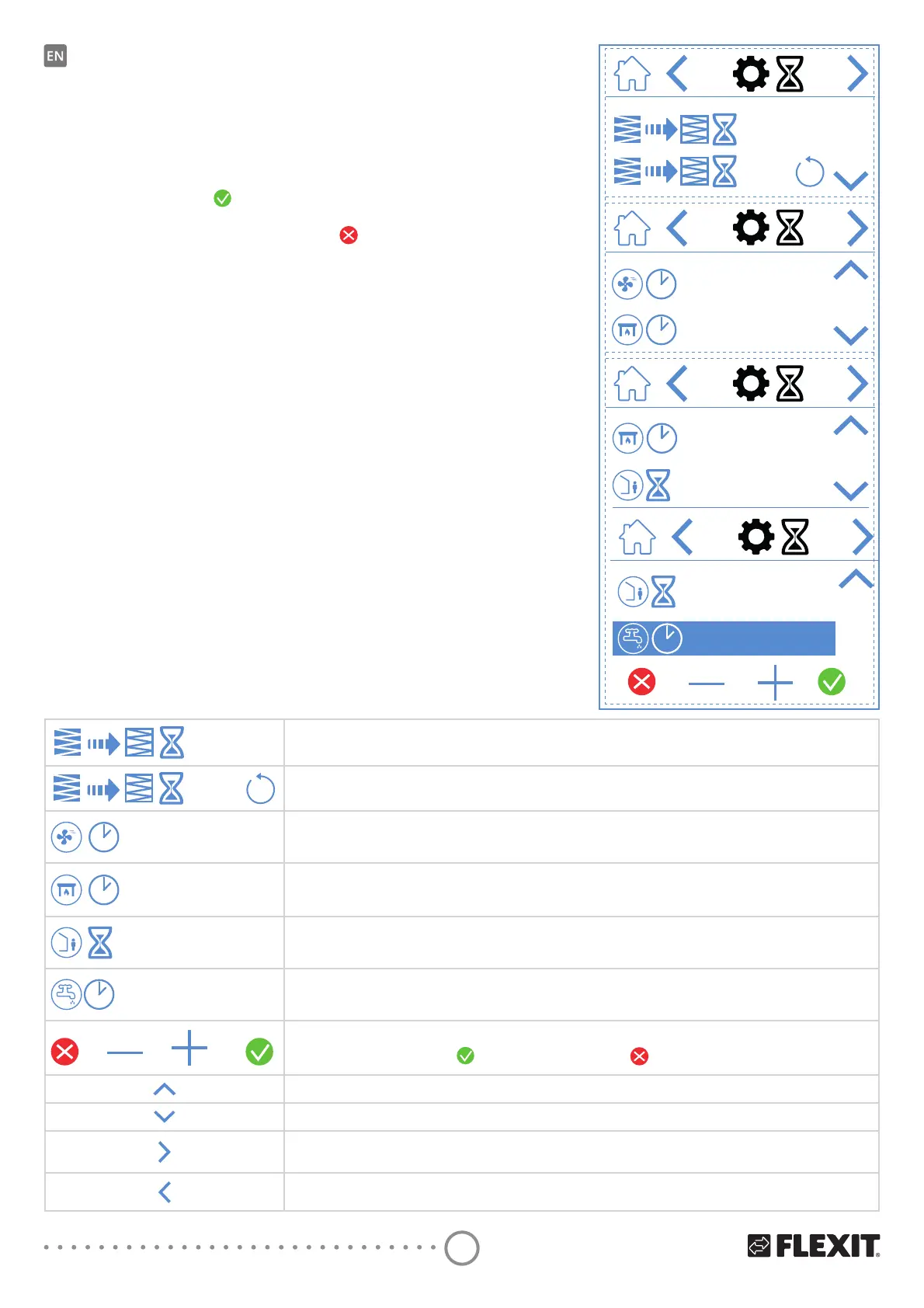
3.4. TIMER SCREEN
This is where you set various operating and countdown
timers. To change a value, highlight the line you want
to change and then press – or +. When you reach
WKHbGHVLUHGYDOXHSUHVV
WRFRQȴUP7KHYDOXH
is written to the unit and the fan changes speed.
7RbFDQFHObDQGbQRWbFKDQJHWKHYDOXHSUHVV
.
12M
30m
30m
30m
60m
Timer screen icons
12M
$GMXVWȴOWHUFKDQJHLQWHUYDO)DFWRU\VHWDWWKUHHPRQWKVEXWDGMXVWDEOHWRXSWRPRQWKV
5HVHWRIWKHȴOWHUFKDQJHLQWHUYDOΔIWKHȴOWHUVDUHFKDQJHGHDUO\IRULQVWDQFH\RXFDQVLPSO\UHVHWWKHWLPHU
30m
Operating timer for the HIGH speed mode. When HIGH is activated on the panel, the unit runs on the set timer
before returning to the previous speed mode. Can be set between 0 and 360 minutes
30m
Operating timer for the FIREPLACE speed mode. When FIREPLACE is activated on the panel, the unit runs
RQbWKHbVHWWLPHUEHIRUHUHWXUQLQJWRWKHSUHYLRXVVSHHGPRGH&DQEHVHWEHWZHHQDQGPLQXWHV
60m
Countdown timer for the AWAY speed mode. When AWAY is activated on the panel, the unit remains at
WKHbSUHYLRXVO\VHOHFWHGVSHHGXQWLOWKHWLPHKDVH[SLUHGDIWHUZKLFKLWVZLWFKHVWR$:$<PRGH
Can be set between 0 and 360 minutes
240m
Operating timer for the BOOST hot water mode. A temporary mode with adjustable duration, which can be
used when you expect very high hot water consumption. Can be set between 0 and 360 minutes.
(EcoNordic only)
To change the value, press the line for the value you want to change. Then, increase or decrease the value
ZLWKbRUȂ3UHVV
WRFRQȴUPDQGVDYHRUSUHVV to undo and reset the value.
Scroll up the menu.
Scroll down the menu.
Go to the next menu.
Go to the previous menu.
60m
240m
(EcoNordic only)


 To Next Page