25
NORDICPANEL
3.5. SELECTING A HOME SCREEN (NORDIC ONLY)
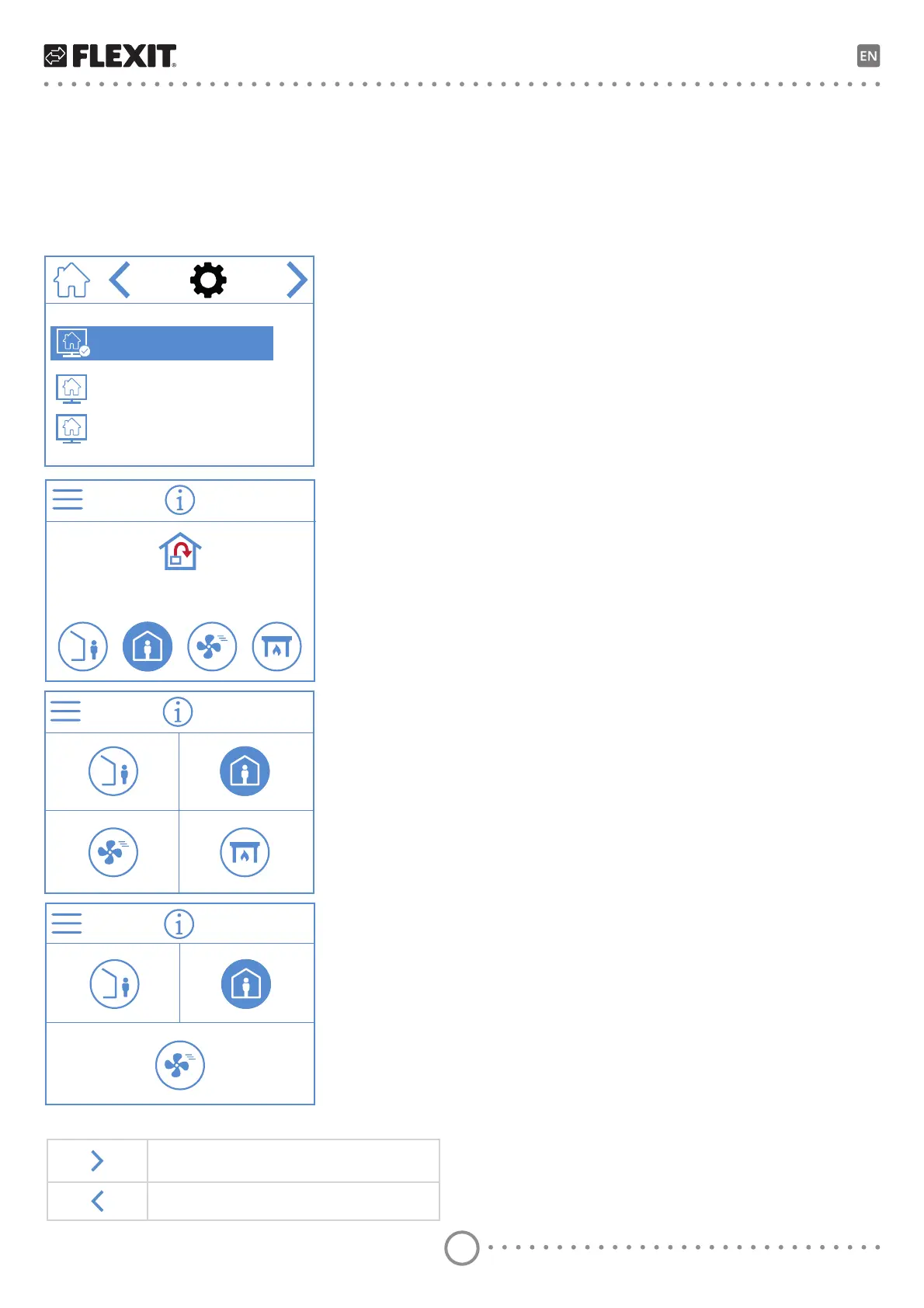
This is where you set which home screen should be
DFWLYH<RXbFDQFKRRVHEHWZHHQWKUHHGLHUHQWKRPH
VFUHHQVGHSHQGLQJRQWKHFRQȴJXUDWLRQDQGLQWHQGHG
use of the unit. Alarms and status messages are displayed
RQbDOObKRPHbVFUHHQV
Below, you can see home screen 1 has been selected.
1
2
3
20.0 °C
Home screen 1
Shows all four speed modes, temperature
regulation type and the set temperature.
Home screen 2
Shows all four speed modes AWAY, HOME,
HIGH and FIREPLACE.
Home screen 3
Only shows the AWAY, HOME, HIGH
VSHHGbPRGHV
Home screen selection icons
Go to the next menu.
Go to the previous menu.


 To Next Page