9
NORDICPANEL
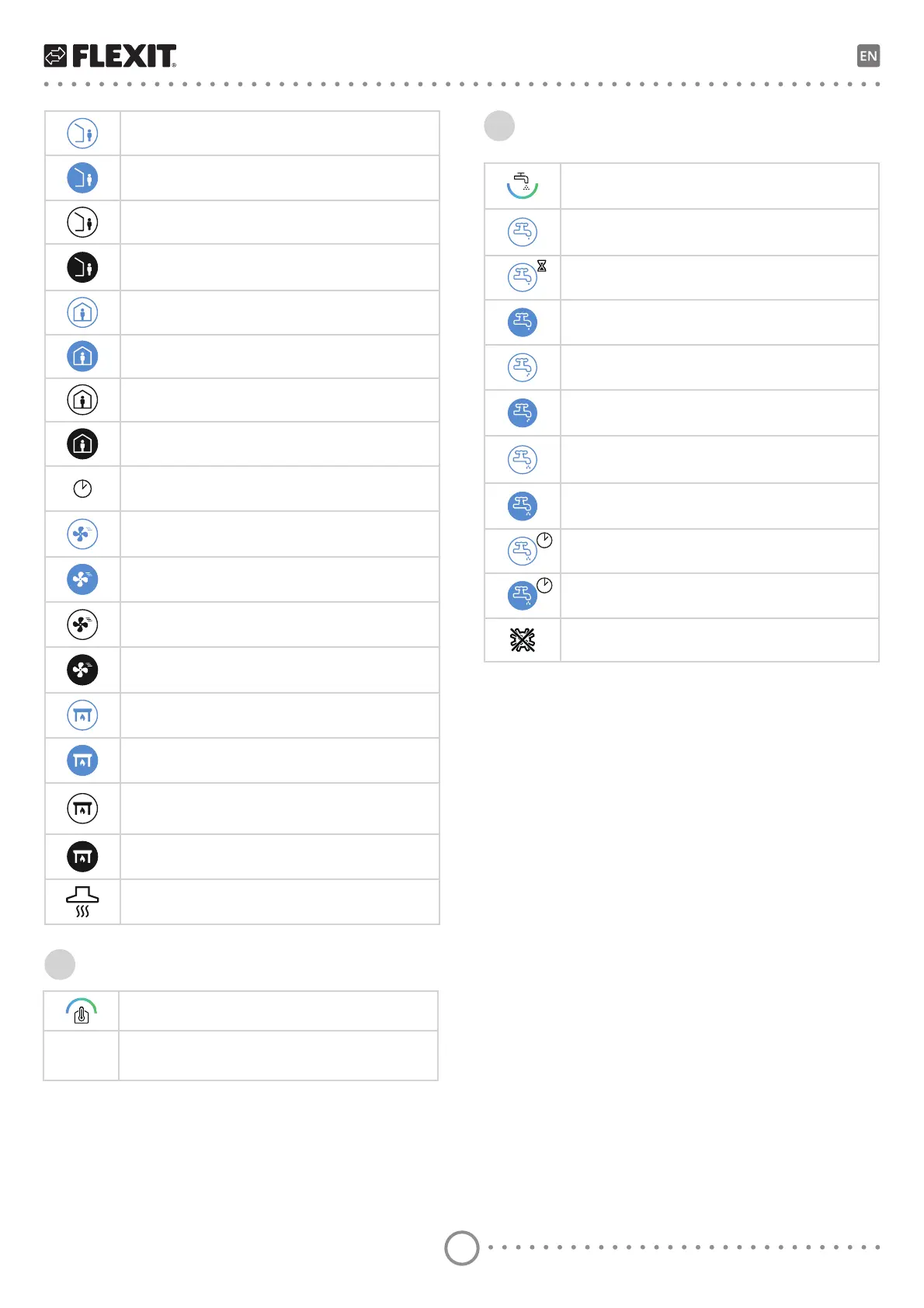
AWAY speed mode. Press to change speed.
AWAY speed mode is active
AWAY speed mode is inactive. The speeds are controlled
via digital input and cannot be changed via the panel.
AWAY speed mode is active and controlled
via a digital input.
HOME speed mode. Press to change speed.
HOME speed mode is active.
HOME speed mode is inactive. The speeds are controlled
via digital input and cannot be changed via the panel.
HOME speed mode is active and controlled
via a digital input.
Timer for HIGH mode. The unit switches back
WRbWKHbSUHYLRXVVSHHGZKHQWKHWLPHUUXQVRXW
HIGH speed mode. Press to change speed.
HIGH speed mode is active.
HIGH speed mode is inactive. The speeds are controlled
via digital input and cannot be changed via the panel.
HIGH speed mode is active and controlled
via a digital input.
FIREPLACE speed mode. Press to change speed.
FIREPLACE speed mode is active.
FIREPLACE speed mode is inactive. The speeds are
controlled via digital input and cannot be changed
via the panel.
FIREPLACE speed mode is active and controlled
via a digital input.
KITCHEN HOOD speed mode is active and controlled
via a digital input.
3
Symbol indicating the heating element in the panel.
0.0
Displacement of set heating curve.
Symbol indicating the hot water element in the panel.
Symbol indicating the ECO hot water mode is selected
EXWbRQVWDQGE\
Symbol indicating the ECO hot water mode will be selected
after timer runs out.
Symbol indicating the ECO hot water mode is selected
DQGbDFWLYH
Symbol indicating the NORMAL hot water mode is selected
but on standby.
Symbol indicating the NORMAL hot water mode is selected
and active.
Symbol indicating the BOOST hot water mode is selected
but on standby.
Symbol indicating the BOOST hot water mode is selected
and active.
Symbol indicating the temporary BOOST hot water mode
is selected but on standby.
Symbol indicating the temporary BOOST hot water mode
is selected and active.
Symbol indicating the legionella hot water mode is active.
4
Heating
Hot water


 To Next Page