10
NORDICPANEL
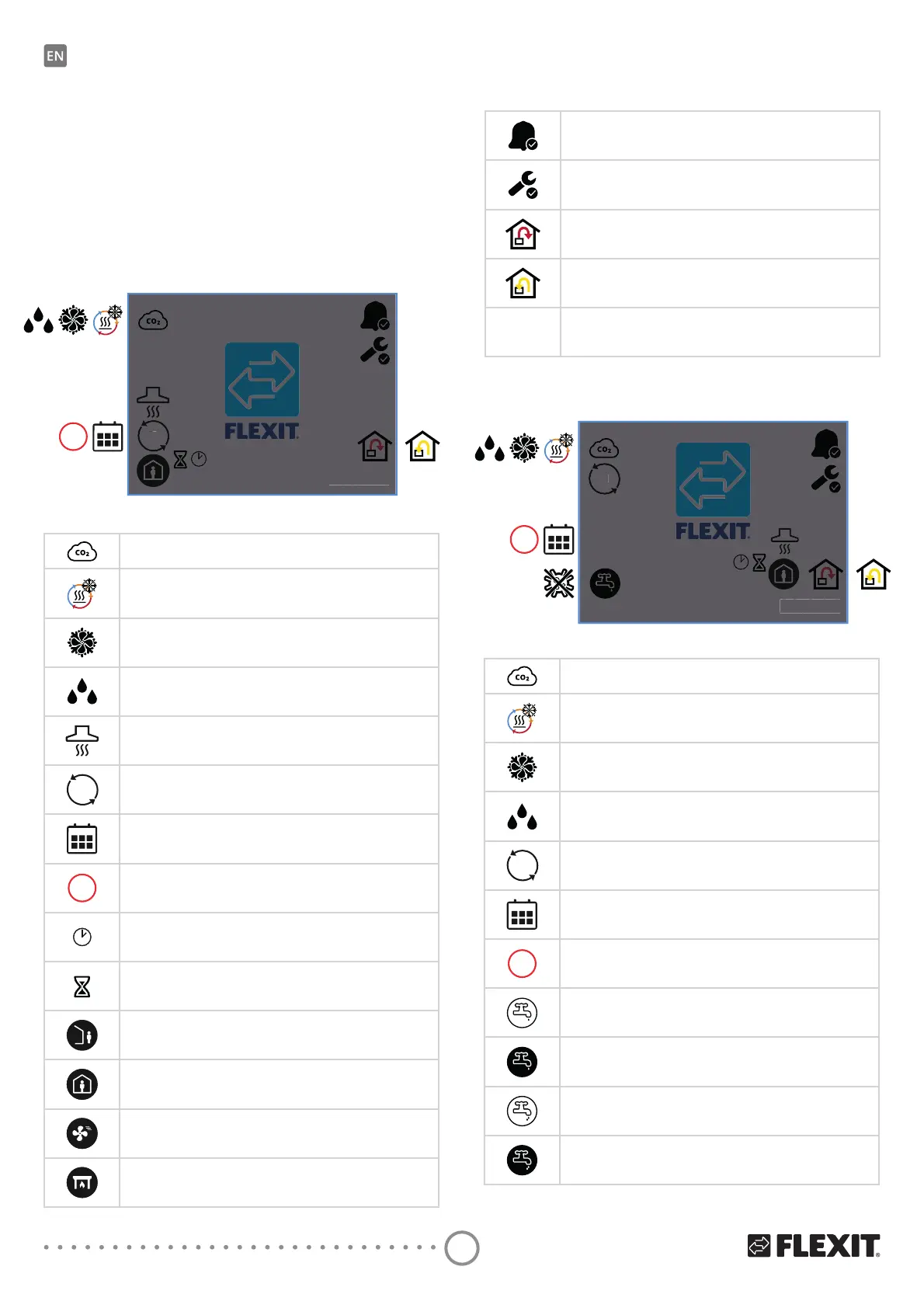
2.4. SCREENSAVER
ΔIWKHVFUHHQLVOHIWXQWRXFKHGIRUVHFRQGVWKHbSDQHO
goes into screensaver mode. The backlight dims
DQGbRQO\DIHZRSHUDWLQJLFRQVDUHGLVSOD\HG<RXFDQ
FKRRVHEHWZHHQGLHUHQWEDFNOLJKWEULJKWQHVVOHYHOV
YLDbWKHFRQȴJXUDWLRQPHQX
Screensaver icons – Nordic
CO
2
regulation is active.
'HLFLQJRIWKHUHJHQHUDWRULVDFWLYH
Free cooling is active.
'HKXPLGLȴFDWLRQUHJXODWLRQLVDFWLYH
COOKER HOOD speed mode is activated.
DI
A digital input (moisture sensor, forcing switch etc.)
LVbDFWLYHDQGRYHUULGHVWKHFXUUHQWVSHHGPRGH
The calendar function has been activated.
You do this via the Flexit GO app.
STOP
Stop is activated.
Timer for HIGH or FIREPLACE mode. The unit switches
back to the previous speed when the timer runs out.
Delay before the unit switches to AWAY mode.
AWAY speed mode is active
HOME speed mode is active.
HIGH speed mode is active.
FIREPLACE speed mode is active.
DI
20.0 °C
STOP
6KRZVWKDWWKHUHLVDQ$DODUPRQWKHXQLW
Open the alarm menu for more info.
Shows that there is a maintenance alarm on the unit.
Open the alarm menu for more info.
Temperature regulation is set to supply air.
Temperature regulation is set to extract air.
20.0 °C
Shows the current temperature at which the unit is set.
DI
°C
2.4.1. Screensaver – Nordic
DI
20.0 °C
STOP
2.4.2. Screensaver – EcoNordic W4
DI
°C
Screensaver icons – EcoNordic W4
CO
2
regulation is active.
'HLFLQJRIWKHUHJHQHUDWRULVDFWLYH
Free cooling is active.
Humidity regulation active
DI
A digital input (moisture sensor, forcing switch etc.)
LVbDFWLYHDQGRYHUULGHVWKHFXUUHQWVSHHGPRGH
The calendar function has been activated.
You do this via the Flexit GO app.
STOP
Stop is activated.
Hot water mode ECO selected and is passive.
Hot water mode ECO selected and is active.
Hot water mode NORMAL selected and is passive.
Hot water mode NORMAL selected and is active.


 To Next Page