6 English
1 Components
More information on components
are available at www.flexlock.se
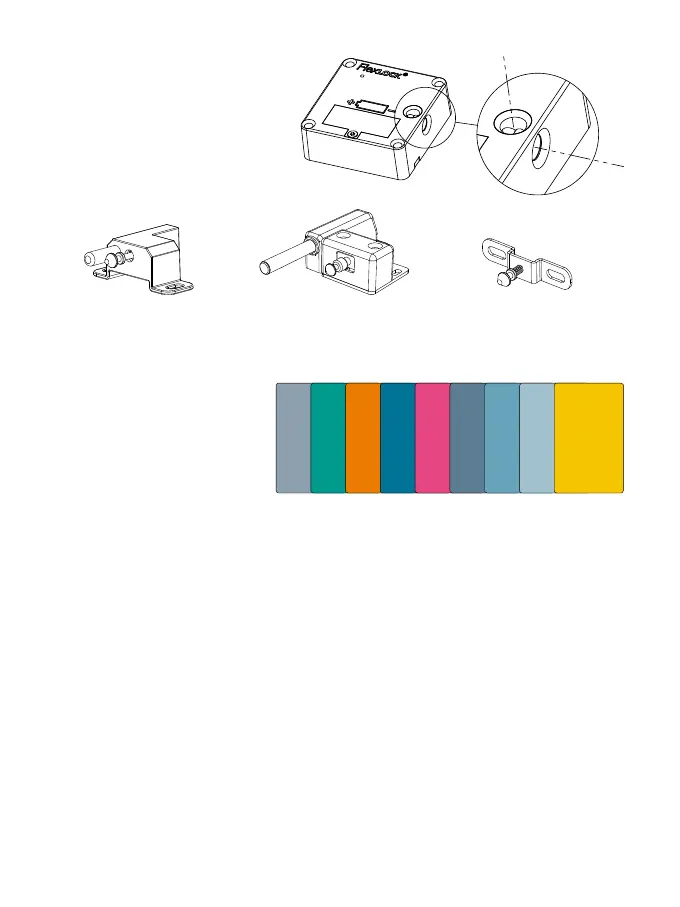
1.1 Lock
1.2 Lock plate
Flexlock is delivered with one of the following:
1.2 Cards
Programming cards, service cards,
Mode cards and user cards
can be ordered.
2 Functions
Mode 1 Default setting. Open as default. Can have 1-200 unique users. Programmed user cards/
tags are needed for opening and locking. Flexlock is delivered in Mode 1
if nothing else is requested.
Mode 2 Locked as default. Can have 1-200 unique users. Programmed user cards/tags
are needed for opening and locking. Locks itself 4 seconds after opening.
Mode 3 Open as default. For temporary use by one user with any compatible
RFID-card/tag. The exact same card/tag has to be used to open the lock again.
The lock is then ready for a new user.
Mode 4 Same as Mode 3, with the addition of a time limit. If the user doesn’t open
the lock within 12 hours, the lock will then automatically open.
Mode 5 Same as Mode 3, with the addition of a time limit. If the user doesn’t open
the lock within 2 hours, the lock will then automatically open.
Ready to use is used in Mode 1 or 2. The lock is prepared so that the first user to present a
card is added as a unique user in the lock. Added after installation.
LOCK PLATE CATAPULT
Suitable types of furniture:
Drawers, cabinets, lockers.
LOCK PLATE CATAPULT+
Suitable types of furniture:
Drawers, cabinets, lockers.
LOCK PLATE SLIDE
Suitable types of furniture:
Sliding fronts, sliding drawers
under desk tops.
Guest
Programming
Sound on/off
Auto lock
Ready to use
User
Timer 12 h
Timer 2 h
Service



 To Next Page