English 7
3 Handling
More instructions are available at www.flexlock.se
3.1 General
3.1.1 Locks in Mode 1 and 2
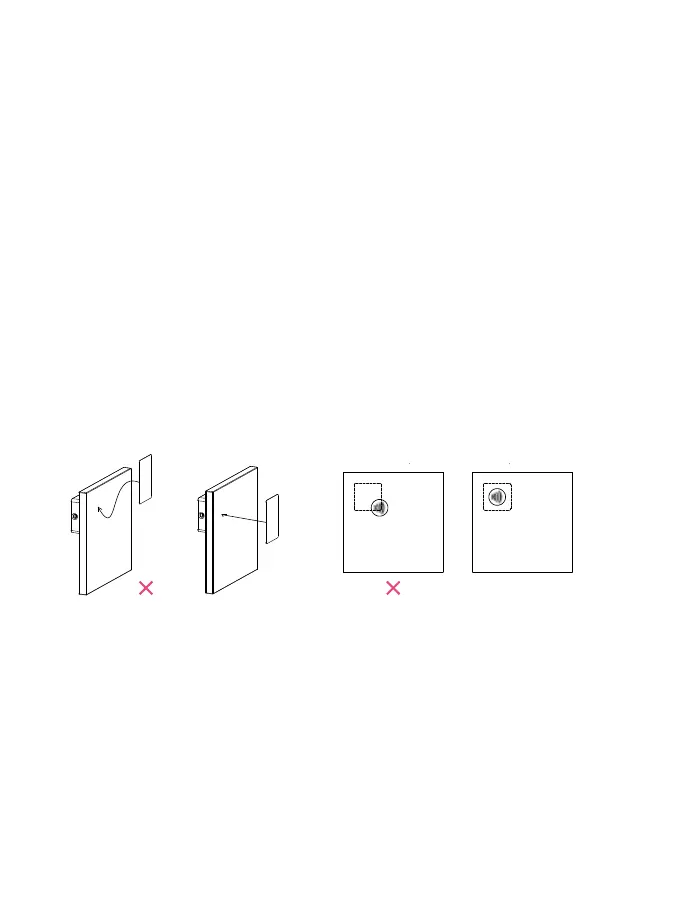
A lock in Mode 1 or 2 has to have user cards programmed to the lock: Open the lock by placing the
correct user card straight onto the lock. To lock in Mode 1, place the card on the lock. In Mode 2 the lock
automatically locks after 4 seconds.
3.1.2 Locks in Mode 3, 4 and 5
When a lock is in Mode 3, 4 or 5, any compatible RFID-card (or tag) may be used (Examples of uses are
lockers at health clubs and leisure centers etc): The lock is locked by placing a compatible RFID-card
(or tag) onto the lock. To open again, the exact same RFID-card (or tag) has to be placed onto the lock
again. Once the lock has been opened again it is then ready for a new user.
Always place the card or tag straight and centered on the lock
Wait for 7 seconds if the attempt didn’t work before trying again.
OK! OK!
PLACEMENT OF LABELING:



 To Next Page