EasyManua.ls Logo

Flexologic FAMM - Adding a New Job

Default Icon
17 pages
Print Icon
To Next Page IconTo Next Page
To Previous Page IconTo Previous Page
Loading...
7
H. Kamerlingh Onnesweg 2
2408 AW Alphen aan den Rijn
The Netherlands
CONFIDENTIAL - THIS DOCUMENT MAY NOT BE DISCLOSED TO ANY THIRD PARTY OR USED FOR ANY
OTHER PURPOSE WITHOUT THE EXPRESS WRITTEN PERMISSION OF AV FLEXOLOGIC BV
CONFIDENTIAL
9. Adding a new job
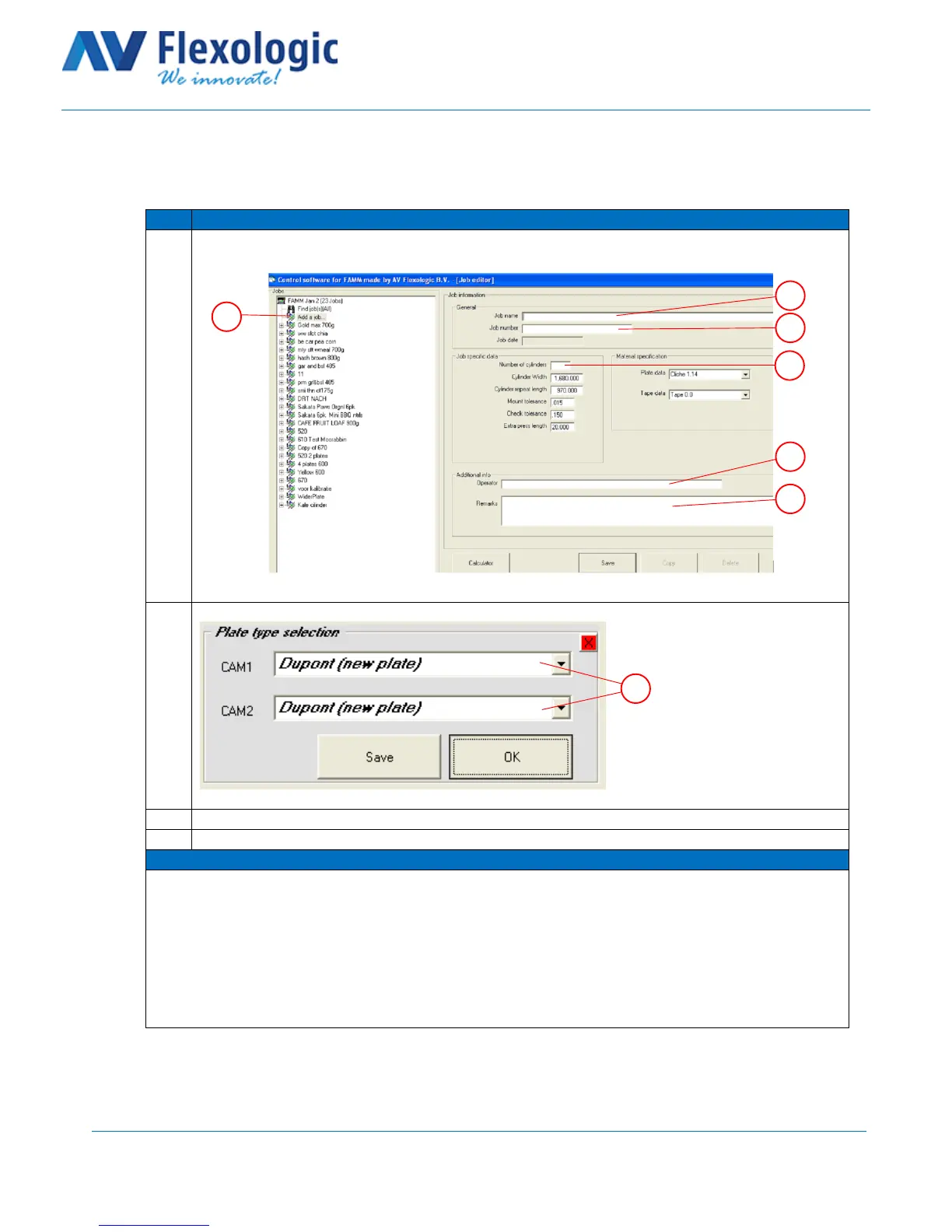
This section describes how to create a new job on the FAMM operator terminal.
Step
Action
1
Click on Add a job (A) and add a job name (B), job number (C), number of cylinders (D),
operator name (E) and optional comments (F).
Click on the Save button.
2
Select the plate type for both cameras. (A)
Click on the Save button
3
You have now created a new job
4
DONE
Comments
A
B
C
D
E
F
A