H. Kamerlingh Onnesweg 2
2408 AW Alphen aan den Rijn
The Netherlands
CONFIDENTIAL - THIS DOCUMENT MAY NOT BE DISCLOSED TO ANY THIRD PARTY OR USED FOR ANY
OTHER PURPOSE WITHOUT THE EXPRESS WRITTEN PERMISSION OF AV FLEXOLOGIC BV
10. Adding plates to the cylinder
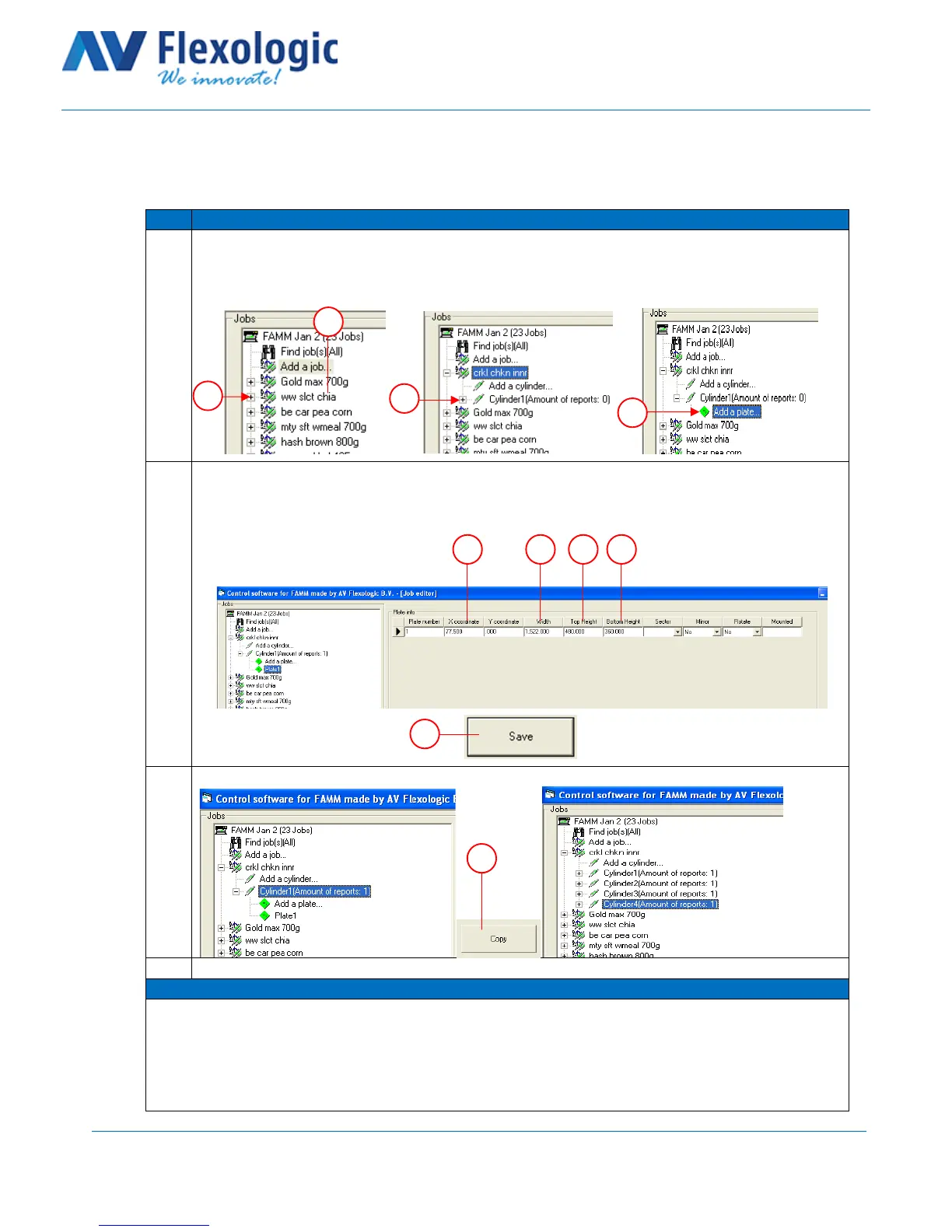
This section describes how to add a plate to a cylinder in the FAMM software.
Find the cylinder you want to add a plate to in the job tree on the left and click on the “+” next to
the job name / item number to open the job (A).
Click on the “+” next to ‘cylinder 1’ to open the cylinder (B).
Click on “add a plate…” (C).
Fill out the details of the plate:
A – X coordinate
B – Width between microdots
C – Top height
D – Bottom height
Click on Save (E)
Copy the current cylinder for multiple colours by clicking “copy” (A):



 To Next Page