Page 12 © 2017 FlexRadio Systems, v1.0.0
Reinstalling the Bottom Cover
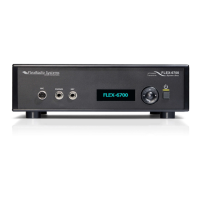
Replace the bottom chassis cover on the FLEX-6000. Orient the cover so that the row of vent holes on the
bottom cover are on top of the side fans towards the front of the FLEX-6000 as shown below.
After reinstalling the bottom cover install the six (6) stainless steel (silver) Bottom Cover screws using the
long portion of the #8 TORX wrench. The image below shows the installation of the Bottom Cover screws.


 To Next Page