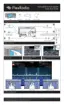
Step 7: Connect the coax to the board below by pressing until you hear it “click” into place. Repeat this
process with the shorter coax by snapping into place as shown below. The longer coax goes in X10, ATU-
OUT and the shorter coax goes into X9, ATU-IN
Step 8: Next, snap the ribbon cable to the connector on the bottom board as shown.



 To Next Page