Page 3 © 2018 FlexRadio Systems, V1.2
Preparing to Install the GPSDO Module
The back panel plugs and top cover must be removed before the GPSDO can be installed.
Removing the Back-Panel Metal Plugs
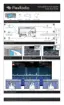
Place the FLEX-6000 on its feet with the back facing you as shown in the image below.
Using your fingernail or another non-metal prying device, remove the two (2) metal plugs from the back
panel below the labels:
• GPS ANT
• 10 MHz OUT



 To Next Page