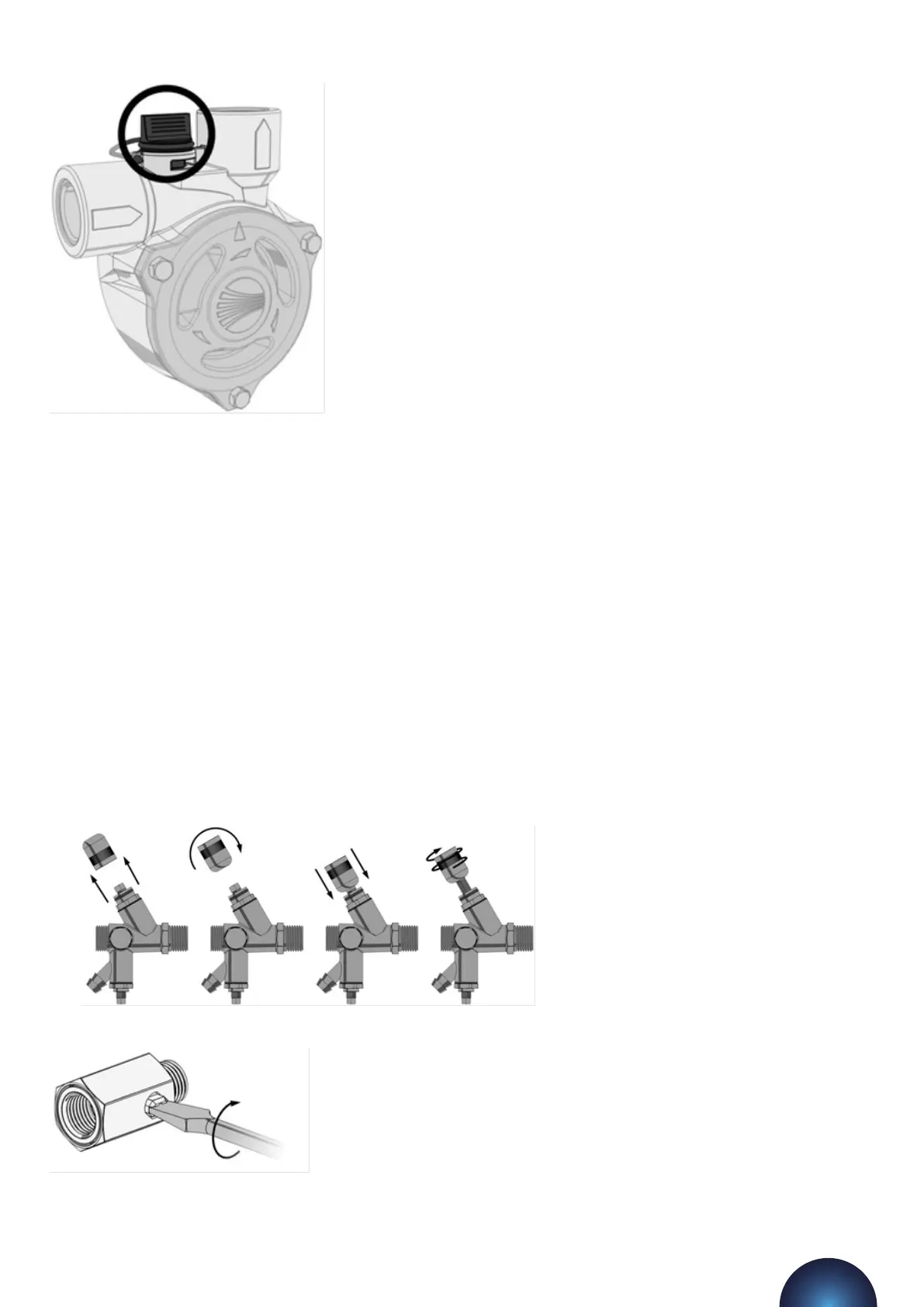
Forcing Pumps to Run
Turn on the power supply to the digital controller and wait for the system pressure to appear on the display.
Then, enter the code 2601 and go to the first seing in the menu, cold fill. While at this point in the menu,
holding down the (MUTE) buon will force pump 1 to run, and holding down the (SET) buon will force pump 2
to run.
If the controller is older than V6.1 then there is no way to force pump 2 to run via the controller. To force the
second pump to run, the unit must be isolated and the live wires in terminals 13 and 14 must be swapped
over. The second pump then becomes “pump 1” and can be forced to run via the controller.
To bleed the pumps, the pumps must be started. Then while the pump is running, the bleed screw must be
opened until all the air has been removed and only water is being discharged. The bleed screw can then be
closed.
Failure to bleed the pumps may result in damage to the equipment, system and property.
Aer bleeding the pumps, close the drain valve and remove the hose from the hose tail.
3 – Initial Start-up
Open the internal isolation valve within the pressurisation unit by following the steps below:
Once the isolation valve is open, the pressure sensor will be able to read the system pressure.
flowpress WMDA Pressurisation Units
21



 To Next Page