Fluance RT80/RT81 User Manual
8
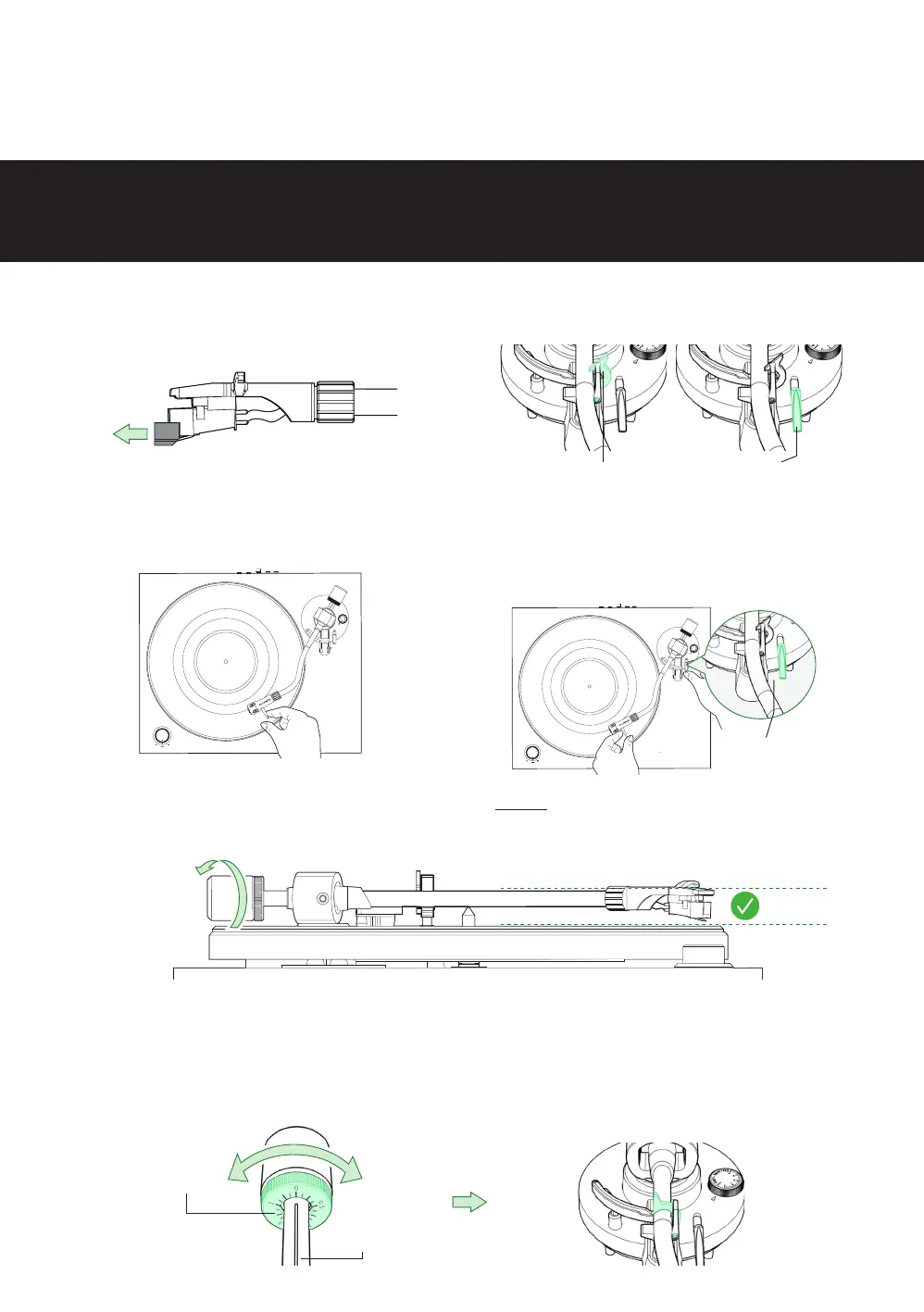
Step Four: Balancing the Tonearm
Important!
Complete all steps for balancing the tonearm. Incorrect tonearm balancing can cause damage to the stylus
and to your records. For additional assistance go to: www.uance.com/support to watch a tutorial video for
this process
1. Remove the stylus protector.
3. Position the tonearm over the platter.
5. With the cueing lever now lowered, turn the entire counterweight until the tonearm is
balanced and floating horizontally when headshell is released.
Tip: When balancing the tonearm make sure the cueing lever is down and the anti-skating control is set to 0.
6. Set only the counterweight indicator ring to “0” on the center line while keeping the
tonearm balanced then lock the tonearm on the tonearm rest.
2. Unlock the tonearm and lift the cueing
lever.
4. Hold the headshell and lower the
cueing lever completely. Protect the
stylus from touching the platter.
Lock Cueing Lever
Counterweight
Indicator Ring
Center Line
Cueing Lever



 To Next Page