16
Parental Menu Options
Parental Menu Options
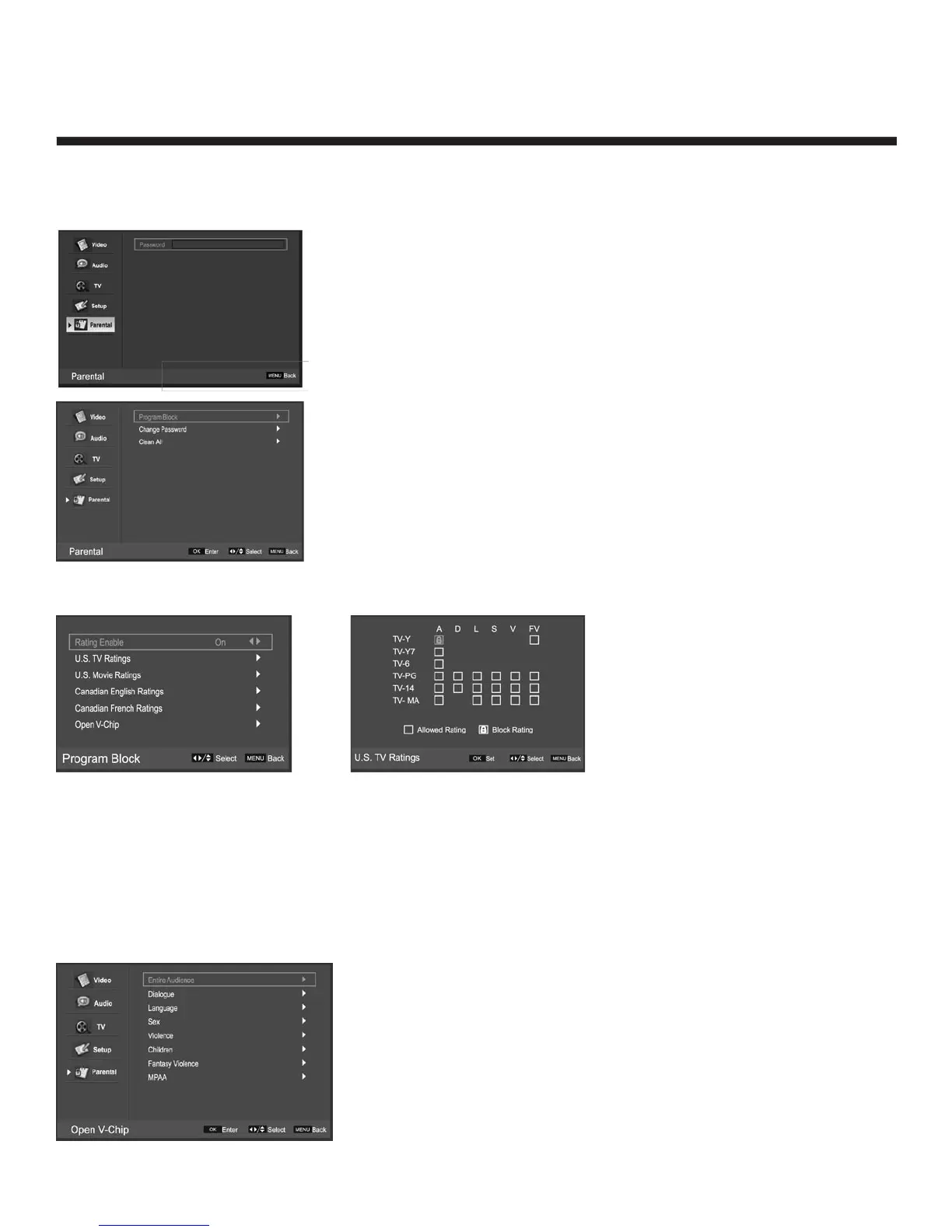
Press the MENU on the front panel or remote control and then use e / d to select the Parental menu,
Press g or OK to enter (see picture below).
Enter code 0000 to enter the parental menu.
Program Block
Change Password: select “Change Password”, press OK to enter the
submenu, and change the password. Press MENU to cancel.
Clean All: Select “Clean All”, Press OK and it will display “Are you
sure”, select “OK” to set default.
Program Block
Rating Enable: Press f / g to select On/Off.
U.S. TV Rating: Press OK to enter, and use f / g and e / d to select, and press OK to confirm.
U.S. Movie Ratings: Press OK to enter, and use e / d to select, and press OK to confirm.
Canadian English Ratings: Press OK to enter, and use e / d to select, and press OK to confirm.
Canadian French Rating: Press OK to enter, and use e / d to select, and press OK to confirm.
Open V-Chip
Select “V-Chip”, Press OK to enter, you will see an item “U.S. (50 states + possessions)”, and press OK
again to enter the V-Chip menu (picture below).
You can select any item, press
OK to enter, use e / d to
select, press OK to confirm.


 To Next Page