18
Connecting to External Devices
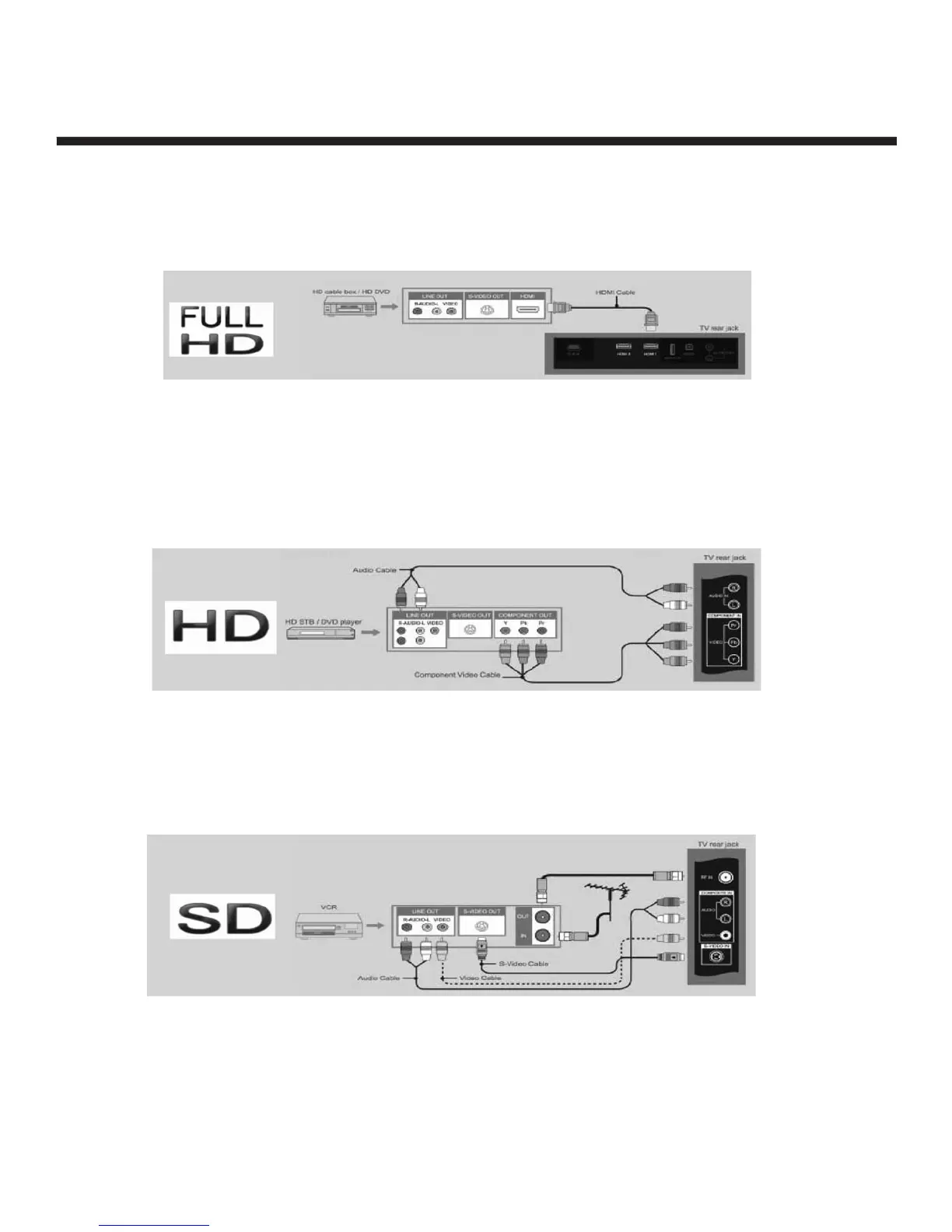
Connecting your TV to Set-top Boxes and DVD players
For Full HD Quality Picture and Sound,
connect your set-top box or Blu-ray/HD/DVD player using a digital HMDI cable.
For HD and Better Quality Picture and Sound,
you can connect your TV to the set-top box or DVD recorder using a component cable for video and L/R
audio cable for sound as shown in the figure below.
For Standard Definition Devices – Most Set-top boxes and VCRs have an AV or S-Video connector that you
can connect to your TV as shown in the figure below. We do not recommend this type of connection since
the video and audio quality will not be as good as digital HDMI or Component signals.
NOTE: Full HD reproduction is dependent on the resolution of your screen. Your television screen must
be full HD resolution (1920x1080). If your television screen is HD resolution (1366x768), your
picture will still be high quality when using a full HD source input.


 To Next Page