9
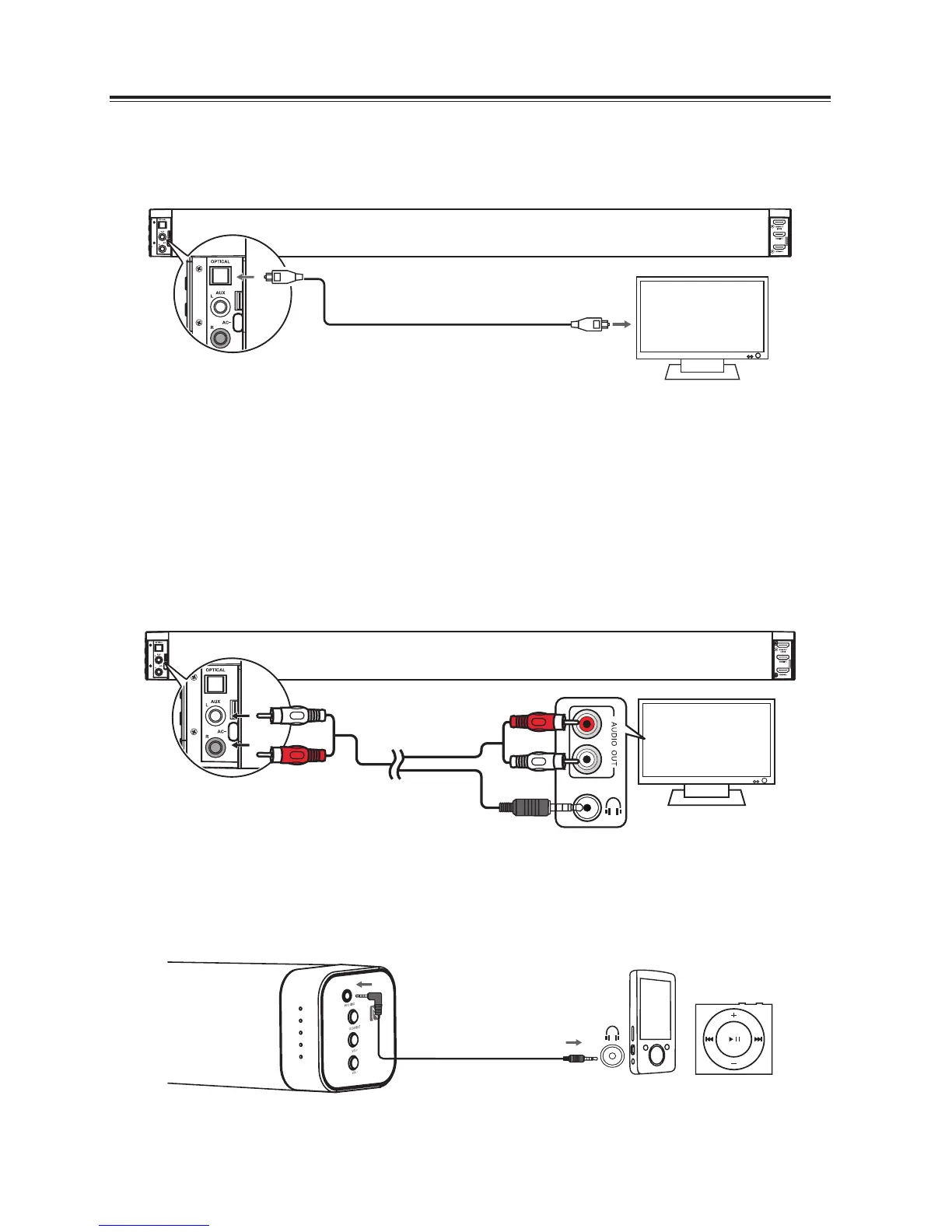
Use the OPTICAL Socket
- Remove the protective cap of the OPTICAL socket, then connect an OPTICAL cable (not included) to
the TV’s OPTICAL OUT socket and the OPTICAL socket on the unit.
Tip:
If there is no sound coming out of the soundbar and the indicator light is blinking, make sure the audio
setting of your source player (e.g. DVD player, game player, TV) is set to PCM with optical input.
Use the AUX Socket
- Use an RCA stereo audio cable (not included) to connect the TV’s audio output socket to the AUX (R/L)
socket on the unit.
- Use an RCA to 3.5mm audio cable (included) to connect the TV’s headphone socket to the AUX (R/L)
socket on the unit.
A
B
Use the MP3 Link Socket
- Use a 3.5mm to 3.5mm audio cable (not included) to connect the external audio device headphone
socket to the MP3 LINK socket on the unit.
OPTICAL cable
OR
3.5mm to 3.5mm audio cable
Phone MP3 Player
TV
TV


 To Next Page