Defibrillator/Transcutaneous Pacemaker Analyzer
Using ECG Waveform Simulation Test Elements
73
Performance Wave Simulation
The Performance Wave simulation can be used to test
the integrity of a defibrillator monitor with a variety of
additional waveform shapes, such as square, triangle,
sine, and pulse. Table 21 lists the custom parameters for
this simulation.
Note
This is a visual / audible test; the Analyzer takes
no measurements during this test.
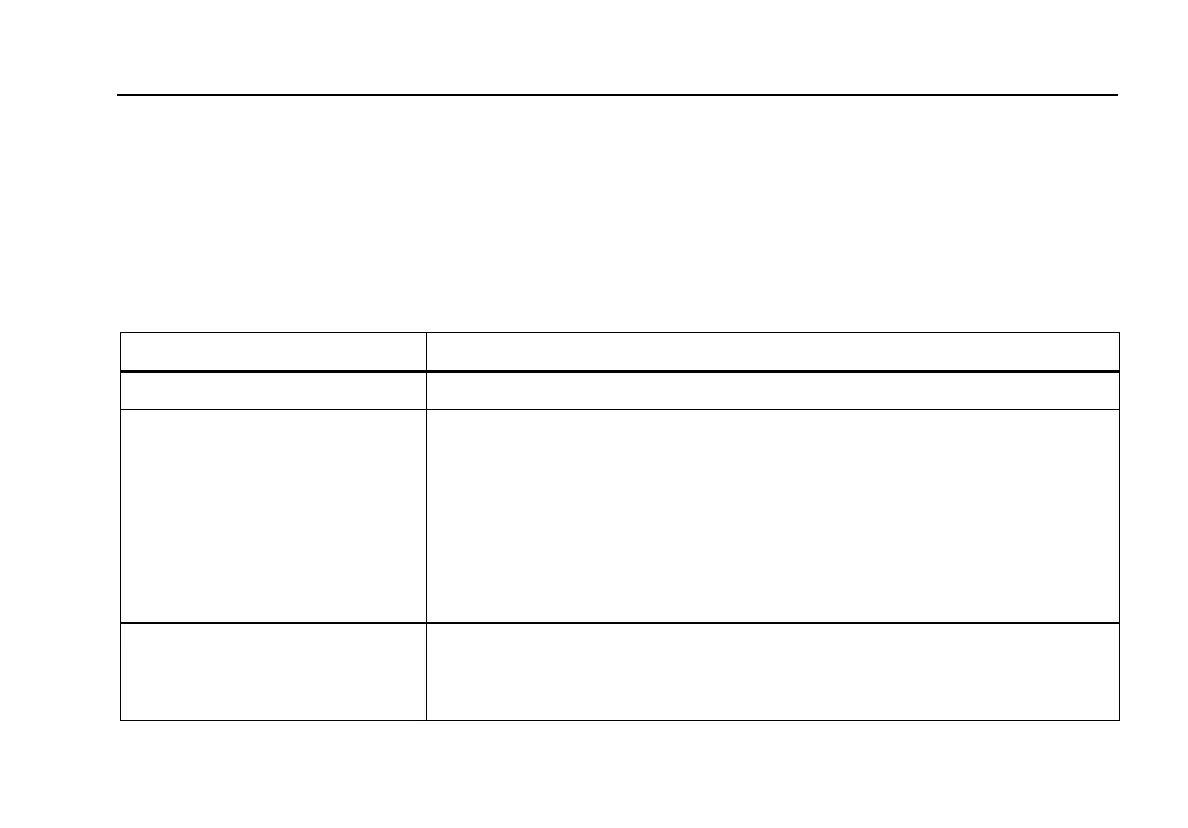
Table 21. Performance Wave Simulation Test Custom Parameters
Parameter Description
ECG Amplitude Indicates the amplitude that the waveform should have
Performance Wave Selects the type of Waveform to use for the test
Choices are:
• Square: 0.125 or 2 Hz
• Pulse: 30 or 60 BPM
• Sine: 0.05, 0.5, 10, 40, 50, 60, 100, 150, 200 Hz
• Triangle: 2 or 2.5 Hz
Duration How long the simulation should last
Setting can range from 1 to 60 seconds. If checkbox Indefinite is selected, duration
is ignored, and the user must stop the test manually (Stop in TEST GUIDE toolbar).


 To Next Page