CERTIFIBER ENGLISH - 30
50/125 or 62.5/125.
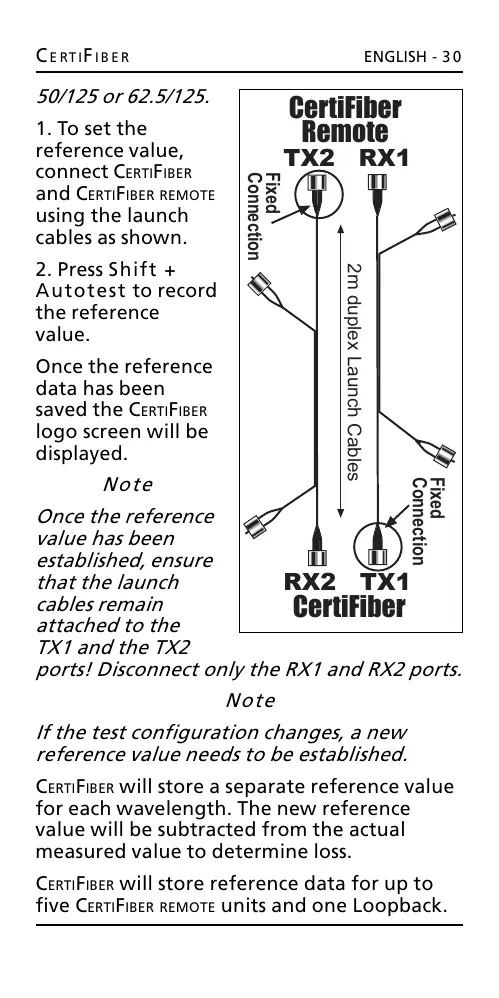
1. To set the
reference value,
connect CERTIFIBER
and CERTIFIBER REMOTE
using the launch
cables as shown.
2. Press Shift +
Autotest to record
the reference
value.
Once the reference
data has been
saved the CERTIFIBER
logo screen will be
displayed.
Note
Once the reference
value has been
established, ensure
that the launch
cables remain
attached to the
TX1 and the TX2
ports! Disconnect only the RX1 and RX2 ports.
Note
If the test configuration changes, a new
reference value needs to be established.
CERTIFIBER will store a separate reference value
for each wavelength. The new reference
value will be subtracted from the actual
measured value to determine loss.
CERTIFIBER will store reference data for up to
five CERTIFIBER REMOTE units and one Loopback.
2m duplex Launch Cables
CertiFiber
Remote
TX2 RX1
CertiFiber
RX2 TX1
Fixed
Connection
Fixed
Connection
All manuals and user guides at all-guides.com










 To Next Page