Home
Fluke
Measuring Instruments
DSX-5000
Page 15
Fluke DSX-5000 - Page 15
27 pages
Manual
Save Page as PDF
To Next Page
To Next Page
To Previous Page
To Previous Page
Loading...
Page
CONFIGURA
TION
OF DSX 5000
15
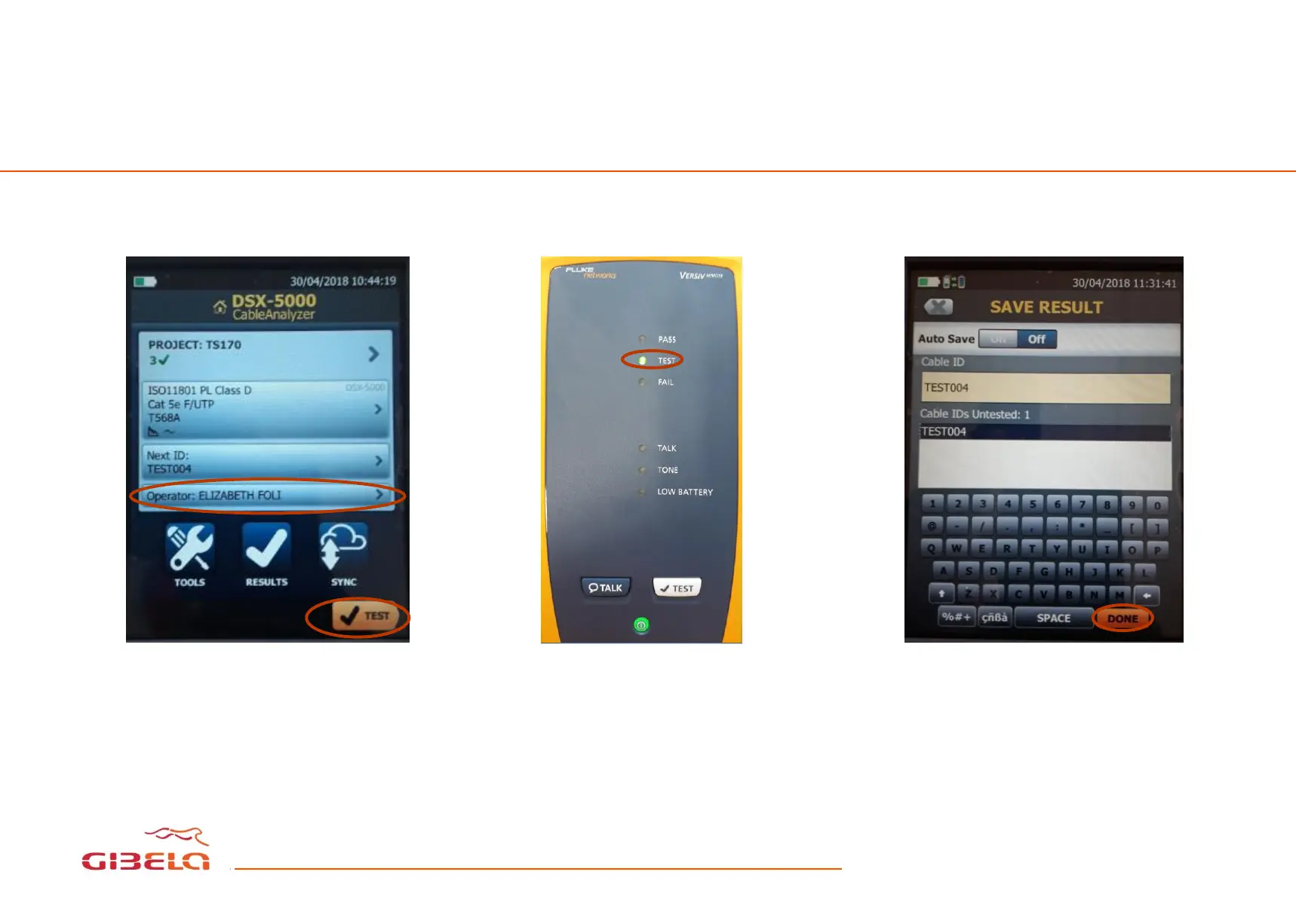
TESTING
AND SAVING RESUL
TS
Select your name
as an
operator
. Press the test button.
The green
light next to “TEST”
will be flashing
d
uring
the test.
Select save results. Write
th
e
cable ID press done to
finish.
14
16
Related product manuals
Fluke CableAnalyzer DSX-5000
10 pages
Fluke DSX 5000 CableAnalyzer
90 pages
Fluke DSX-600
238 pages
Fluke CableAnalyzer DSX-602
110 pages
Fluke DSX-600 CableAnalyzer
28 pages
Fluke DSP-4100
216 pages
Fluke DSP-4300
216 pages
Fluke CableAnalyzer DSP-4300
24 pages
Fluke CableAnalyzer DSP-4000SR
228 pages
Fluke CableAnalyzer DSP-4300SR
24 pages
CableAnalyzer DSP-4000 Series
228 pages
Fluke DTX-1800
62 pages









 To Next Page