OCXO
Range
Extended
New OCXOs
Oven-Controlled
Oscillators, PM9691
&
PM9692
The PM9691
is
adjusted
to
10 MHz
±
0.2 Hz when manufactured,
the
PM9692 to
10 MHz
±
0.05 Hz,
so
there
is
no
need to adjust the
frequency
directly
after installation.
These
oscillators, like any
oscillator, change
frequency because of
aging.
Use the table in the
Operators
Manual, Chapter
10,
to calcu-
late
when calibration
is due.
The
complete
specifications can
be
found
in
the
same
manual, Chapter 11.
Required test
equipment
Instrument
Required specification Model
Counter
with Rubidium
Reference
1
0 MHz
±
0.01
Hz (Uncer-
tainty
£
1x10'^)
PM6681R/
PM6685R
Table
9-1
Setup
-
Connect the
counter to the
line power.
-
Switch
on
the
counter.
-
Set the counter
to default settings
(preset).
Make the adjustment at
an ambient temperature
of
4-23
°C, if
possi-
ble.
The
oscillator
must have been operating
continuously
for 48
hours
before an adjustment.
-
Connect the
10 MHz OUT
socket
of
the counter to
be
adjusted
(rear
panel) to the Input A
of
the
PM6681R/PM6685R.
-
Set
up the
PM6681R/PM6685R:
“
Measuring
time
=
0.5 s
—
50 Q input
impedance
—
Frequency
A
measurements
Adjustment
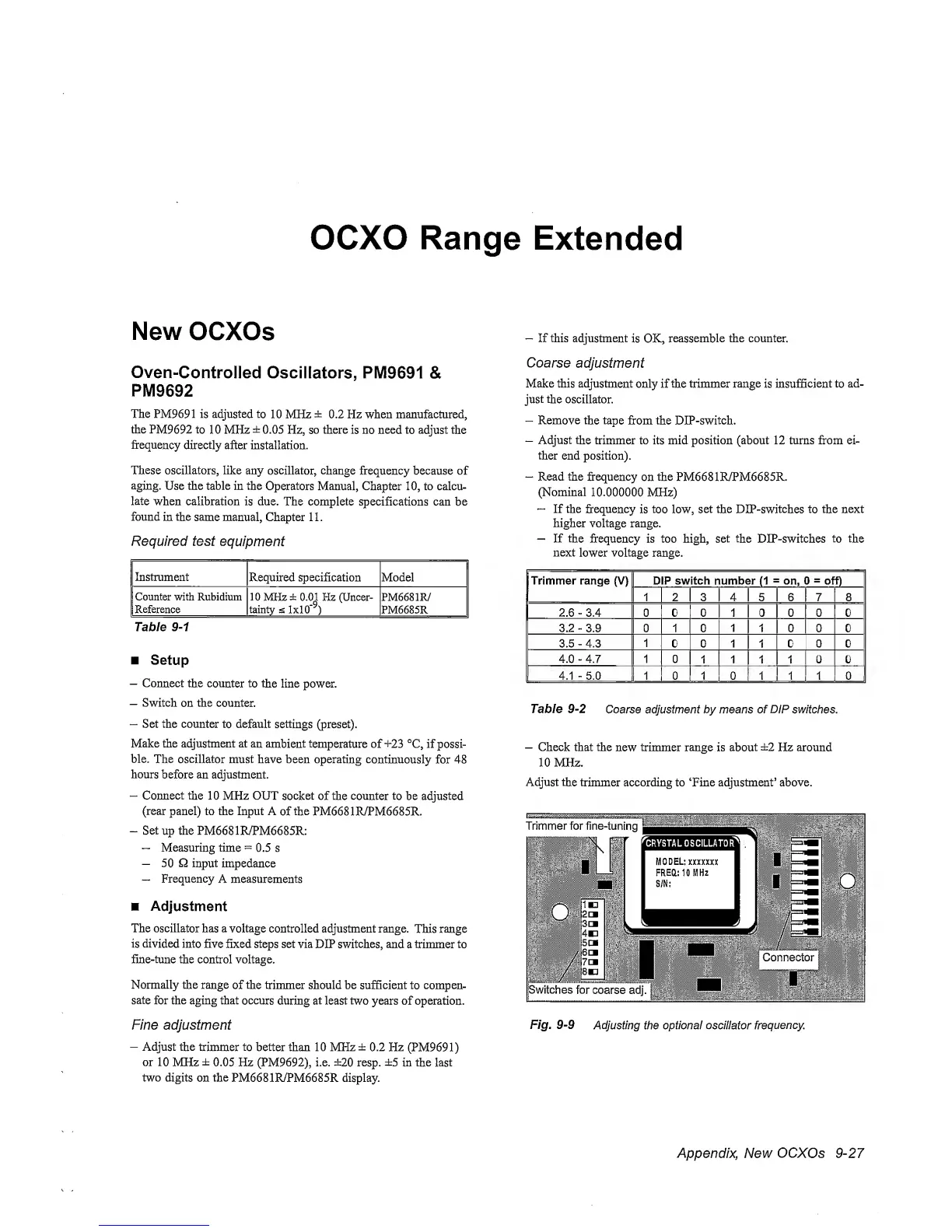
The oscillator
has
a
voltage controlled
adjustment range.
This
range
is divided into
five fixed steps set via
DIP
switches, and
a
trimmer
to
fine-tune
the control voltage.
Normally the
range
of
the trimmer
should be sufficient
to compen-
sate
for the aging that
occurs
during
at
least two years of operation.
Fine adjustment
-
Adjust the
trimmer to
better than 10 MHz
±
0.2 Hz
(PM9691)
or
10 MHz
±
0.05 Hz (PM9692), i.e. ±20 resp.
±5
in
the
last
two digits
on
the
PM6681R/PM6685R display.
-
If this adjustment
is OK,
reassemble
the counter.
Coarse
adjustment
Make this adjustment
only if
the trimmer range
is
insufficient to
ad-
just the
oscillator.
-
Remove
the tape
from the
DIP-switch.
-
Adjust the
trimmer to its mid position (about 12 turns from ei-
ther
end position).
-
Read the frequency
on
the
PM6681R/PM6685R.
(Nominal
10.000000
MHz)
~
If the frequency
is
too
low,
set the
DlP-switches to
the next
higher
voltage
range.
—
If
the
frequency is too high, set
the
DIP-switches
to the
next
lower
voltage
range.
1 2 3 4 5 6 7 8
2.6
-
3.4 0 0 0 1 0 0 0 0
3.2
-
3.9 0 1 0 1 1 0 0 0
3.5
-
4.3 1 0 0 1
1
0 0 0
4.0
-
4.7 1 0 1 1 1 1 0 0
4.1
-
5.0
1 0 1 0 1 1 1 0
Table
9-2
Coarse adjustment by means of
DIP
switches.
-
Check that the
new
trimmer range
is
about
±2
Hz around
10 MHz.
Adjust
the
trimmer according to ‘Fine adjustment’ above.
Fig,
9-9
Adjusting the optional osciHator
frequency.
Appendix, New
OCXOs
9-27


 To Next Page
 Loading...



