EasyManua.ls Logo

FlyDigi APEX - Operation Mode; Compatible Devices and Modes; Switching and Indicators

FlyDigi APEX
12 pages
Print Icon
To Next Page IconTo Next Page
To Previous Page IconTo Previous Page
Loading...
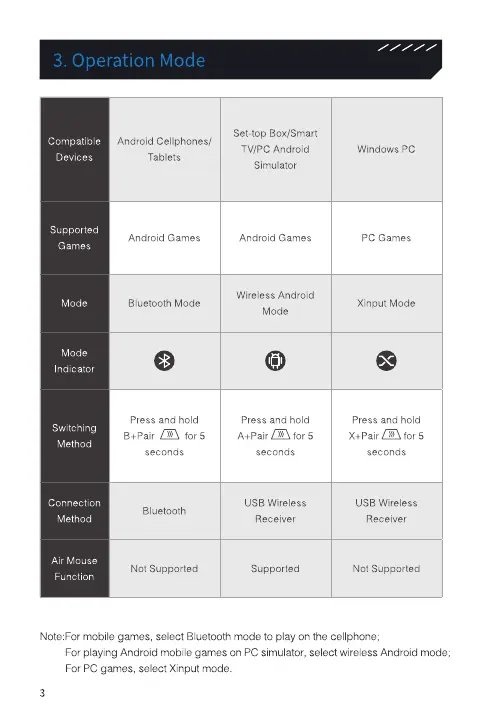
3. Operation Mode
Compatible
Devices
Supported
Games
Mode
Mode
Indicator
Switching
Method
Connection
Method
Air Mouse
Function
Android Cellphones/
Tablets
Android Games
Bluetooth Mode
Press and hold
B+Pair
seconds
Bluetooth
Not Supported
Set-top Box/Smart
TV/PC Android
Simulator
Android Games
Wireless Android
Mode
Press and hold
seconds
USB Wireless
Receiver
Supported
Windows PC
pc Games
Xinput Mode
Press and hold
X+Pair for
seconds
IJSB Wireless
Receiver
Not Supported
Note:For mobile games, select Bluetooth mode to play on the cellphone;
For playing Android mobile games on PC simulator, select wireless Android mode;
For PC games, select Xinput mode.
3

Related product manuals