&OBCMF64#%FCVH
+VNQJOUPEFWFJPQFSPQUJPOT
Setting
64#%FCVHHJOH
3. Flymapping Activating Activation)
o
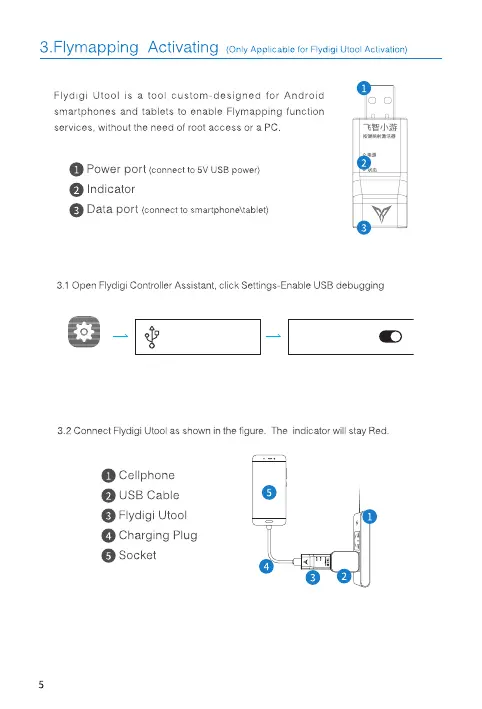
Flydigi Utool is a tool custom-designed for Android
smartphones and tablets to enable Flymapping function
services, without the need of root access or a
O Powerport (connecttosvusapower)
O Indicator
Data port (connect smartphone\tablet)
3.1 Open Flydigi Controller Assistant, click Settings-Enable USB debugging
EnableUSBDebug
optkms
USBDebugging
32 Connect Flydigi utool as shown in the figure. The indicator will stay Red
O Cellphone
O usa Cable
O FlydigiIJtool
o
Charging Plug
Socket
o


 To Next Page