5. Play Games on Wireless Set-Top Box/Smart
TV/PC Android Simulator (WirelessAndroidMode)
Connect the controller
@ PlugtheUSBwirelessreceiverintothe USBportofSet-TopBox/SmartTV/PC.
@Turn the power switch on the back to "ON", press and hold A + Pair buttons in turn for
over 5 seconds, The controller will switch to Wireless Android Mode with mode indicator
stays steadily on, and the controller will connect to the USB wireless receiver
Note 1:For paired controllers, it'S only Click the Pair button re-connecting
Note 2; What to do if the Mode indicator keeps slcoulyflashing atter switching to Wireless Android Mode and
cannot be connected?
Unplug the wireless receiver it it is plugged On the controller, turn the power on and press and
hold the Pair button: the Android Mode indicator Will [Lash quick" Plug and unplug the LISB "ireless
receiver once and keep the distance between controller and receiver within 2Dcn-L Once successfully
connected, the mode indicator slcnvfy flash twice, then stays steadiitv on.
Air Mouse (Only Supporting Wireless Android Mode)
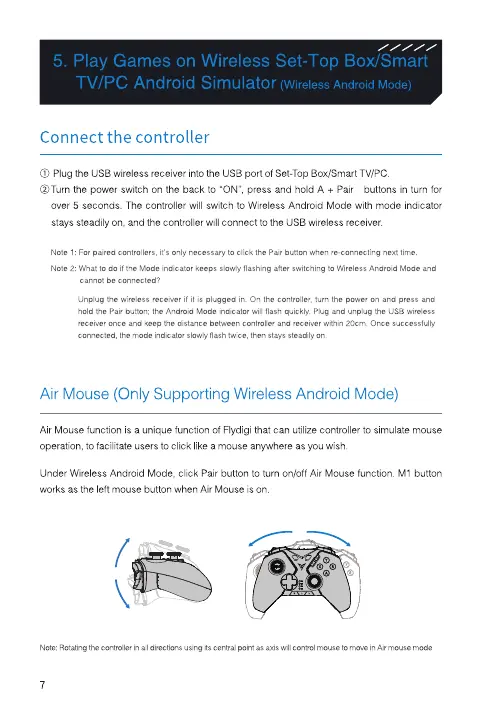
Air Mouse function is a unique function of Flydigi that can utilize controller to simulate mouse
operation, to facilitate users to click like a mouse anywhere as you wish.
under Wireless Android Mode. click Pair button to turn on/off Air Mouse function. MI button
works as the left mouse button when Air Mouse is on.
Note,Rotatingthecontrollerinall using its as axisWin to in Air mode
7


 To Next Page