28
WARNING: The ‘grey’ state should be selected when a line output is to be
used to drive external processors. Note that in this state, the signal routed to that
output will be at full level. Should you have amplifiers/loudspeakers connected
to the output, this may result in a very high sound level in your monitor speakers
or headphones. Always check your levels (in your DAW or the Scarlett MixControl
Mixer) before setting the monitor button to this mode.
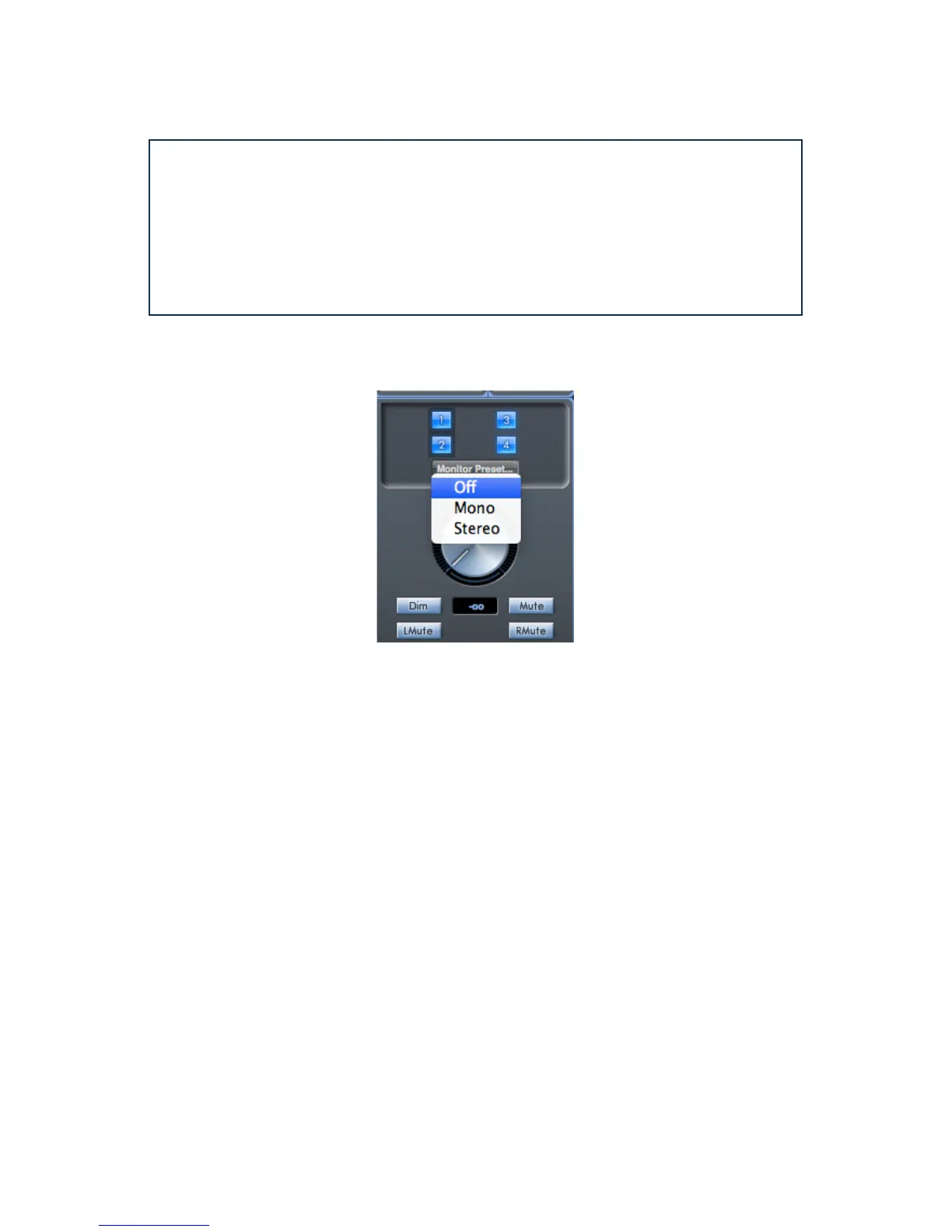
Monitor Presets dropdown menu
A range of preset monitoring configurations is provided; click on the Monitor Preset… button to open
a drop-down list. These presets allow simple selection of common monitoring configurations.
The Monitor Presets function as follows:
• Off – all monitor control buttons disabled; all analogue outputs are off.
• Mono – only Line Output 3 is enabled. Connect to a centrally-located speaker for working in
mono.
• Stereo – Line Outputs 1 and 2 (Monitor 1 and 2) are enabled. All other channels are muted.
Connect Output 1 to your left monitor and 2 to your right.
Monitor Section Controls
The controls in Scarlett MixControl’s Monitor section will affect those channels that have been
selected for monitor control (i.e., those displaying ‘blue’ status - see above).




 To Next Page