32
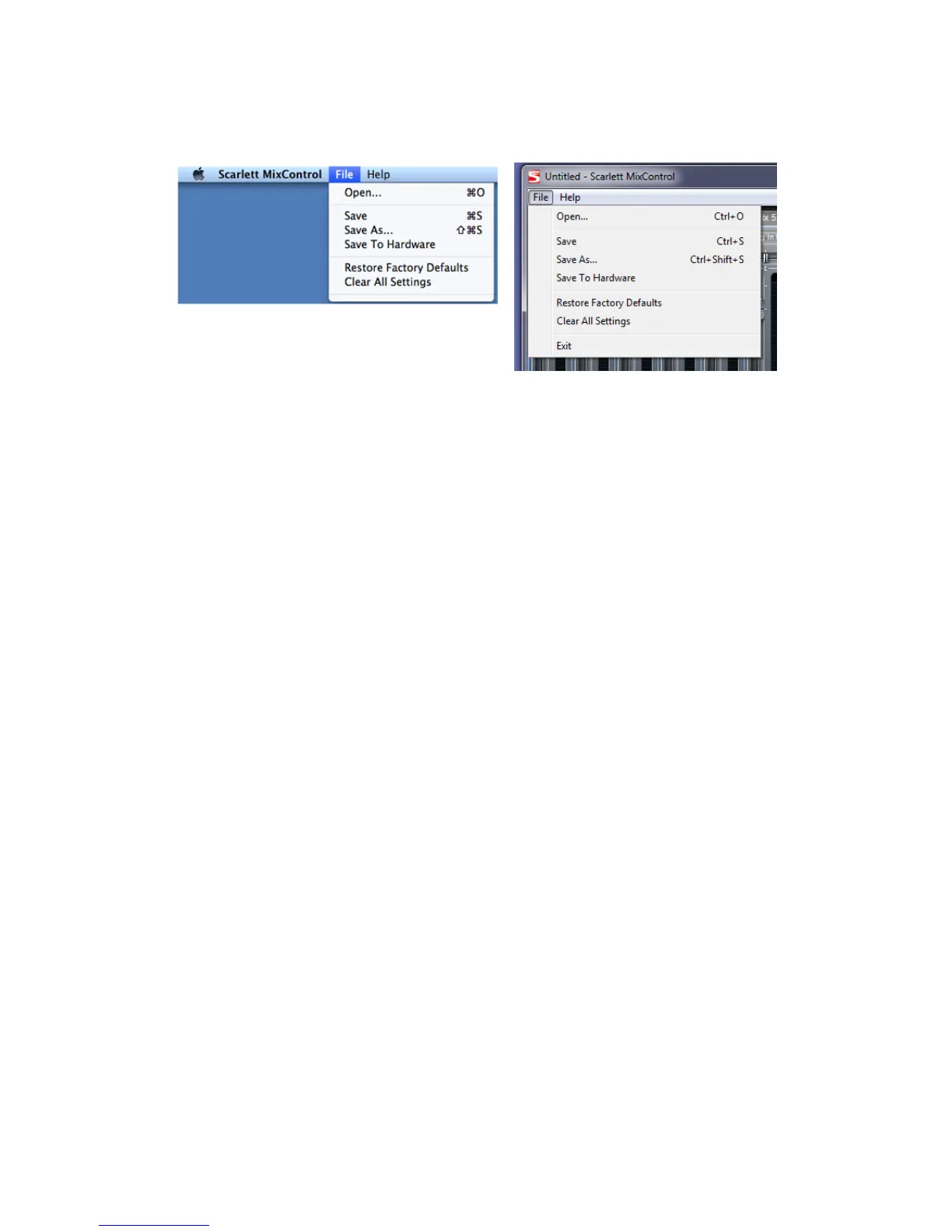
File Menu
The File menus differ slightly between Mac and Windows versions of Scarlett MixControl.
• Open - opens a File Open dialogue box, allowing selection of any previously saved Scarlett
MixControl mix data.
• Save - opens a File Save dialogue box, allowing selection of a location to which your Scarlett
MixControl mix data can be saved. Subsequent Saves overwrite the original file.
• Save As - opens a File Save As dialogue box. Use this option if you want to keep your original
saved mix data but save the current mix data under a different filename.
• Restore Factory Default - resets the Scarlett 6i6 to its original default factory state. This can
be used to globally reset all mixer, routing, and monitor settings, allowing creation of a new
set-up from scratch.
• Save to Hardware - This saves the current Scarlett MixControl set-up to the Scarlett 6i6
hardware. If you are moving the Scarlett 6i6 from one computer to another and want to retain
the set-up, or want to use it in “stand-alone” mode, select this option.
As with nearly all other software applications, ‘Open’, ‘Save’ and ‘Save As’ all have standard keyboard
shortcuts.




 To Next Page