FORCE1
12
TRIM ADJUSTMENTS
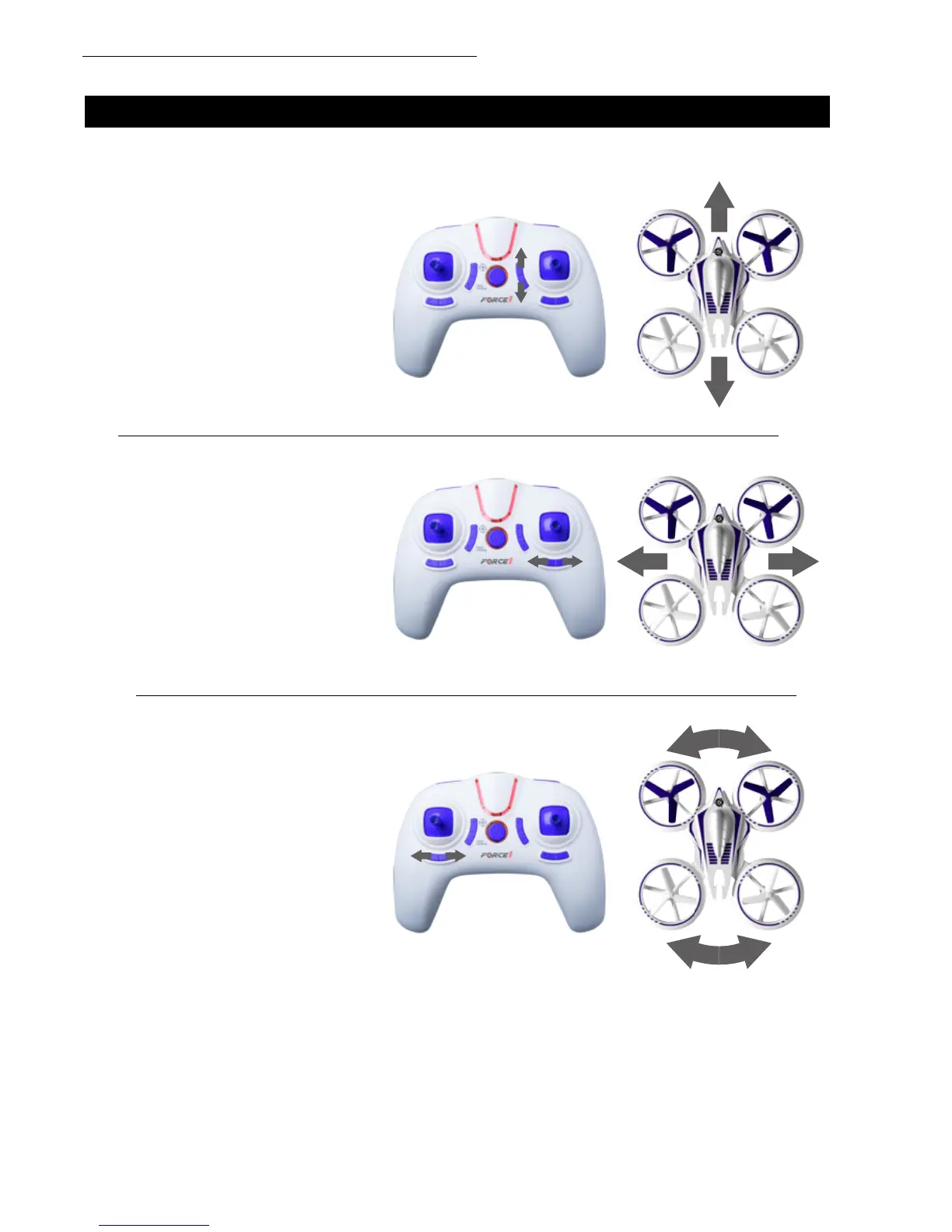
FORWARD/BACKWARD TRIM
Adjust the FORWARD/BACKWARD
TRIMMER backwards if the drone drifts
forward when taking off, and adjust the
FORWARD/BACKWARD TRIMMER
forwards if drone drifts backwards. In
Mode 1, the FORWARD/BACKWARD
TRIMMER is on the left side.
If your drone drifts in an unwanted direction, try adjusting the trim as shown below.
LEFT/RIGHT TRIM
Adjust the LEFT/RIGHT FLYING
TRIMMER to the right if the drone drifts
to the left when taking off, and adjust
the LEFT/RIGHT FLYING TRIMMER to
the left if drone drifts to the right.
LEFT OR RIGHT ROTATION TRIM
Adjust the LEFT/RIGHT RUDDER
TRIMMER to the right if the drone
rotates to the left when taking off,
and adjust the LEFT/RIGHT RUDDER
TRIMMER to the left if drone rotates to
the right.



 To Next Page