Default
a. Select to , which
means the limit position moves in the
CLOSE DOOR direction.
a. Select to , which
means the limit position moves in the
door center direction.
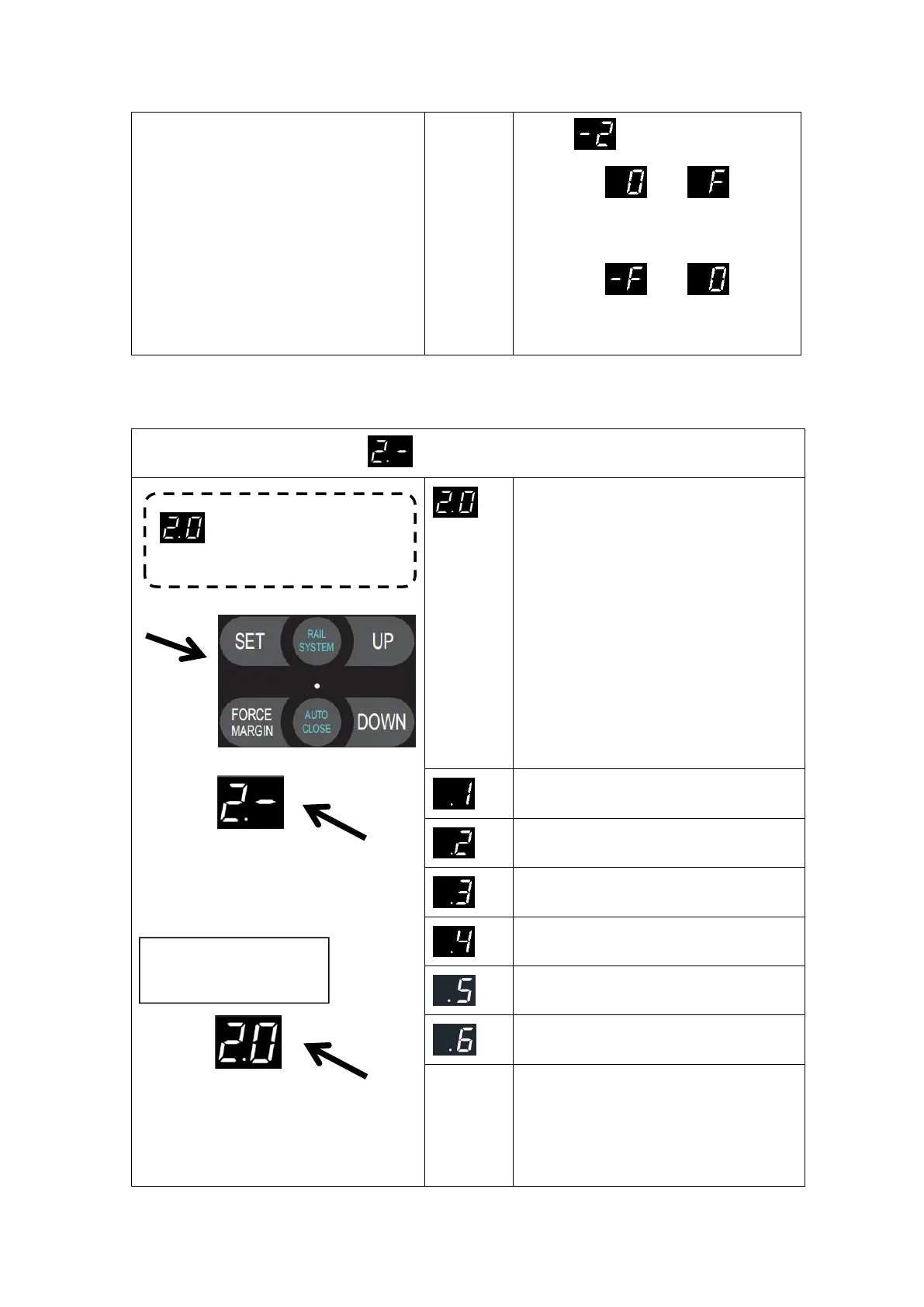
MENU2 Operating Parameter Setting
Press and hold SET button for
about 6 seconds to enter main
menu until “0.-” appears on the
display then release the button.
Press UP till “2.-” appears on the
display.
Press “ SET ” into the operating
parameter setting menu, digital
displays “2.0”
Press SET to enter the door closing
speed adjustment menu,
High speed, 100% of standard door closing
speed,50% of soft closing speed
Medium speed, 90% standard door closing
speed,40% of soft closing speed
Low speed, 80% standard door closing
speed,40% of soft closing speed
Low speed, 70% standard door closing
speed,35% of soft closing speed
Low speed, 60% standard door closing
speed,35% of soft closing speed
Low speed, 50% standard door closing
speed,35% of soft closing speed
After quick setting the door drive,AAS
function automatically select the most
optimized speed for the door already.
When you change the speed manually in
this menu,you have to set the travel
Door closing speed adjustment


 To Next Page