FLASH/Warning light
output port setting
and after 1.5 seconds electronic lock
stops supplying power.
After the door drive receives the door
opening command at the close limit
position, the electronic lock will be
powered on firstly to retract the bolt,
then the door starts to run after 1.5
seconds, and the electronic lock stops
power supply after the door runs for 1
second.
The default electronic lock function is
off.
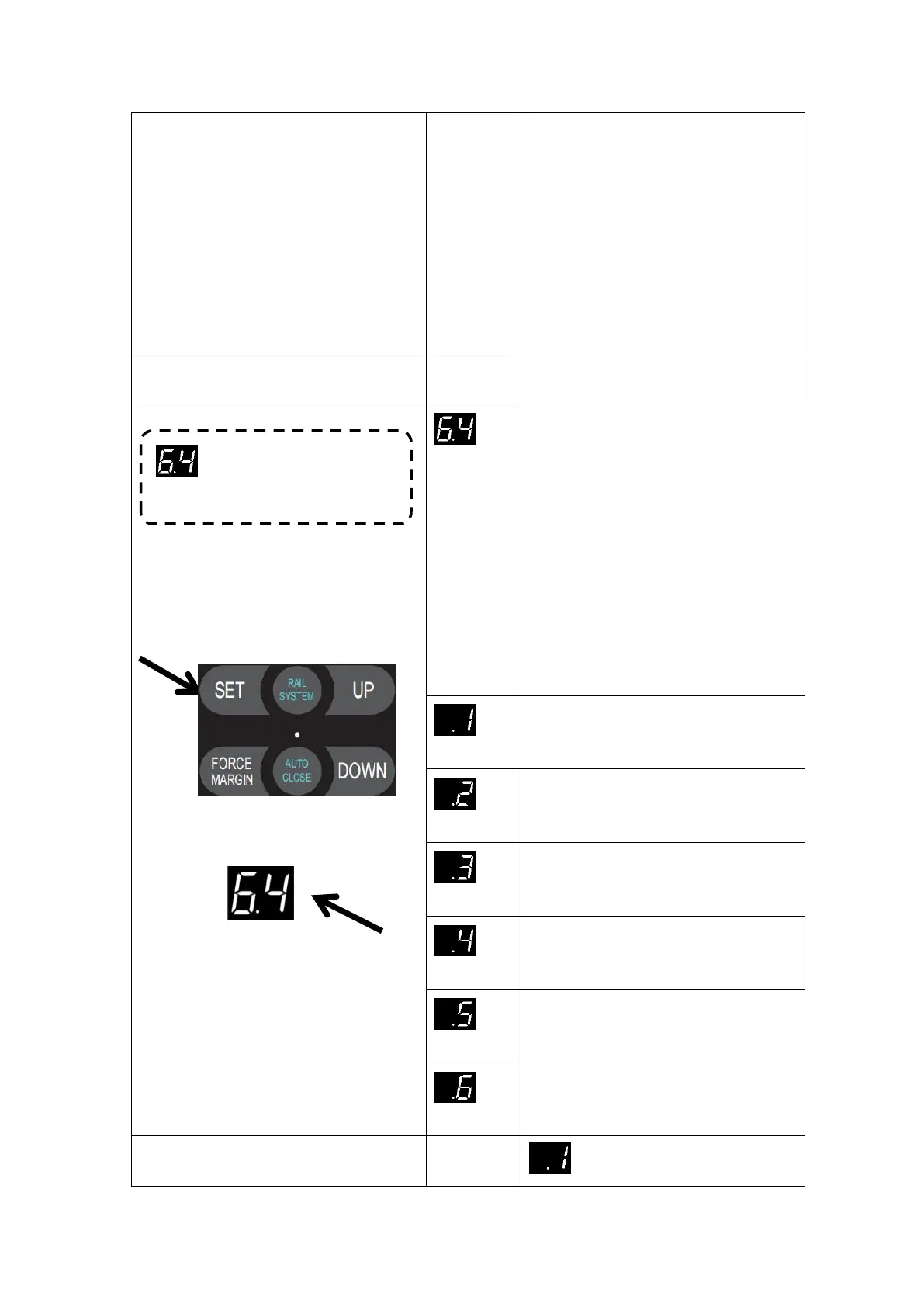
Press and hold SET button for
about 6 seconds to enter main
menu until “0.-” appears on the
display then release the button.
Press UP till “6.-” appears on
the display.
Press SET then appears “6.0” on
the display
Press UP till “6.4” appears on the
display.
Press SET enter into the FLASH/
Warning light output port setting.
Warning light flashes when the door is
running, and warning light off when the
door is stop. (default)
The warning light is always on when the
door is running, and the warning light is
off when the door is stop.
The warning light flashes when the door
is running, and the warning light flashes
also when the door is stop,
The warning light is always on when the
door is running,and the warning light is
always on also when the door is stop.
The warning light flashes when the door
is running,and the warning light is
always on when the door is stop.
The warning light is always on when the
door is running,and the warning light
flashes also when the door is stop,
means: Warning light flashes


 To Next Page