Forcepoint Next Generation Firewall Hardware Guide | Models 330, 331, 335, 335W
Number Component Color Description
1 Activity/link/link speed
indicator
Green 1 Gbps link (other speeds not supported),
flashes on activity.
2 Thumbscrews N/A N/A
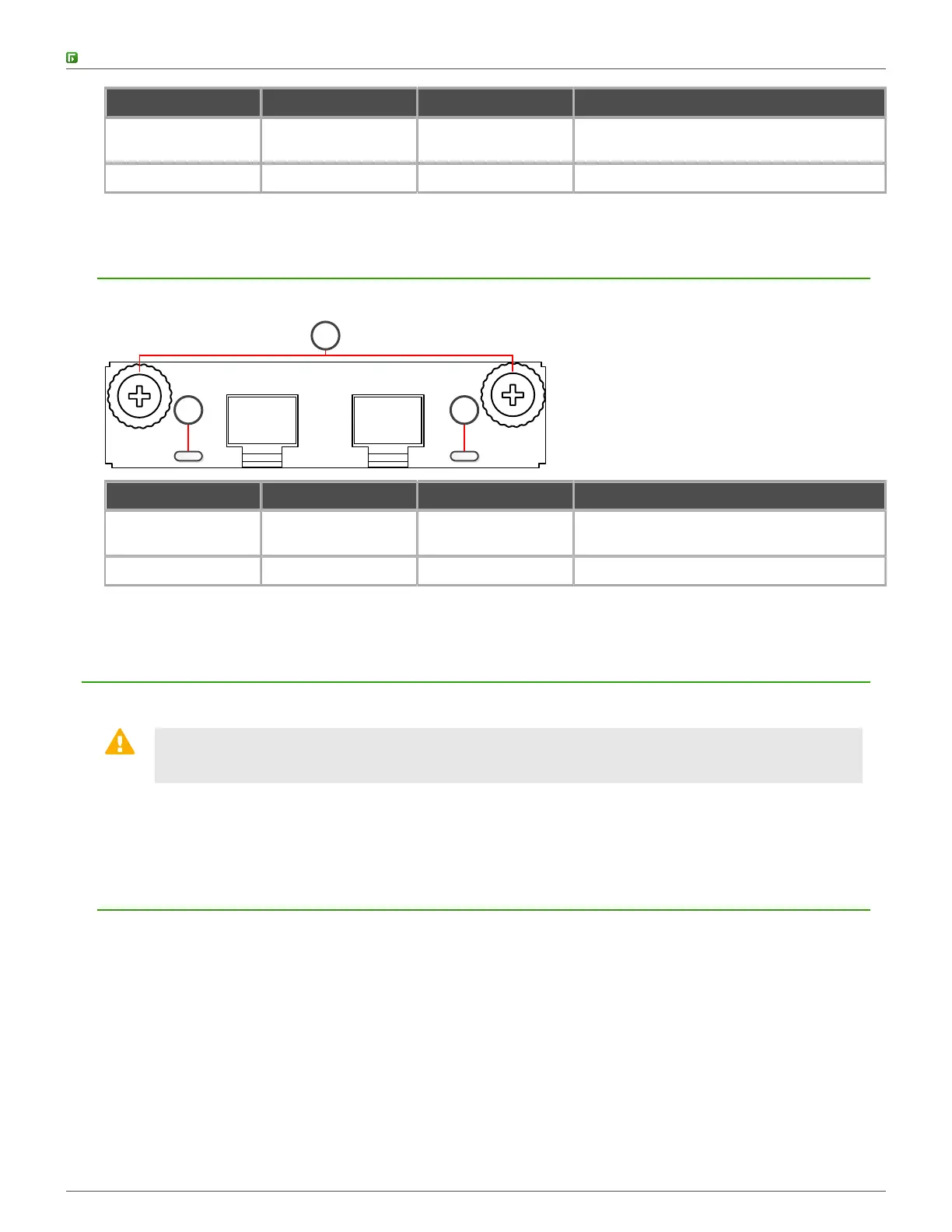
MMGESFP2 module
The MMGESFP2 module is a two-port gigabit interface SFP mini module.
2
1 1
Number Component Color Description
1 Activity/link/link speed
indicators
Green 1 Gbps link (other speeds not supported),
flashes on activity.
2 Thumbscrews N/A N/A
Precautions
The precautions provide safety guidance when working with Forcepoint appliances and electrical equipment.
CAUTION: Forcepoint appliances cannot be serviced by end users. Never open the appliance
covers for any reason. Doing so can lead to serious injury and void the hardware warranty.
For additional safety information, see the Forcepoint Product Safety and Regulatory Compliance Guide.
General safety precautions
Read the safety information and follow these rules to ensure general safety whenever you are working with
electronic equipment.
• Keep the area around the appliance clean and free of clutter.
• Use a regulating uninterruptible power supply (UPS) to keep your system operating if there is a power failure
and to protect the appliance from power surges and voltage spikes.
• If you need to turn off or unplug the appliance, always wait at least five seconds before turning on or plugging
in the appliance again.
9



 To Next Page