11
Using the display
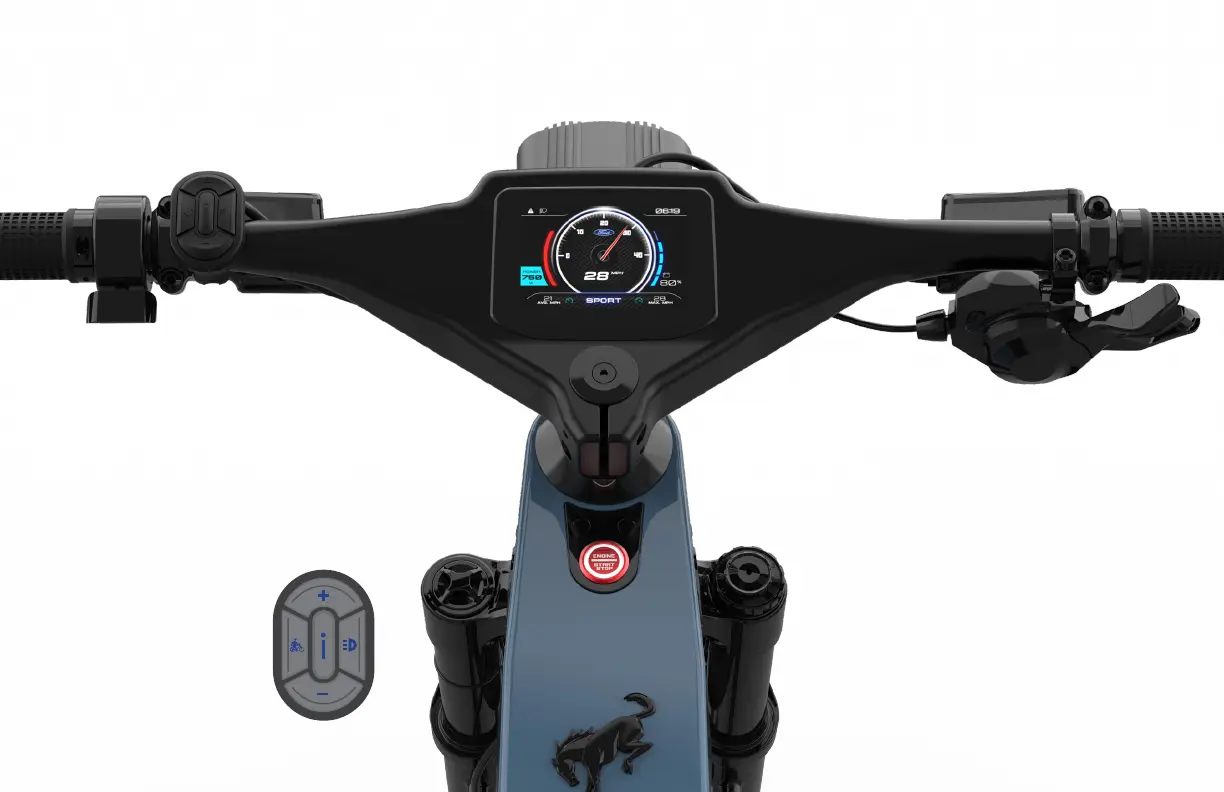
Your eBike is equipped with a custom
integrated handlebar display.
Press the ENGINE START STOP switch
on the top tube to activate your bike.
In the main interface, short
press the “Power” button
to switch to view different
data information.
Switch data display
order: Trip mileage
and total mileage,
average speed and
maximum speed,
riding time and
calories burnt.
Menu operation
1. When the bike is stationary, long press the
“i” button on the handlebar mounted control
switch for two seconds to enter the user menu.
2. Short press the “+” or “-” button on the
handlebar control switch to select the setting
option, then short press the “Power” button
on the handlebar control switch to confirm
the selection and modify the item.
3. Short press the “+” or the “-” handlebar
control switch button to adjust the value.
4. Short press the “Power” button on the
handlebar control switch to complete
modification and return to the main menu.
5. Long press the “i” button on the handlebar
control switch for two seconds to
exit the user menu interface.
How To Ride Your Ford Bronco
®
eBike
4/ How to Ride












 To Next Page