16
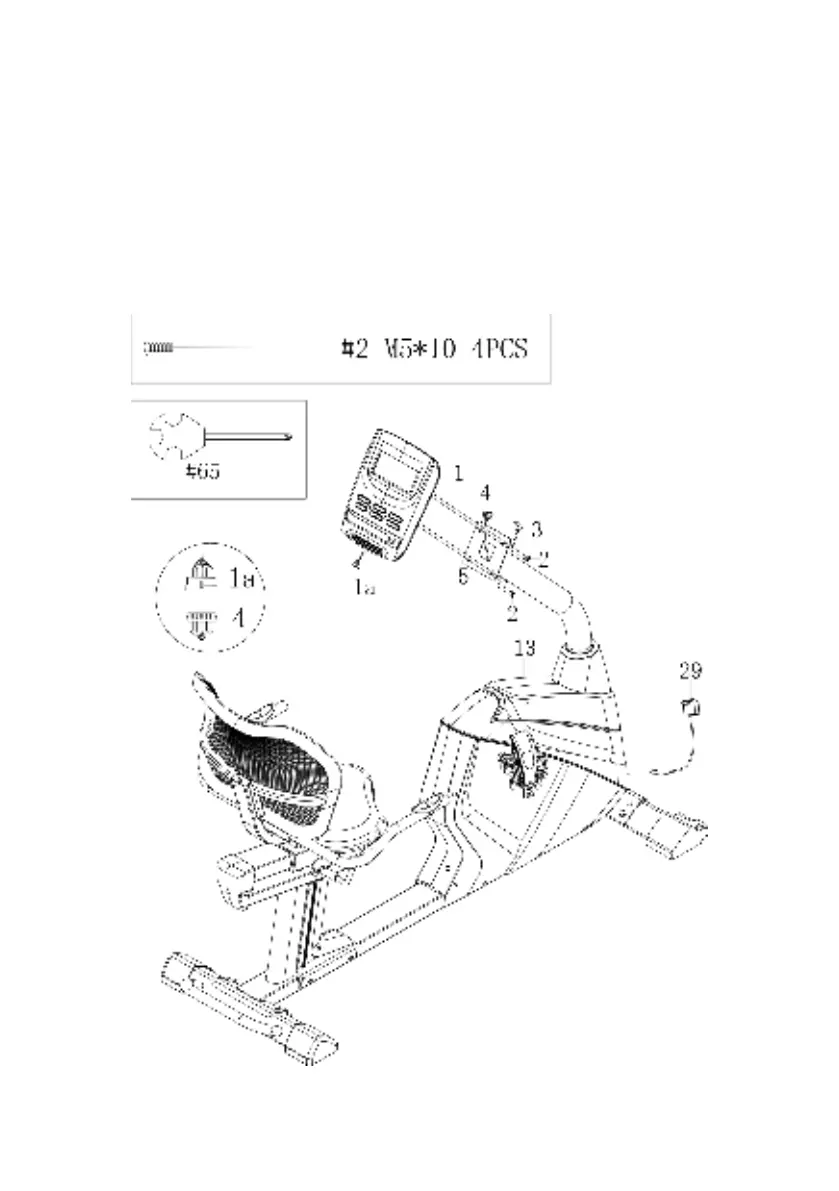
Step 8
Unscrew the x4 screws (2) in the back of the Console (1) with Wrench (65) and set aside.
Connect the Console Wire (1a) with the Mid Sensor Wire 1 (4). Push the wires down into the
Handlebar Post (5), so they don’t get pinched. Attach the Console (1) to the Handlebar Post
(5) with x4 Screws (2). Use Wrench (65) to secure the screws. Then plug in the Trunk Line (3)
into the hole in the rear of the Console (1).
Move your machine by grasping the bar on the rear stabilizer and lifting until the wheels
touch the ground, then move the machine to your desired location. Level with the two
adjustable feet on the bottom of the Rear Stabilizer.
Plug in the Adaptor (29) into a wall socket and then the socket in the front of the machine.


 To Next Page