EasyManua.ls Logo

Foscam FI8904W - Page 35

Foscam FI8904W
74 pages
Print Icon
To Next Page IconTo Next Page
To Previous Page IconTo Previous Page
Loading...
34
w
w
w
w
w
w
w
w
w
w
w
w
w
w
w
w
ww.foscam.co
ww.foscam.co
ww.foscam.co
ww.foscam.co
ww.foscam.co
ww.foscam.co
ww.foscam.co
ww.foscam.co
m
m
m
m
m
m
m
m
Shenzhen
Shenzhen
Shenzhen
Shenzhen
Shenzhen
Shenzhen
Shenzhen
Shenzhen
Foscam
Foscam
Foscam
Foscam
Foscam
Foscam
Foscam
Foscam
Intelligent
Intelligent
Intelligent
Intelligent
Intelligent
Intelligent
Intelligent
Intelligent
Technology
Technology
Technology
Technology
Technology
Technology
Technology
Technology
Co.,
Co.,
Co.,
Co.,
Co.,
Co.,
Co.,
Co.,
Limited
Limited
Limited
Limited
Limited
Limited
Limited
Limited
Tel:
Tel:
Tel:
Tel:
Tel:
Tel:
Tel:
Tel:
86
86
86
86
86
86
86
86
755
755
755
755
755
755
755
755
2674
2674
2674
2674
2674
2674
2674
2674
5668
5668
5668
5668
5668
5668
5668
5668
Fax:
Fax:
Fax:
Fax:
Fax:
Fax:
Fax:
Fax:
86
86
86
86
86
86
86
86
755
755
755
755
755
755
755
755
2674
2674
2674
2674
2674
2674
2674
2674
5168
5168
5168
5168
5168
5168
5168
5168
34
34
34
34
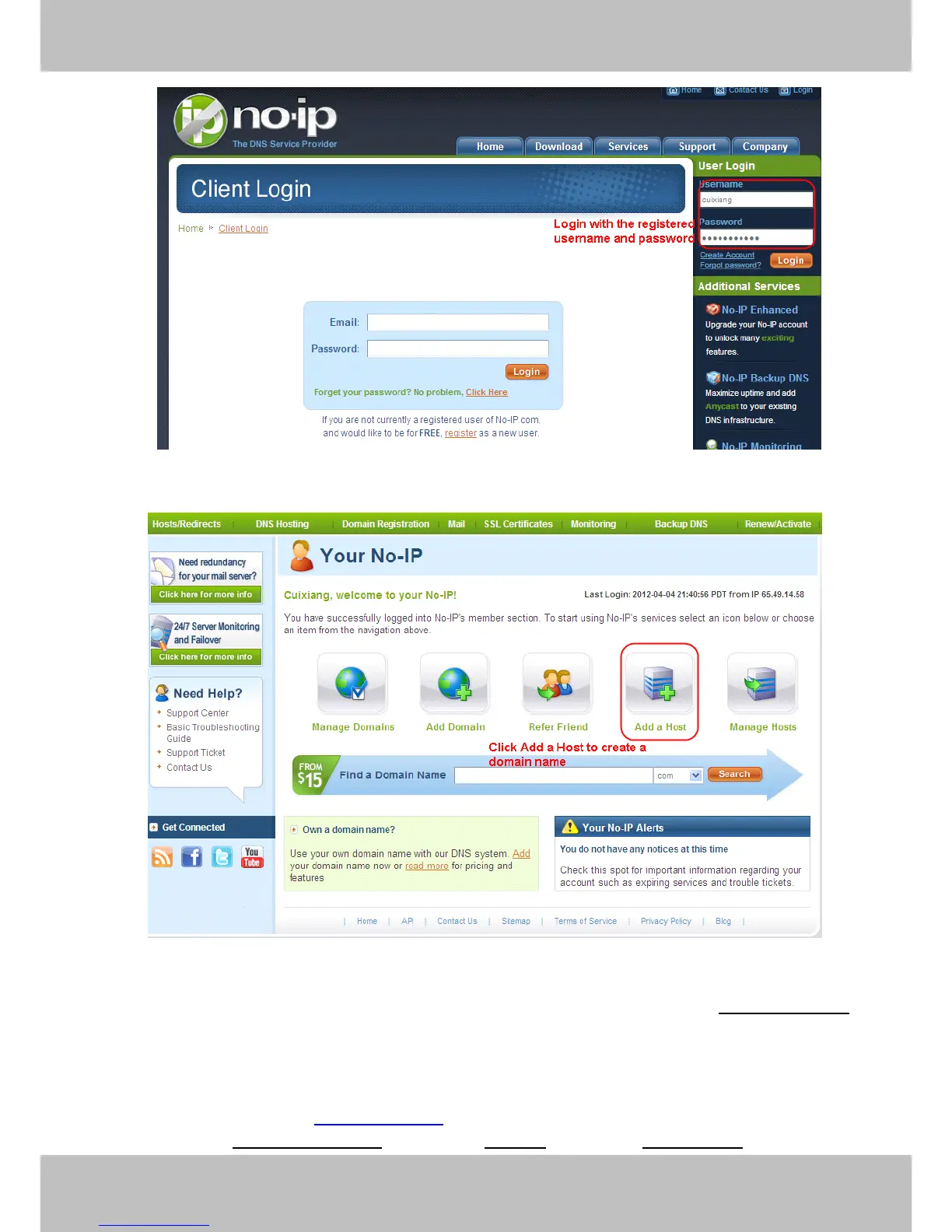
Figure 3.28
Figure 3.29
Please
Please
Please
Please create
create
create
create the
the
the
the domain
domain
domain
domain name
name
name
name step
step
step
step by
by
by
by step
step
step
step according
according
according
according to
to
to
to instructions
instructions
instructions
instructions on
on
on
on www.no-ip.com
www.no-ip.com
www.no-ip.com
www.no-ip.com
Step
Step
Step
Step 2,
2,
2,
2, DO
DO
DO
DO DDNS
DDNS
DDNS
DDNS Service
Service
Service
Service Settings
Settings
Settings
Settings within
within
within
within the
the
the
the Camera
Camera
Camera
Camera
Please set DDNS
DDNS
DDNS
DDNS Service
Service
Service
Service Settings
Settings
Settings
Settings within the camera by hostname
hostname
hostname
hostname , a user
user
user
user name
name
name
name and
password
password
password
password you ve got from www.
www.
www.
www. no-ip
no-ip
no-ip
no-ip .com
.com
.com
.com
Take
hostname
hostname
hostname
hostname ycxgwp.no-ip.info
ycxgwp.no-ip.info
ycxgwp.no-ip.info
ycxgwp.no-ip.info , user
user
user
user name
name
name
name fosc
fosc
fosc
fosc am
am
am
am , password
password
password
password fos
fos
fos
fos cam201
cam201
cam201
cam201 2
2
2
2 for example.

Other manuals for Foscam FI8904W

Related product manuals