43
w
w
w
w
w
w
w
w
w
w
w
w
w
w
w
w
ww.foscam.co
ww.foscam.co
ww.foscam.co
ww.foscam.co
ww.foscam.co
ww.foscam.co
ww.foscam.co
ww.foscam.co
m
m
m
m
m
m
m
m
Shenzhen
Shenzhen
Shenzhen
Shenzhen
Shenzhen
Shenzhen
Shenzhen
Shenzhen
Foscam
Foscam
Foscam
Foscam
Foscam
Foscam
Foscam
Foscam
Intelligent
Intelligent
Intelligent
Intelligent
Intelligent
Intelligent
Intelligent
Intelligent
Technology
Technology
Technology
Technology
Technology
Technology
Technology
Technology
Co.,
Co.,
Co.,
Co.,
Co.,
Co.,
Co.,
Co.,
Limited
Limited
Limited
Limited
Limited
Limited
Limited
Limited
Tel:
Tel:
Tel:
Tel:
Tel:
Tel:
Tel:
Tel:
86
86
86
86
86
86
86
86
755
755
755
755
755
755
755
755
2674
2674
2674
2674
2674
2674
2674
2674
5668
5668
5668
5668
5668
5668
5668
5668
Fax:
Fax:
Fax:
Fax:
Fax:
Fax:
Fax:
Fax:
86
86
86
86
86
86
86
86
755
755
755
755
755
755
755
755
2674
2674
2674
2674
2674
2674
2674
2674
5168
5168
5168
5168
5168
5168
5168
5168
43
43
43
43
3.14
3.14
3.14
3.14 Alarm
Alarm
Alarm
Alarm Service
Service
Service
Service Settings
Settings
Settings
Settings
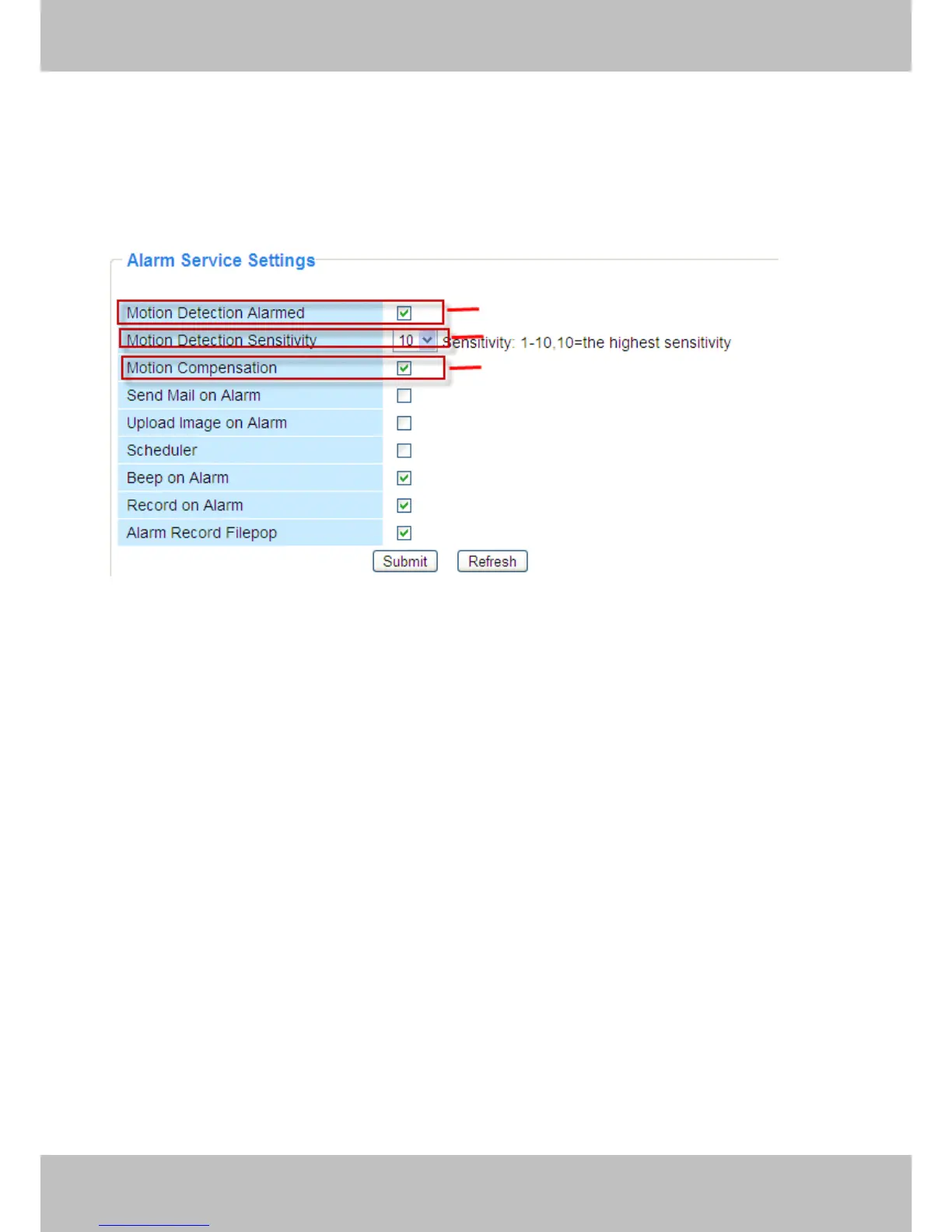
IP Camera supports Motion
Motion
Motion
Motion Detection
Detection
Detection
Detection Alarmed
Alarmed
Alarmed
Alarmed , when the motion has been detected, it will
send email alerts or upload images or record.
Figure 3.39
1---- If you want to set Motion Detection Alarmed ,select the checkbox
2---- The larger the number , the higher the motion sensitivity will be
3---- Select this option to reduce false alarms when light changes
If motion is detected after you enable Motion
Motion
Motion
Motion Detection
Detection
Detection
Detection Armed
Armed
Armed
Armed , the Alarm Status will turn to
Motion Detect Alarm.
1
1
1
1
2
2
2
2
3
3
3
3



 To Next Page