37
w
w
w
w
w
w
w
w
w
w
w
w
w
w
w
w
ww.foscam.co
ww.foscam.co
ww.foscam.co
ww.foscam.co
ww.foscam.co
ww.foscam.co
ww.foscam.co
ww.foscam.co
m
m
m
m
m
m
m
m
Shenzhen
Shenzhen
Shenzhen
Shenzhen
Shenzhen
Shenzhen
Shenzhen
Shenzhen
Foscam
Foscam
Foscam
Foscam
Foscam
Foscam
Foscam
Foscam
Intelligent
Intelligent
Intelligent
Intelligent
Intelligent
Intelligent
Intelligent
Intelligent
Technology
Technology
Technology
Technology
Technology
Technology
Technology
Technology
Co.,
Co.,
Co.,
Co.,
Co.,
Co.,
Co.,
Co.,
Limited
Limited
Limited
Limited
Limited
Limited
Limited
Limited
Tel:
Tel:
Tel:
Tel:
Tel:
Tel:
Tel:
Tel:
86
86
86
86
86
86
86
86
755
755
755
755
755
755
755
755
2674
2674
2674
2674
2674
2674
2674
2674
5668
5668
5668
5668
5668
5668
5668
5668
Fax:
Fax:
Fax:
Fax:
Fax:
Fax:
Fax:
Fax:
86
86
86
86
86
86
86
86
755
755
755
755
755
755
755
755
2674
2674
2674
2674
2674
2674
2674
2674
5168
5168
5168
5168
5168
5168
5168
5168
37
37
37
37
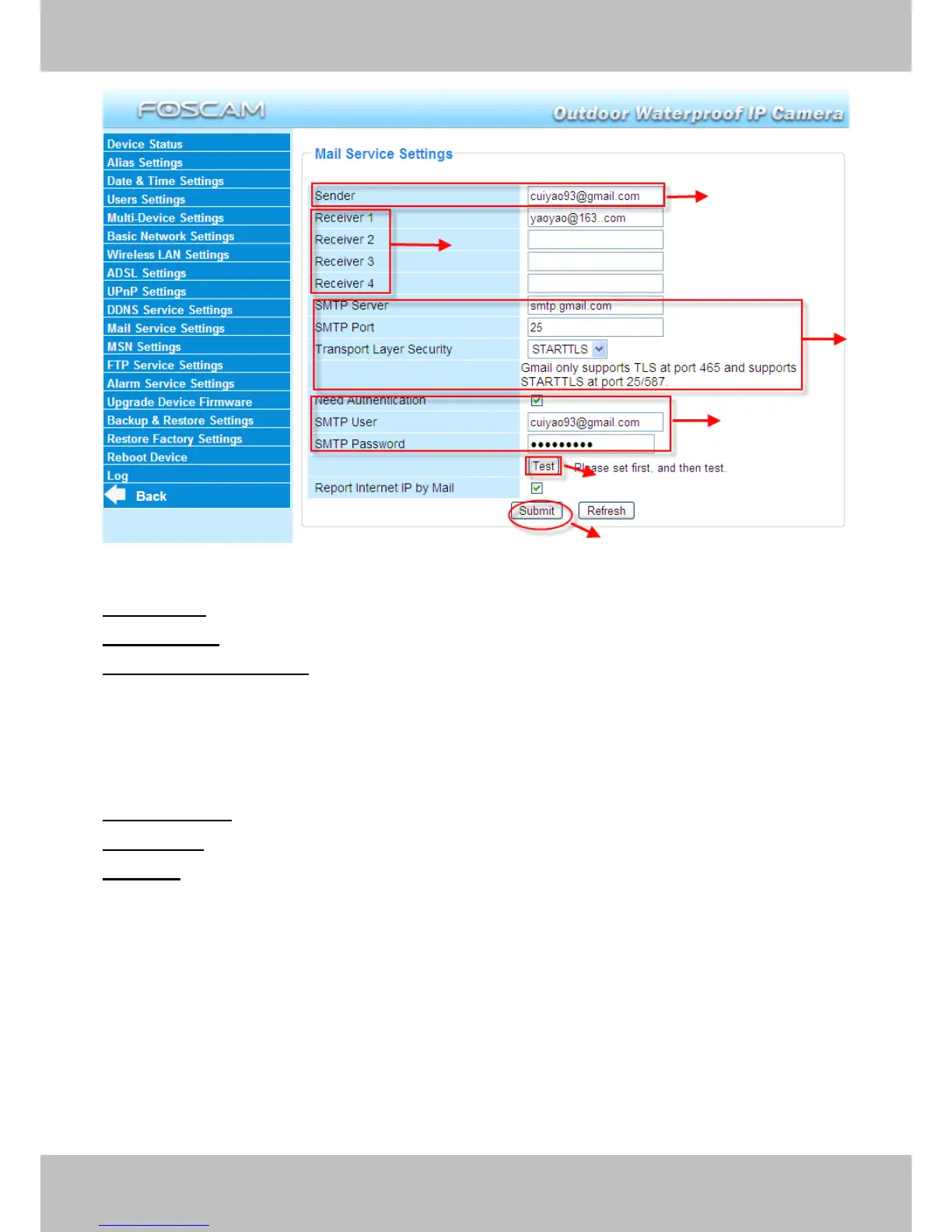
Figure 3.31
1-----
1-----
1-----
1----- Sender
Sender
Sender
Sender Mailbox for sender must support SMTP
2-----
2-----
2-----
2----- Receiver
Receiver
Receiver
Receiver Mailbox for receiver need not support SMTP,you can set 4 receivers
3-----
3-----
3-----
3----- SMTP
SMTP
SMTP
SMTP Server/
Server/
Server/
Server/ Port
Port
Port
Port Enter SMTP server for sender. SMTP
SMTP
SMTP
SMTP port
port
port
port is usually set as 25.
Some SMTP servers have their own port, such as 587 or 465 and Transport Layer Security
usually is None. If you use Gmail, Transport Layer Security must be set to TLS or STARTTLS
and SMTP Port must be set to 465 or 25 or 587, which port you choose should be decided by
which Transport Layer Security you select.
4----
4----
4----
4---- SMTP
SMTP
SMTP
SMTP user
user
user
user ID account of the sender email address
5----Submit
5----Submit
5----Submit
5----Submit Click Submit to take effect
6----Test
6----Test
6----Test
6----Test Click Test
Test
Test
Test to see if SMTP has been successfully configured .
NOTE:
NOTE:
NOTE:
NOTE: Click Submit
Submit
Submit
Submit first before choosing Test
Test
Test
Test .
Click Test
Test
Test
Test to see if SMTP has been successfully configured .
1
1
1
1
2
2
2
2
3
3
3
3
6
6
6
6
4
4
4
4
5
5
5
5



 To Next Page