67
w
w
w
w
w
w
w
w
www
www
www
www
www
www
www
www
.foscam.com
.foscam.com
.foscam.com
.foscam.com
.foscam.com
.foscam.com
.foscam.com
.foscam.com
Shenzhen
Shenzhen
Shenzhen
Shenzhen
Shenzhen
Shenzhen
Shenzhen
Shenzhen
Foscam
Foscam
Foscam
Foscam
Foscam
Foscam
Foscam
Foscam
Intelligent
Intelligent
Intelligent
Intelligent
Intelligent
Intelligent
Intelligent
Intelligent
Technology
Technology
Technology
Technology
Technology
Technology
Technology
Technology
Co.,
Co.,
Co.,
Co.,
Co.,
Co.,
Co.,
Co.,
Limited
Limited
Limited
Limited
Limited
Limited
Limited
Limited
Tel:
Tel:
Tel:
Tel:
Tel:
Tel:
Tel:
Tel:
86
86
86
86
86
86
86
86
755
755
755
755
755
755
755
755
2674
2674
2674
2674
2674
2674
2674
2674
5668
5668
5668
5668
5668
5668
5668
5668
Fax:
Fax:
Fax:
Fax:
Fax:
Fax:
Fax:
Fax:
86
86
86
86
86
86
86
86
755
755
755
755
755
755
755
755
2674
2674
2674
2674
2674
2674
2674
2674
5168
5168
5168
5168
5168
5168
5168
5168
67
67
67
67
4
4
4
4 .7.2
.7.2
.7.2
.7.2 Preset
Preset
Preset
Preset Settings
Settings
Settings
Settings
This section explains how to add/ delete/ alter one cruise track.
There are two default cruise tracks: Vertical and Horizontal.
Vertical:
Vertical:
Vertical:
Vertical: The camera will rotate from up to down
Horizontal:
Horizontal:
Horizontal:
Horizontal: The camera will rotate form left to right.
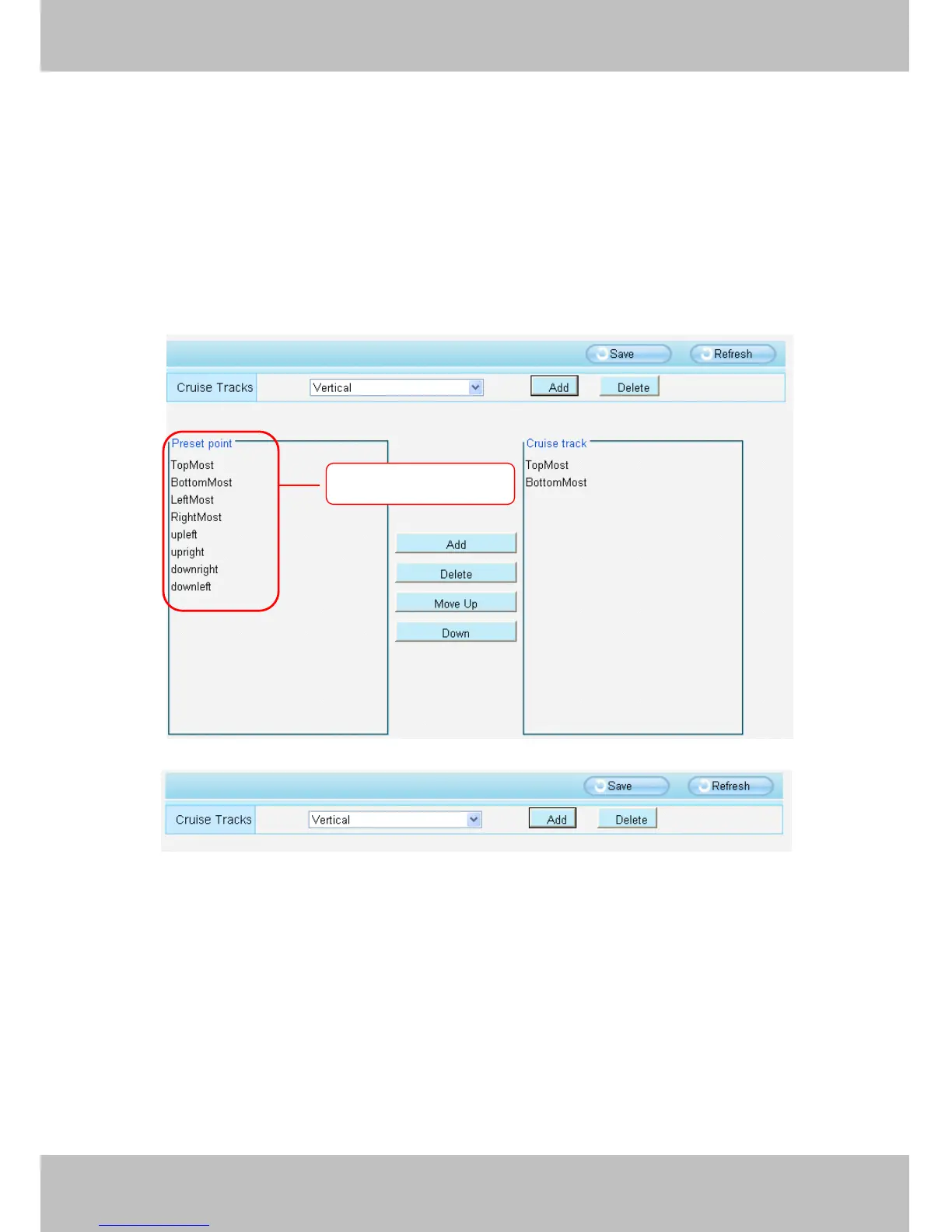
Figure 4 .49
Figure 4 .50
Add:
Add:
Add:
Add: Add one cruise track.
Delete:
Delete:
Delete:
Delete: Select one cruise track and delete it.
How
How
How
How to
to
to
to do
do
do
do add
add
add
add cruise
cruise
cruise
cruise tracks
tracks
tracks
tracks ?
?
?
?
Firstly,
Firstly,
Firstly,
Firstly, Click Add button and enter a descriptive name to identify the cruise track
Secondly:
Secondly:
Secondly:
Secondly: On the lower left of the page, you can see all preset points you have added. Select one preset point
and click Add button, you can see the preset point has been added to the cruise track on the cruise track page.
You
need to add two or more preset points to the cruise track.
All
All
All
All preset
preset
preset
preset positions
positions
positions
positions



 To Next Page