71
w
w
w
w
w
w
w
w
www
www
www
www
www
www
www
www
.foscam.com
.foscam.com
.foscam.com
.foscam.com
.foscam.com
.foscam.com
.foscam.com
.foscam.com
Shenzhen
Shenzhen
Shenzhen
Shenzhen
Shenzhen
Shenzhen
Shenzhen
Shenzhen
Foscam
Foscam
Foscam
Foscam
Foscam
Foscam
Foscam
Foscam
Intelligent
Intelligent
Intelligent
Intelligent
Intelligent
Intelligent
Intelligent
Intelligent
Technology
Technology
Technology
Technology
Technology
Technology
Technology
Technology
Co.,
Co.,
Co.,
Co.,
Co.,
Co.,
Co.,
Co.,
Limited
Limited
Limited
Limited
Limited
Limited
Limited
Limited
Tel:
Tel:
Tel:
Tel:
Tel:
Tel:
Tel:
Tel:
86
86
86
86
86
86
86
86
755
755
755
755
755
755
755
755
2674
2674
2674
2674
2674
2674
2674
2674
5668
5668
5668
5668
5668
5668
5668
5668
Fax:
Fax:
Fax:
Fax:
Fax:
Fax:
Fax:
Fax:
86
86
86
86
86
86
86
86
755
755
755
755
755
755
755
755
2674
2674
2674
2674
2674
2674
2674
2674
5168
5168
5168
5168
5168
5168
5168
5168
71
71
71
71
FTP
FTP
FTP
FTP server
server
server
server : If your FTP server is located on the LAN, you can set as Figure 3.54.
If you have an FTP server which you can access on the internet, you can set as Figure 3.55.
Port
Port
Port
Port : Default is port 21. If changed, external FTP client program must change the server connection port
accordingly.
FTP
FTP
FTP
FTP Mode:
Mode:
Mode:
Mode: Here supports two modes: PORT and PASV.
Username/password:
Username/password:
Username/password:
Username/password: The FTP account and password.
Click Save
Save
Save
Save to take effect.
Click Test
Test
Test
Test to see if FTP has been successfully configured.
4
4
4
4 .9
.9
.9
.9 Firewall
Firewall
Firewall
Firewall
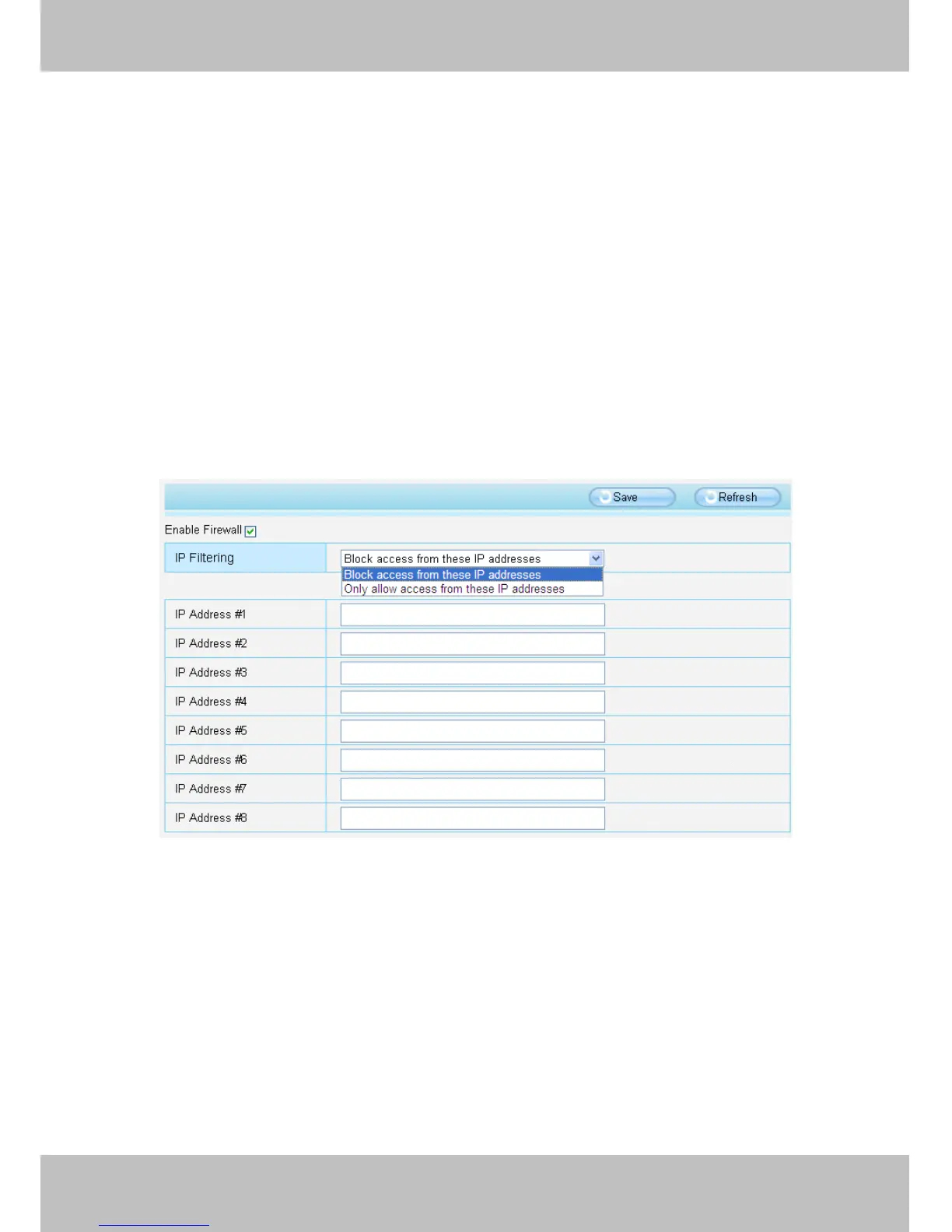
This section explains how to control the access permission by checking the client PC ’ s IP addresses. It is
composed of the following columns: Block
Block
Block
Block access
access
access
access from
from
from
from these
these
these
these IP
IP
IP
IP addresses
addresses
addresses
addresses and Only
Only
Only
Only allow
allow
allow
allow access
access
access
access from
from
from
from
these
these
these
these IP
IP
IP
IP addresses
addresses
addresses
addresses ..
Figure 4 .56
Enable firewall, If you select Only allow access from these IP addresses and fill in 8 IP addresses at most, only
those clients whose IP addresses listed in the Only
Only
Only
Only allow
allow
allow
allow access
access
access
access from
from
from
from these
these
these
these IP
IP
IP
IP addresses
addresses
addresses
addresses can access the
Network Camera. If you select Block
Block
Block
Block access
access
access
access from
from
from
from these
these
these
these IP
IP
IP
IP addresses,
addresses,
addresses,
addresses, only those clients whose IP
addresses are in the IP list cannot access the Network Camera.
Click Save
Save
Save
Save to take effect.
4
4
4
4 .10
.10
.10
.10 System
System
System
System
In this panel, you can backup/restore your camera settings, upgrade the firmware to the latest version, restore
the camera to default settings and reboot the device.



 To Next Page