22
w
w
w
w
w
w
w
w
www
www
www
www
www
www
www
www
.foscam.com
.foscam.com
.foscam.com
.foscam.com
.foscam.com
.foscam.com
.foscam.com
.foscam.com
Shenzhen
Shenzhen
Shenzhen
Shenzhen
Shenzhen
Shenzhen
Shenzhen
Shenzhen
Foscam
Foscam
Foscam
Foscam
Foscam
Foscam
Foscam
Foscam
Intelligent
Intelligent
Intelligent
Intelligent
Intelligent
Intelligent
Intelligent
Intelligent
Technology
Technology
Technology
Technology
Technology
Technology
Technology
Technology
Co.,
Co.,
Co.,
Co.,
Co.,
Co.,
Co.,
Co.,
Limited
Limited
Limited
Limited
Limited
Limited
Limited
Limited
Tel:
Tel:
Tel:
Tel:
Tel:
Tel:
Tel:
Tel:
86
86
86
86
86
86
86
86
755
755
755
755
755
755
755
755
2674
2674
2674
2674
2674
2674
2674
2674
5668
5668
5668
5668
5668
5668
5668
5668
Fax:
Fax:
Fax:
Fax:
Fax:
Fax:
Fax:
Fax:
86
86
86
86
86
86
86
86
755
755
755
755
755
755
755
755
2674
2674
2674
2674
2674
2674
2674
2674
5168
5168
5168
5168
5168
5168
5168
5168
22
22
22
22
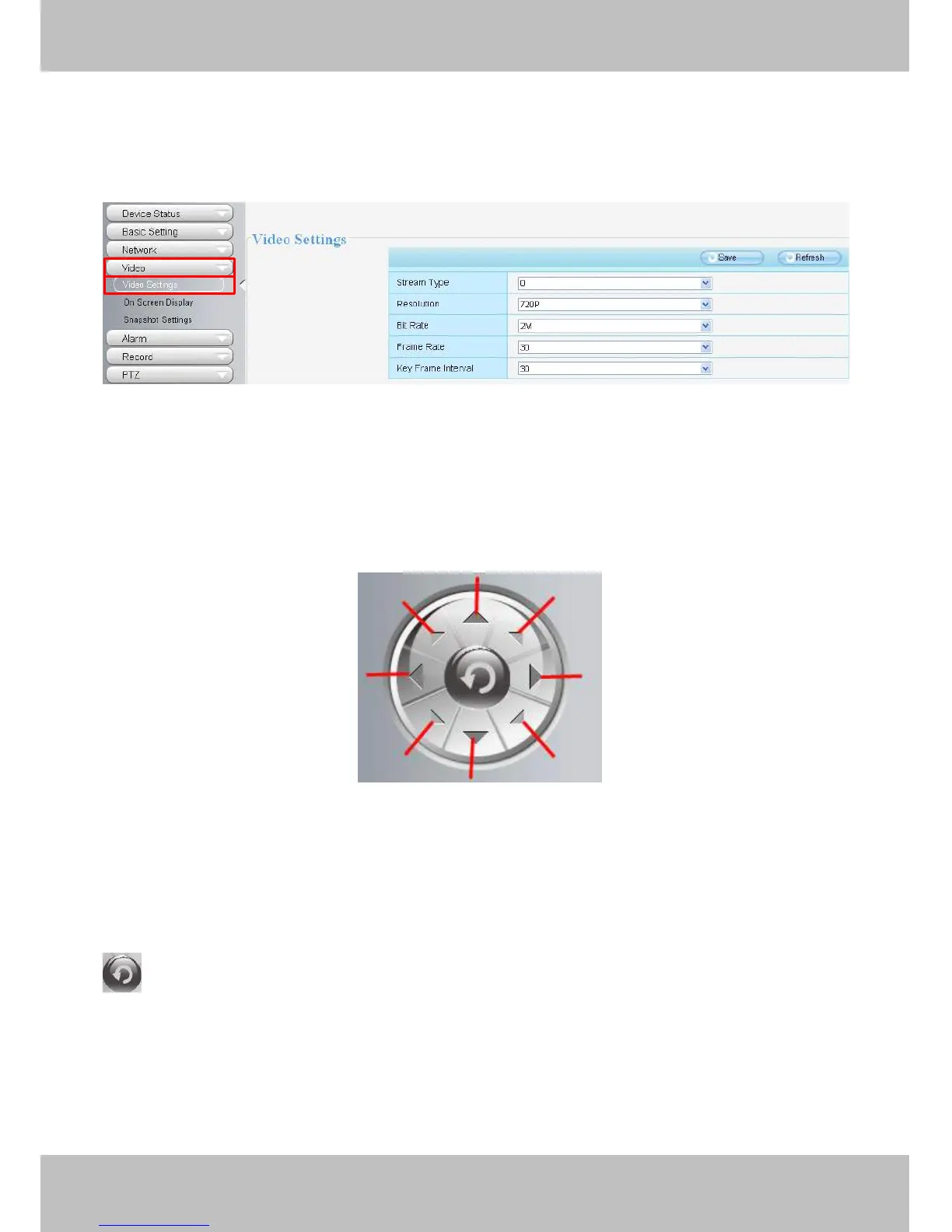
combine well with the network bandwidth. When the bandwidth is very narrow, and bit rate is large, that will
lead to video can not play well.
You
can reset the stream type on Settings->
Settings->
Settings->
Settings-> Video->
Video->
Video->
Video-> Video
Video
Video
Video Settings
Settings
Settings
Settings panel.
Figure 3 . 5
After changing, please re-login the camera and you can see the modification.
Section4
Section4
Section4
Section4 Pan/Tilt
Pan/Tilt
Pan/Tilt
Pan/Tilt Control
Control
Control
Control
1------Up control button, 2------Down control button,
3------Left control button, 4------Right control button,
5----- Up-Left control button 6----- Up-Right control button
7----- Down-Left control button 8----- Down-Right control button
Click this button and go to center
Section5
Section5
Section5
Section5 Cruise
Cruise
Cruise
Cruise /
/
/
/ Preset
Preset
Preset
Preset settings
settings
settings
settings
Cruise
Cruise
Cruise
Cruise Settings
Settings
Settings
Settings
1
1
1
1
2
2
2
2
3
3
3
3 4
4
4
4
5
5
5
5 6
6
6
6
7
7
7
7 8
8
8
8



 To Next Page